AMD FSR Unreal Engine plugin guide
Download the AMD FSR plugin for Unreal Engine, and learn how to install and use it.
GeezerVisonThe World Wide Web, restored to 800 pixels of glory. | ||||||||||||||||||||||||||||||||||||||||||||||||||||||||||||||||||||||||||||||||||||||||||||||||||||||||||||||||||||
| Home|About|Gaming cabinet|Archives|How it works|Starter sites | ||||||||||||||||||||||||||||||||||||||||||||||||||||||||||||||||||||||||||||||||||||||||||||||||||||||||||||||||||||
GeezerVison is showing gpuopen.com — How to use the AMD FidelityFX™ Super Resolution 2 (FSR 2) Unreal Engine plugin How to use the AMD FidelityFX™ Super Resolution 2 (FSR 2) Unreal Engine plugin
Originally posted:
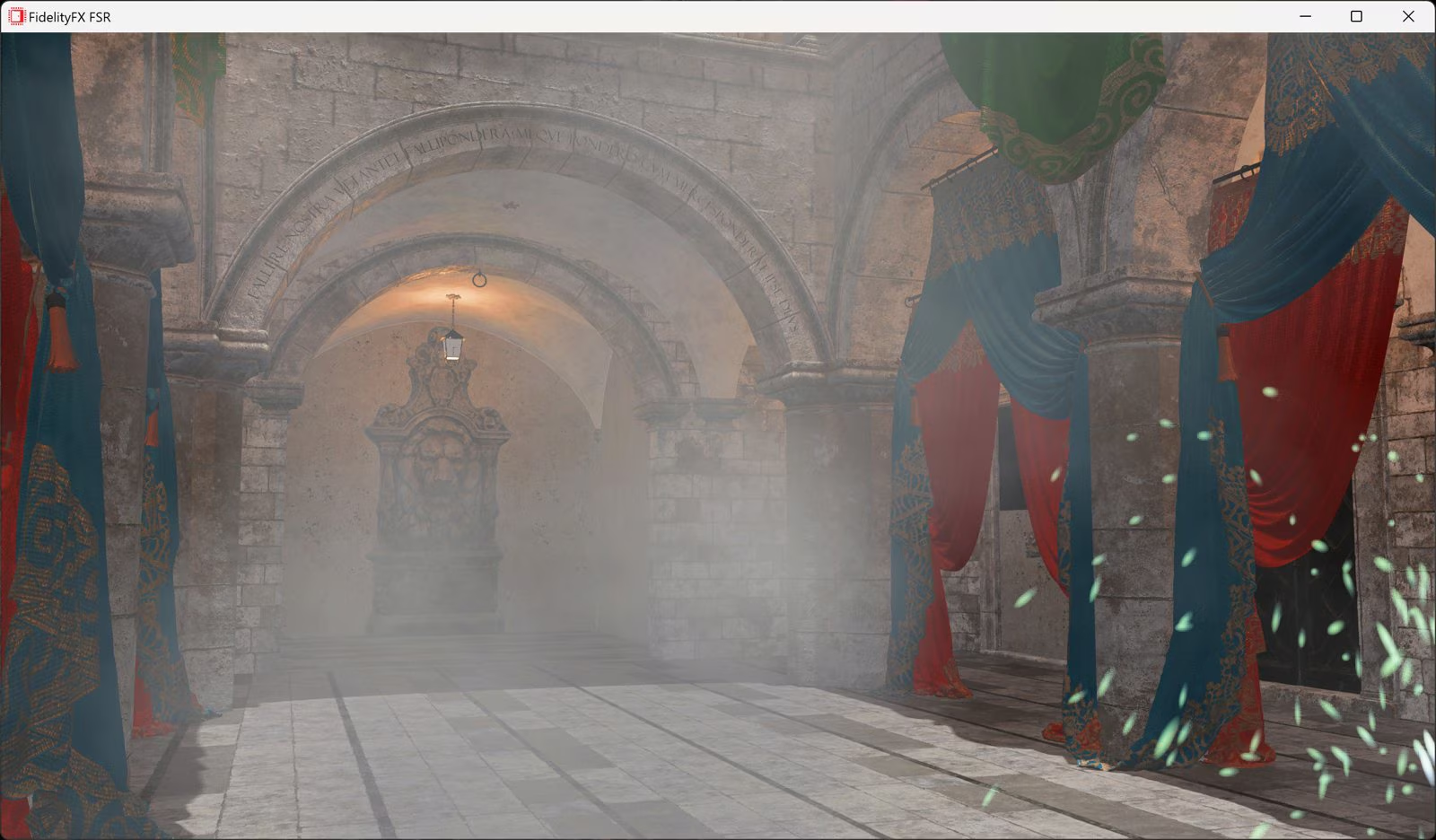
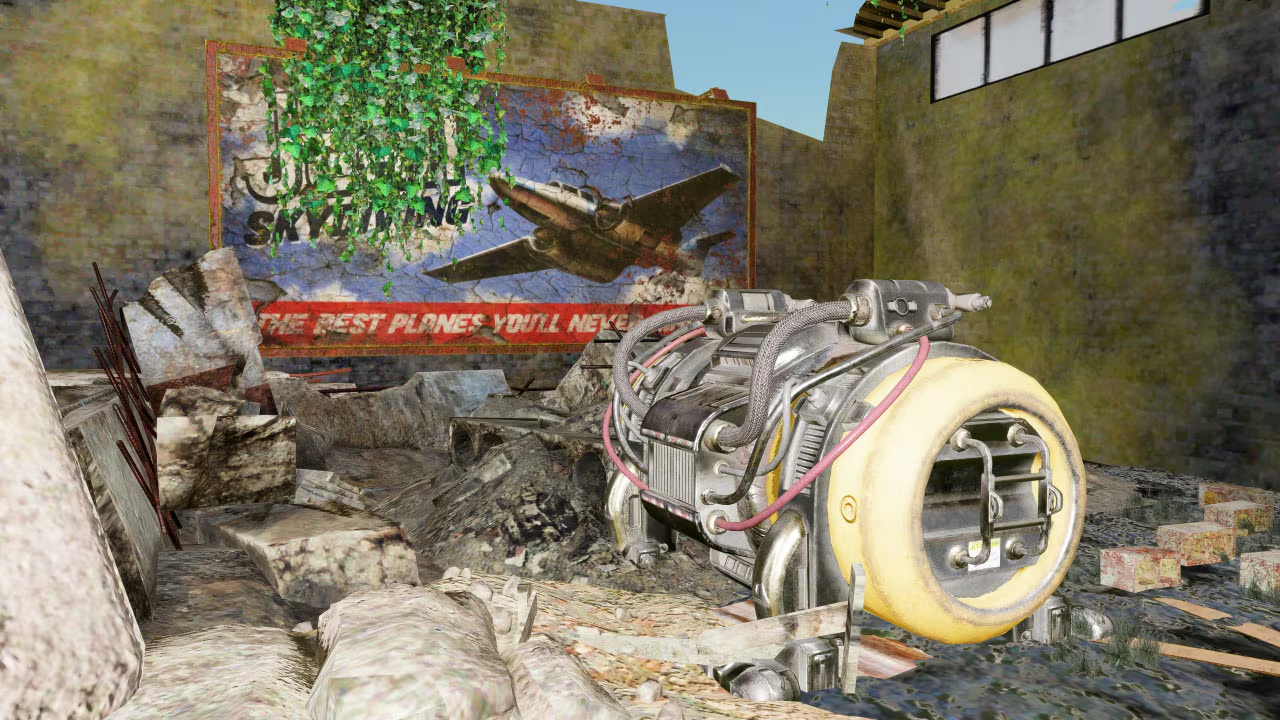
Last updated: IntroductionAMD FidelityFX™ Super Resolution 2 (FSR 2) is our open source temporal upscaling solution. FSR 2 uses cutting-edge temporal algorithms to reconstruct fine geometric and texture detail, producing anti-aliased output from aliased input. This package also includes the FSR2MovieRenderPipeline plugin which enables use of FSR 2 to accelerate rendering when using the Unreal Movie Render Queue. FSR2’s Recommendations and Known Issues must be understood and addressed per-project to achieve optimal quality. See the respective section in this guide. Latest version: v2.2.1c (plugin last updated 7th November 2023 to support UE 5.3.1) Download Unreal Engine FSR 2 pluginsBlog post updated 7th November 2023 to include support for UE 5.3.1 Our latest, ML-based upscaler, AMD FSR Upscaling, effectively supersedes this FSR 2 plugin, as it integrates AMD FSR Frame Generation and AMD FSR 2/3/4, and falls back to FSR 3.1.5 where needed. Also supports UE 5.7. Optimizing FSR 2 Unreal Engine blog seriesDon’t miss our very detailed blog series which explains what the patches which come supplied with the plugin (for FSR 2.1 onwards only) are, how to install them, and how to use them to your benefit. You can also learn about the changes you can make to get similar benefits without using the patches. Known issuesUnreal 5.1.0The pre-built binary version of the 5.1 plugin requires Unreal Engine 5.1.1 due to an ABI incompatibility between 5.1.0 and 5.1.1. Please update to Unreal Engine 5.1.1. World-position-offset on static objectsStatic objects that use a material with World-Position-Offset do not generate motion vectors. This affects FSR2’s ability to correctly upscale such materials and results in blurring/ghosting of the affected objects. Unreal 5.0 and earlierOne option is to enable the console-variables For cases where this is too expensive and changing content is infeasible follow the installation instructions to install the correct version of the ‘ImproveStaticWPO’ engine patch to avoid this issue or ensure that all objects using a WPO material are set to Stationary or Movable. When changing the content grass layers attached to Landscape actors require a new console variable Unreal 5.1For Unreal 5.1 the handling of WPO has changed and more objects with WPO should render velocity by default. In this version the default is to render velocity in the base pass and this can be changed using Animated opaque materialsAnimated opaque materials which don’t generate motion vectors for the animated content, such as in-world video screens, may also blur or ghost when obscured by static geometry. This can be reduced by ensuring such materials write into the Reactive Mask generated in the plugin. For the Deferred Renderer this can be achieved by selecting a Shading Model for the Where selecting an existing shading model is unsuitable follow the installation instructions to install the correct version of the ‘LitReactiveShadingModel’ engine patch which adds a new This problem cannot currently be resolved in the Forward Renderer where the Shading Model cannot be determined by the plugin. Substrate materials (Strata in Unreal 5.1) are currently not supported by the LitReactive shading model. PIX and RenderDoc issuesWhen the native FSR2 backends used within FSR2 plugin, graphics capture tools such as PIX and RenderDoc may be less stable. Disabling the native backend ( r.FidelityFX.FSR2.UseNativeDX12 or UE4 post-processing volume screen-percentage overridesUE4, developers should be aware that FSR2’s quality mode (when enabled) will determine the screen-percentage and ignores any screen-percentage override present in a post-processing volume. This will cause different visual and performance results. UE5.2 RDG debuggingUsage of some RDG debugging features can lead to GPU device removal when FSR2 and Lumen are both active. RecommendationsOptimizing translucency appearanceWhile the default settings for the FSR2 Reactive Mask should generate reasonable results it is important that developers are aware that the appearance can be altered via the Translucent skyboxes and background planesWhen using a skybox or a distant background plane it is beneficial for this to be rendered with the Opaque or Masked shading model when using FSR2. If these are rendered with the Translucent shading model they will contribute to the FSR2 translucency and reactive masks, which can result in unnecessary artefacts. This is especially noticeable when other translucent materials are rendered over the top of the skybox/background plane and the camera moves. This occurs because the plugin cannot distinguish the purpose of individual translucent materials, so they are all treated the same. To address this issue, the FSR2 plugin assumes that a translucent skybox or background-plane is used and will fade out translucency contribution based on reconstructed distance from the camera. This will cut-out all translucency rendered over distant opaque geometry and can be controlled with the When using an opaque skybox or backplane, adjust the Hair and dither effectsFSR2 does not smooth dither effects in the way other upscalers do. They are retained as thin features which may not be intentional. To avoid this, especially with hair, enable the SetupSupported Unreal Engine versions
*If you are not a registered Unreal Engine developer, you will need to follow these instructions to register for access to this link. Patch the engineFor optimal quality it is necessary to use Unreal Engine from source code and apply source code patches.
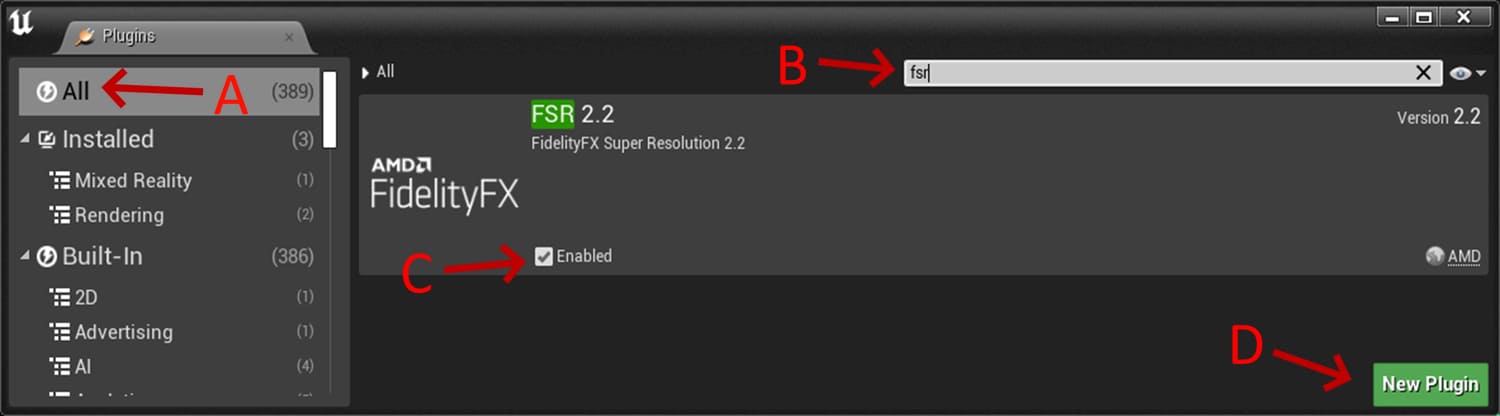
Installation procedureTo install the plugin:
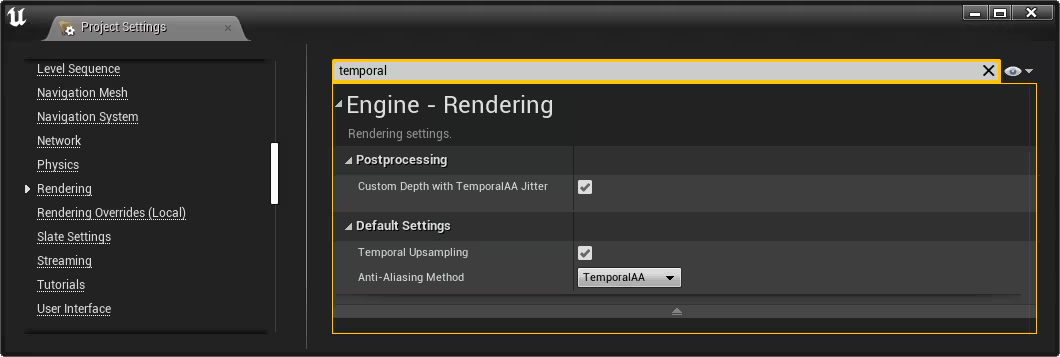
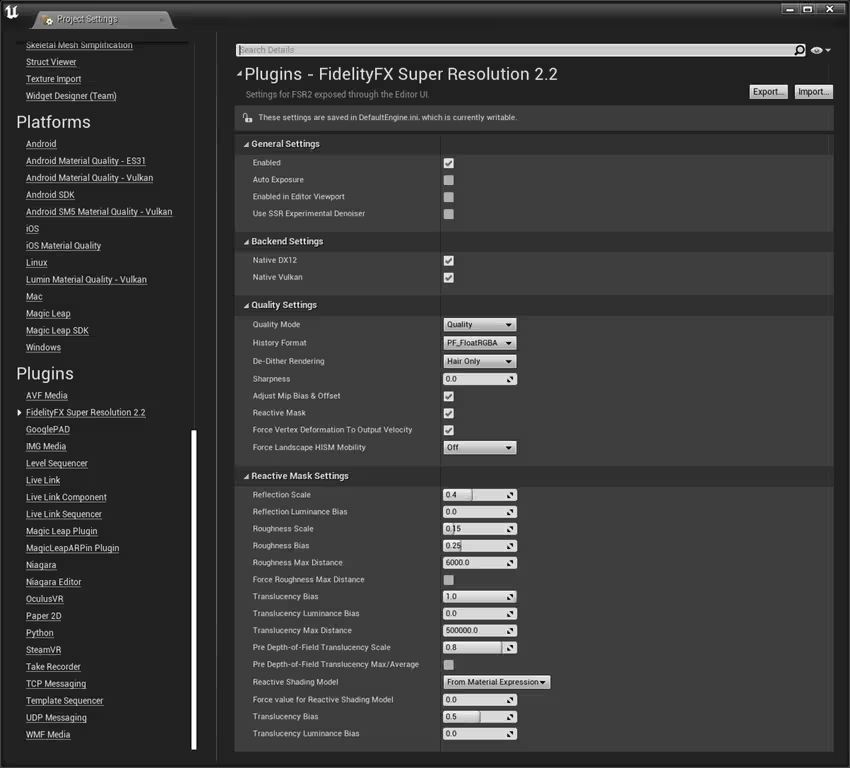
Plugin configurationUsageTemporal Upsampling must be enabled in the Project Settings > Rendering window, accessed via Edit > Project Settings in the Unreal Engine toolbar, or via the console variable Quality modesFSR 2 can be enabled or disabled via the Enabled option in the Project Settings > FidelityFX Super Resolution 2.2 settings window, or with the console variable Warning The variable can be modified at runtime however this is not guaranteed to be safe when other third-party upscalers are also enabled. The plugin will use specific quality modes specified via the Console Variable The exposed modes are:
Integration instructionsRCASFidelityFX Super Resolution 2.2 contains a built-in sharpening pass called Robust Contrast Adaptive Sharpening (RCAS) that can be configured through the console variable World-position offsetIn order for FSR2 to process materials with World Position Offset and/or World Displacement correctly the This option also forces on the console-variable For grass layers attached to Landscape actors it is also necessary to enable a new console variable See the Known Issues and Setup sections for more details about an Engine patch that can improve visual quality in some circumstances. Reactive mask and experimental ScreenSpace Reflection DenoiserWhen Multiple upscalersTo switch to or from FSR2 to another temporal upscaler, always ensure that only one external temporal upscaler is enabled at a time. Disable the current upscaler before enabling the desired upscaler. Other configuration parametersThis table can be scrolled horizontally to view the entire width
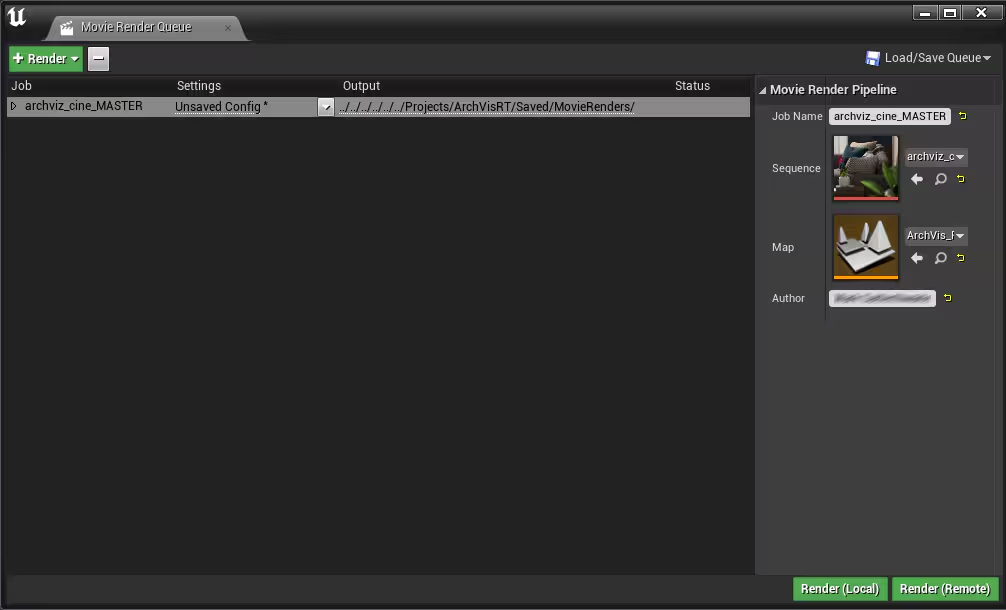
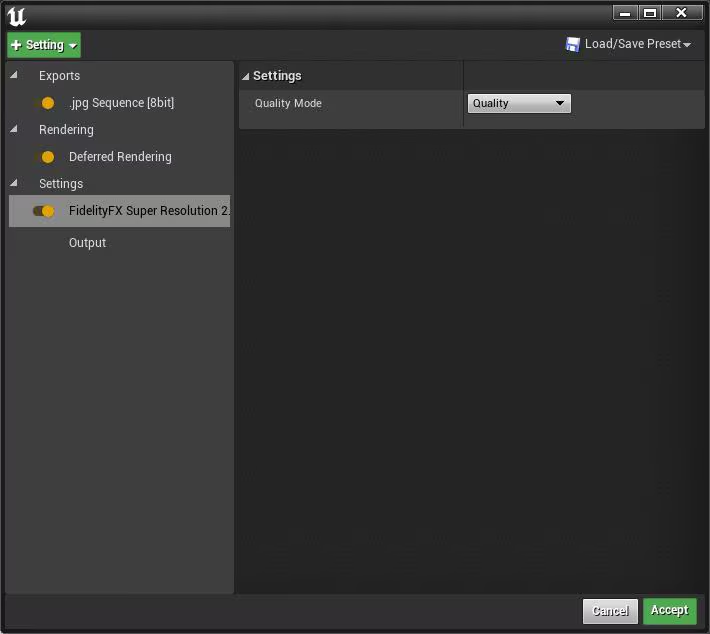
Movie render pipeline pluginThe FSR2MovieRenderPipeline plugin once enabled allows using FSR2 to accelerate rendering of Sequencer cinematics using Unreal’s Movie Render Queue. To use the plugin:
4. Click on Unsaved Config to open the settings for the Movie Render Queue. 5. Select the + Setting option and enable Fidelity FX Super Resolution 2.1 Settings. 6. Then select the new Fidelity FX Super Resolution 2.2 Settings in the list and choose the desired quality mode for rendering. 7. Click Accept and then Render (Local). 8. The output will be rendered using FSR 2 to upscale the output to the target resolution. Get the Unreal Engine FSR 2 plugins now!The package linked below contains the latest version of all our currently available UE 4/5 plugins [~600MB]. Download latest FSR 2 pluginsThe package linked above will always provide the most recently available plugins (latest version below) Release notes
Learn more about FSR and Unreal EngineRelated software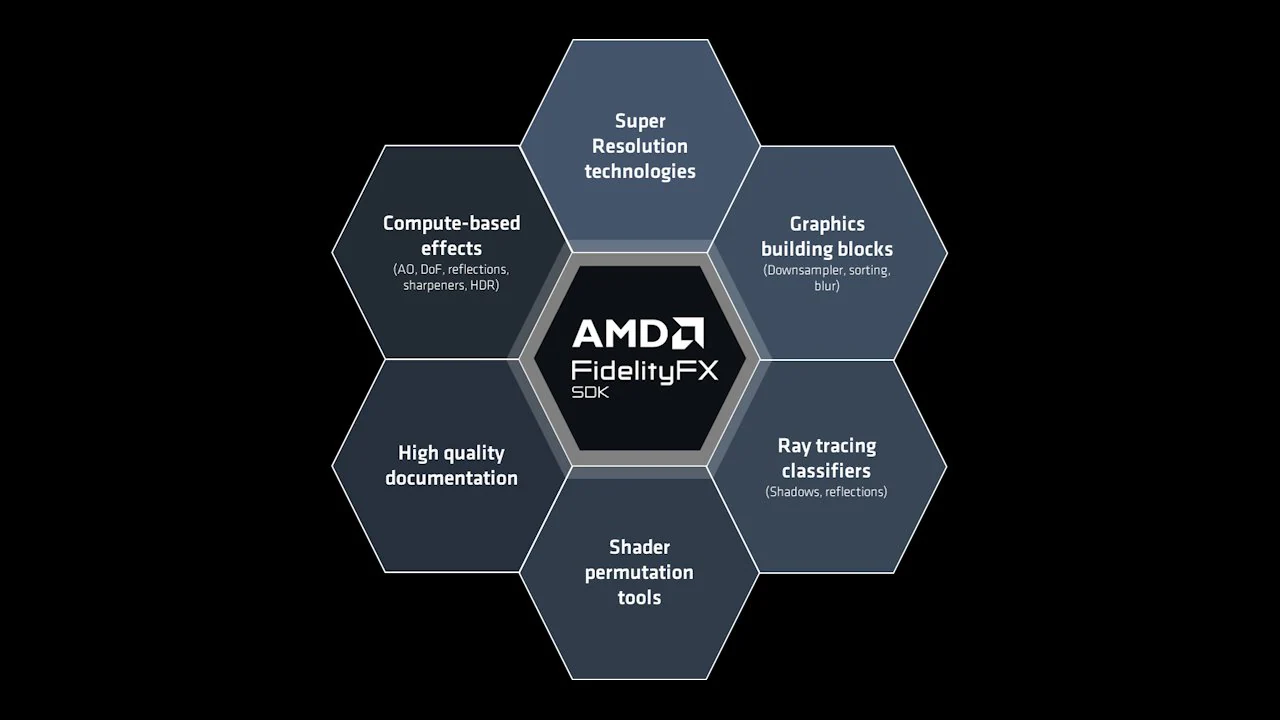 AMD FidelityFX™ SDK v1 The AMD FidelityFX SDK v1 is our easy-to-integrate solution for developers looking to include FidelityFX v1 features into their games.  AMD Schola AMD Schola is a library for developing reinforcement learning (RL) agents in Unreal Engine and training with your favorite python-based RL Frameworks.  AMD Radeon™ Anti-Lag 2 AMD Radeon™ Anti-Lag 2 reduces the system latency by applying frame alignment between the CPU and GPU jobs.  AMD FidelityFX™ Depth of Field (DoF) AMD FidelityFX Depth of Field is an AMD RDNA™-architecture optimized implementation of physically correct camera-based depth of field. Related news and technical articles AMD FSR Unreal Engine plugin guide Download the AMD FSR plugin for Unreal Engine, and learn how to install and use it.  AMD FidelityFX Super Resolution 3.1.4 Unreal Engine plugin guide Download the AMD FSR 3.1.4 plugin for Unreal Engine, and learn how to install and use it.  How to use AMD FidelityFX™ Super Resolution (FSR) 1.0 Unreal Engine 4 Plugin Find out how to install and configure the AMD FidelityFX Super Resolution (FSR) 1.0 plugin for Unreal Engine 4.  AMD FSR 2 UE plugin enhancements part 1 Intro & improving foliage appearance using the base pass Discover one of several ways to improve upscaled foliage appearance in the first of this five part blog series on getting the most out of our FSR 2.1 Unreal Engine plugin.  AMD FSR 2 UE plugin enhancements part 2 Improving foliage appearance via content changes Learn which content changes you can make in the Unreal Engine editor to improve the appearance of upscaled foliage.  AMD FSR 2 UE plugin enhancements part 3 Improving foliage appearance with the ImproveStaticWPO patch Find out how to apply one of our supplied Unreal Engine patches to improve upscaled foliage appearance with our FSR 2.1 plugin.  AMD FSR 2 UE plugin enhancements part 4 Making a specific shading model write to the reactive mask See ways you can improve suboptimal FSR 2 results caused by animated materials obscured by a fine mesh or grill with no motion vectors.  AMD FSR 2 UE plugin enhancements part 5 Making materials reactive Applying the LitReactiveShadingModel patch This final part demonstrates how to apply the LitReativeShadingModel patch which adds a new Lit Reactive shading model. Related videos Advancing AI in video games with AMD Schola | HTEC Days 2025 - YouTube link Join Alexander Cann, Lead Developer at Schola, and Mehdi Saeedi, AI Lead at Schola, as they take you through the fascinating world of reinforcement learning (RL) and its transformative impact on gaming. They'll be joined by Gabor Sines, Sr. Fellow Engineer at AMD, as moderator.  GDC 2024 - High Performance Rendering in Snowdrop using AMD FidelityFX™ Super Resolution 3 (FSR 3) - YouTube link Learn about how AMD FSR 3 was integrated into the Snowdrop engine, which issues were faced and how the integration helped to improve FSR 3.  Temporal Upscaling - Past, Present, and Future (GDC 2023 - YouTube link) This talk focuses on temporal upscaling, describing how the algorithm generates a final image and how FSR mitigates against common artifacts.  The FidelityFX™ SDK (GDC 2023 - YouTube link) Join AMD as we unveil the FidelityFX SDK, a consolidation of all the great FidelityFX technologies into a sleek, easy-to-use SDK.  A guided tour of Blackreef: rendering technologies in Deathloop - YouTube link This talk will deep-dive into the rendering technology of Deathloop. We will explore the challenges and lessons learned.  Breaking down the world of Athia: the technologies of Forspoken - YouTube link This session covers the collaboration between AMD and Luminous Productions on their upcoming title: Forspoken.  FidelityFX™ Super Resolution 2 - YouTube link FidelityFX Super Resolution 2.0 is AMD's next generation upscaling technology. Check out our GDC talk to understand exactly how it works.  Unreal Engine 4 TressFX 5.0 Watch our video explaining what UE4 TressFX 5.0 is, and how to use it. TressFX is designed to simulate and render realistic hair and fur. | ||||||||||||||||||||||||||||||||||||||||||||||||||||||||||||||||||||||||||||||||||||||||||||||||||||||||||||||||||||
| You are visitor 01402503 — GeezerVison does not store the pages you look up. Best viewed with Netscape Navigator 4.7 or Internet Explorer 6 at 800×600. No cookies required. |