GeezerVisonThe World Wide Web, restored to 800 pixels of glory. |
| Home|About|Gaming cabinet|Archives|How it works|Starter sites |
GeezerVison is showing tkdocs.com — TkDocs Tutorial - Event Loop Event LoopAt the end of the More Widgets chapter, we explained how to use a progressbar to provide feedback to users about long-running
operations. The progressbar itself was simple: call its Tutorial
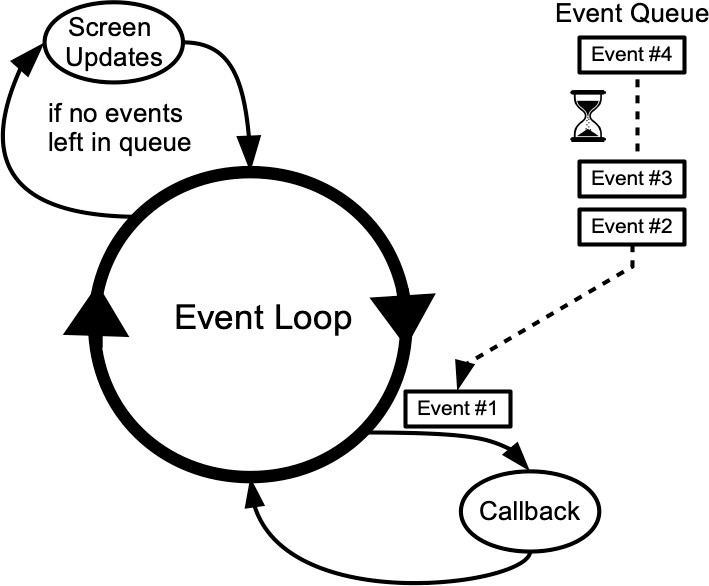
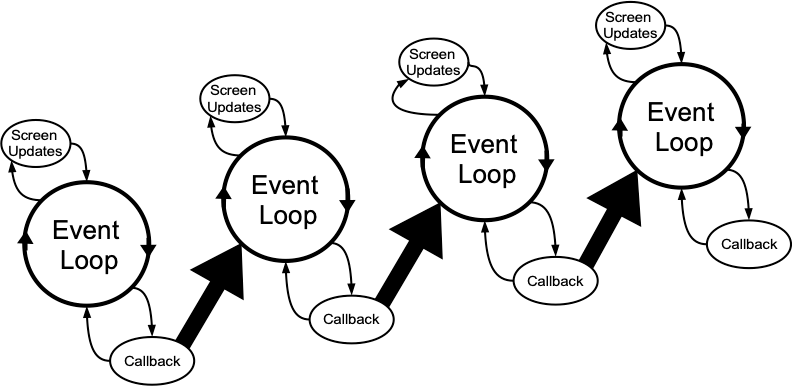
To understand why, we need to revisit our discussion of event handling way back in the Tk Concepts chapter. As we've seen, after we construct our application's initial user interface, we enter the Tk main event loop. The event loop continually processes events, pulled from the system event queue, usually dozens of times a second. It watches for mouse or keyboard events, invoking command callbacks and event bindings as needed. Less obviously, all screen updates are processed only in the event loop. For example, you may change the text of a label widget. However, that change doesn't appear onscreen immediately. Instead, the widget notifies Tk that it needs to be redrawn. Later on, in between processing other events, Tk's event loop will ask the widget to redraw itself. All drawing occurs only in the event loop. The change appears to happen immediately because the time between changing the widget and the actual redraw in the event loop is so short.
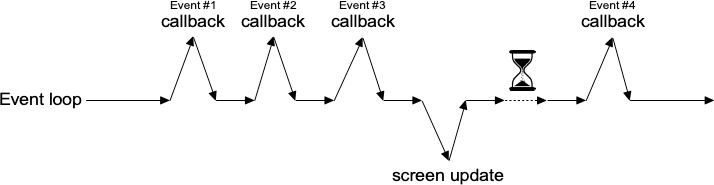
Blocking the event loopYou run into problems when the event loop is prevented from processing events for a lengthy period. Your application won't redraw or respond to events and will appear to be frozen. The event loop is said to be blocked. How can this happen? Let's start by visualizing the event loop as an execution timeline. In a normal situation, each deviation from the event loop (callback, screen update) takes only a fraction of a second before returning control to the event loop.
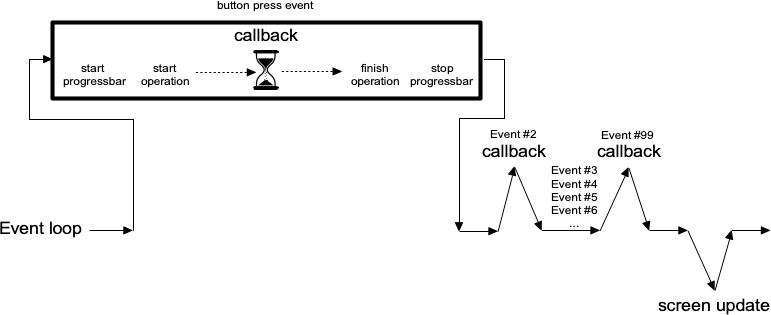
In our progressbar scenario, the whole thing probably started from an event like a user pressing a button. So the event loop calls our application code to handle the button event. Our code creates the progressbar, starts it, performs the (lengthy) operations, and stops the progressbar. Only then does our code return control back to the event loop. No events have been processed in the meantime, and no screen redrawing has occurred. Our application has appeared frozen. The progressbar never appeared on the screen. Meanwhile, events have been piling up in the event queue.
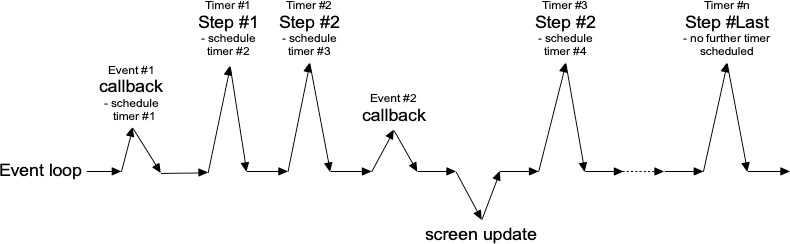
To prevent blocking the event loop, event handlers must execute quickly and return control to the event loop. If you have a long-running operation to perform or anything like network I/O that could potentially take a long time, you can't perform them directly within your event handler. Instead, there are a few different approaches you can take. For the more technically inclined, Tk uses a single-threaded, event-driven programming model. All the GUI code, the event loop, and your application run within the same thread. Because of this, any calls or computations that block event handlers are highly discouraged. Some GUI toolkits use different models that allow for blocking code, running the GUI and event handlers in separate threads from application code, etc. Attempting to shoehorn these models into Tk can be a recipe for frustration and lead to fragile and hacky code. If you respect Tk's model rather than fight it, you won't run into problems. One step at a timeIf possible, the very best thing you can do is break your operation into tiny steps, each of which can execute very quickly. You let the event loop be responsible for when the next step occurs. That way, the event loop continues to run, processing regular events, updating the screen, and, in between all that, calling your code to perform the next step of the operation. To do this, we make use of timer events. Our program can ask the event loop to generate one of these events at a later time. As part of its regular work, when the event loop reaches that time, it will call back into our code to handle the event. Our code would perform the next step of the operation. It then schedules another timer event for the next step of the operation and immediately returns control back to the event loop.
Tk's In the following example, we'll perform a lengthy operation that is broken up into 20 small steps. While this operation is being performed, we'll update a progressbar and allow users to interrupt the operation. Ruby/Tk provides the To interrupt the process, we set a global variable, checking it each time the timer event fires.
Another option would be to cancel the pending timer event. When we create the timer event, it returns an id number to
uniquely identify the pending timer. To cancel it, we can call the
You'll also note that we used a blocking form of Asynchronous I/OTimer events take care of breaking up a long-running computation, where you know that each step can be guaranteed to complete quickly so that your handler will return to the event loop. What if you have an operation that may not complete quickly? This can happen when you make a variety of calls to the operating system. The most common is when we're doing some kind of I/O, whether writing a file, communicating with a database, or retrieving data from a remote web server. Most I/O calls are blocking, so they don't return until the operation completes (or fails). What we want to use instead are non-blocking or asynchronous I/O calls. When you make an asynchronous I/O call, it returns immediately, before the operation is completed. Your code can continue running, or in this case, return back to the event loop. Later on, when the I/O operation completes, your program is notified and can process the result of the I/O operation. If this sounds like treating I/O as another type of event, you're exactly right. In fact, it's also called event-driven I/O. In Tcl, asynchronous I/O is managed through the In Python, asynchronous I/O is provided by the All asyncio applications rely heavily on an event loop. How convenient; Tkinter has a great event loop! Unfortunately, the asyncio event loop and the Tkinter event loop are not the same. You can't run both at the same time, at least not within the same thread (well, you can have one repeatedly call the other, but it's pretty hacky and fragile). My recommendation: keep Tkinter in the main thread and spin-off your asyncio event loops in another thread. Your application code, running in the main thread, may need to coordinate with the asyncio event loop running in the other thread.
You can call a function running in the asyncio event loop thread (even from the Tkinter event loop, e.g., in a widget callback)
using the asyncio Threads or processesSometimes it's either impossible or impractical to break up a long-running computation into discrete pieces that each run quickly. Or you may be
using a library that doesn't support asynchronous operations. Or, like Python's Running tasks in threads, communicating with them, etc., is beyond the scope of this tutorial. However, there are some restrictions on using Tk with threads that you should be aware of. The main rule is that you must only make Tk calls from the thread where you loaded Tk. Tkinter goes to great lengths internally so that you can make Tkinter calls from multiple threads by routing them to the main thread (the one that created the Tk instance). It mostly works, but not always. Despite all it tries to do, I highly recommend you make all Tkinter calls from a single thread. If you need to communicate from another thread to the thread running Tkinter, keep it as simple as possible. Use Nested event processingThe previous three approaches are the correct ways to handle long-running operations while keeping your Tk GUI responsive. What they have in common is a single event loop that continuously processes events of all kinds. That event loop will call event handlers in your application code, which do their thing and quickly return. There is one other way. Within your long-running operation, you can invoke the event loop to process a bunch of events. You can do this with a single
command, This approach is seductively easy. And if you're lucky, it might work. At least for a little while. But sooner or later, you're going to run into serious difficulties trying to do things that way. Something won't be updating, event handlers aren't getting called that should be, events are going missing or being fired out of order, or worse. You'll turn your program's logic inside out and tear your hair out trying to make it work again. When you use
|
| You are visitor 01402503 — GeezerVison does not store the pages you look up. Best viewed with Netscape Navigator 4.7 or Internet Explorer 6 at 800×600. No cookies required. |