GV

GeezerVison

The World Wide Web, restored to 800 pixels of glory.

Home|About|Gaming cabinet|Archives|How it works|Starter sites

On this site

  • Documentation
  • Privacy Statement
  • License Agreement
  • Contact Us

This view

  • Original page
  • New address

GeezerVison is showing university.voltdb.com — Chapter 16. Streaming Data: Import, Export, and Migration

  • Volt Active Data
  • Developer Hub
  • Books
    • VoltDB Tutorial
    • Using VoltDB
    • VoltDB Guide to Performance and Customization
    • VoltDB Administrator's Guide
    • Volt Kubernetes Administrator's Guide
    • VoltDB Quick Reference
  • VoltDB V16
    • VoltDB V16
    • VoltDB V15.3 LTS
    • VoltDB V14.3 LTS
    • VoltDB V13.3 LTS
    • VoltDB V12.3 LTS
    • VoltDB V11.4
    • VoltDB V10.2
    • VoltDB V9.3
Chapter 16. Streaming Data: Import, Export, and Migration

Using VoltDB

  • About This Book
  • 1. Overview▶
    • 1.1. What is VoltDB?
    • 1.2. Who Should Use VoltDB
    • 1.3. How VoltDB Works
      • 1.3.1. Partitioning
      • 1.3.2. Serialized (Single-Threaded) Processing
      • 1.3.3. Partitioned vs. Replicated Tables
      • 1.3.4. Ease of Scaling to Meet Application Needs
    • 1.4. Working with VoltDB Effectively
  • 2. Installing VoltDB▶
    • 2.1. Operating System and Software Requirements
    • 2.2. Installing VoltDB
      • 2.2.1. Upgrading From Older Versions
    • 2.3. Setting Up Your Environment
    • 2.4. What is Included in the VoltDB Distribution
  • 3. Starting the Database▶
    • 3.1. Initializing and Starting a VoltDB Database
    • 3.2. Initializing and Starting a VoltDB Database on a Cluster
    • 3.3. Stopping a VoltDB Database
    • 3.4. Saving the Data
    • 3.5. Restarting a VoltDB Database
    • 3.6. Updating Nodes on the Cluster
    • 3.7. Defining the Cluster Configuration
      • 3.7.1. Determining How Many Sites per Host
      • 3.7.2. Configuring Paths for Runtime Features
      • 3.7.3. Verifying your Hardware Configuration
  • 4. Designing the Database Schema▶
    • 4.1. How to Enter DDL Statements
    • 4.2. Creating Tables and Primary Keys
    • 4.3. Analyzing Data Volume and Workload
    • 4.4. Partitioning Database Tables
      • 4.4.1. Choosing a Column on which to Partition Table Rows
      • 4.4.2. Specifying Partitioned Tables
      • 4.4.3. Design Rules for Partitioning Tables
    • 4.5. Replicating Database Tables
      • 4.5.1. Choosing Replicated Tables
      • 4.5.2. Specifying Replicated Tables
    • 4.6. Modifying the Schema
      • 4.6.1. Effects of Schema Changes on Data and Clients
      • 4.6.2. Viewing the Schema
      • 4.6.3. Modifying Tables
      • 4.6.4. Adding and Dropping Indexes
      • 4.6.5. Modifying Partitioning for Tables and Stored Procedures
  • 5. Designing Stored Procedures to Access the Database▶
    • 5.1. How Stored Procedures Work
      • 5.1.1. VoltDB Stored Procedures are Transactional
      • 5.1.2. VoltDB Stored Procedures are Deterministic
    • 5.2. The Anatomy of a VoltDB Stored Procedure
      • 5.2.1. The Structure of the Stored Procedure
      • 5.2.2. Passing Arguments to a Stored Procedure
      • 5.2.3. Creating and Executing SQL Queries in Stored Procedures
      • 5.2.4. Interpreting the Results of SQL Queries
      • 5.2.5. Returning Results from a Stored Procedure
      • 5.2.6. Rolling Back a Transaction
    • 5.3. Installing Stored Procedures into the Database
      • 5.3.1. Compiling, Packaging, and Loading Stored Procedures
      • 5.3.2. Declaring Stored Procedures in the Schema
      • 5.3.3. Partitioning Stored Procedures in the Schema
  • 6. Designing VoltDB Client Applications▶
    • 6.1. Connecting to the VoltDB Database
      • 6.1.1. How Connections To The Cluster Work
      • 6.1.2. Specifying Multiple Servers
    • 6.2. Invoking Stored Procedures
    • 6.3. Invoking Stored Procedures Asynchronously
    • 6.4. Defining Options on a Per-Call Basis
    • 6.5. Closing the Connection
    • 6.6. Handling Errors
      • 6.6.1. Interpreting Execution Errors
      • 6.6.2. Handling Timeouts
      • 6.6.3. Writing Handlers to Interpret Other Errors
    • 6.7. Compiling and Running Client Applications
      • 6.7.1. Starting the Client Application
      • 6.7.2. Running Clients from Outside the Cluster
  • 7. Simplifying Application Development▶
    • 7.1. Using Default Procedures
    • 7.2. Shortcut for Defining Simple Stored Procedures
    • 7.3. Verifying Expected Query Results
    • 7.4. Scheduling Stored Procedures as Tasks
    • 7.5. Directed Procedures: Distributing Transactions to Every Partition
  • 8. Using VoltDB with Other Programming Languages▶
    • 8.1. C++ Client Interface
      • 8.1.1. Writing VoltDB Client Applications in C++
      • 8.1.2. Creating a Connection to the Database Cluster
      • 8.1.3. Invoking Stored Procedures
      • 8.1.4. Invoking Stored Procedures Asynchronously
      • 8.1.5. Interpreting the Results
    • 8.2. JSON HTTP Interface
      • 8.2.1. How the JSON Interface Works
      • 8.2.2. Using the JSON Interface from Client Applications
      • 8.2.3. How Parameters Are Interpreted
      • 8.2.4. Interpreting the JSON Results
      • 8.2.5. Error Handling using the JSON Interface
      • 8.2.6. Managing Client Sessions
    • 8.3. JDBC Interface
      • 8.3.1. Using JDBC to Connect to a VoltDB Database
      • 8.3.2. Using JDBC to Query a VoltDB Database
    • 8.4. Python Client Interface
      • 8.4.1. Creating a Connection to the Database Cluster
      • 8.4.2. Invoking Stored Procedures
      • 8.4.3. Invoking Stored Procedures Asynchronously
      • 8.4.4. Interpreting the Results
      • 8.4.5. Closing the Connections to the Database Cluster
  • 9. Integrating Volt Active Data with AI Agents and Chatbots▶
    • 9.1. Volt Agent Skills
      • 9.1.1. Installing Volt Skills
      • 9.1.2. Using Volt Skills Effectively
    • 9.2. The VoltDB MCP Server
      • 9.2.1. Installing the VoltDB MCP Server
      • 9.2.2. Configuring the MCP Server
      • 9.2.3. How to Use the VoltDB MCP Server
  • 10. Using VoltDB in a Cluster▶
    • 10.1. Starting a Database Cluster
    • 10.2. Defining the Cluster Configuration
    • 10.3. Elastic Scaling to Resize the Cluster
      • 10.3.1. Adding Nodes with Elastic Scaling
      • 10.3.2. Removing Nodes with Elastic Scaling
      • 10.3.3. Configuring How VoltDB Rebalances Nodes During Elastic Scaling
  • 11. Availability▶
    • 11.1. How K-Safety Works
    • 11.2. Enabling K-Safety
      • 11.2.1. What Happens When You Enable K-Safety
      • 11.2.2. Calculating the Appropriate Number of Nodes for K-Safety
    • 11.3. Recovering from System Failures
      • 11.3.1. What Happens When a Node Rejoins the Cluster
      • 11.3.2. Where and When Recovery May Fail
    • 11.4. Avoiding Network Partitions
      • 11.4.1. K-Safety and Network Partitions
      • 11.4.2. Network Fault Protection
  • 12. Active(N) Database Replication▶
    • 12.1. How Database Replication Works
      • 12.1.1. Starting Database Replication
      • 12.1.2. Database Replication, Availability, and Disaster Recovery
      • 12.1.3. Database Replication and Completeness
    • 12.2. Using Active(N) Cross Datacenter Replication
      • 12.2.1. Designing Your Schema for Active Replication
      • 12.2.2. Configuring the Database Clusters
      • 12.2.3. Starting the Database Clusters
      • 12.2.4. Loading a Matching Schema and Starting Replication
      • 12.2.5. Stopping Replication
      • 12.2.6. Example XDCR Configurations
      • 12.2.7. Understanding Conflict Resolution
    • 12.3. Updating the Schema During Replication
      • 12.3.1. Safely Updating the Schema While the Clusters are Paused
      • 12.3.2. Adding and Removing Tables Without Pausing
      • 12.3.3. Using Dynamic Schema Change to Add, Remove, and Modify Table Columns Without Pausing
    • 12.4. Monitoring Database Replication
    • 12.5. Tuning Active(N) to Meet Your Application Needs
      • 12.5.1. The XDCR Workflow
      • 12.5.2. Detecting and Correcting Bottlenecks in the XDCR Workflow
  • 13. Security▶
    • 13.1. How Security Works in VoltDB
    • 13.2. Enabling Authentication and Authorization
    • 13.3. Defining Users and Roles
    • 13.4. Assigning Access to Stored Procedures
    • 13.5. Assigning Access by Function (System Procedures, SQL Queries, and Default Procedures)
    • 13.6. Using Built-in Roles
    • 13.7. Encrypting VoltDB Communication Using TLS/SSL
      • 13.7.1. Creating the TLS/SSL Certificates
      • 13.7.2. Using Certificate Revocation Lists (CRLs)
      • 13.7.3. Configuring TLS/SSL on the VoltDB Server
      • 13.7.4. Configuring Mutual TLS/SSL on the Server and Clients
      • 13.7.5. Using the VoltDB Command Line Utilities with TLS/SSL
      • 13.7.6. Implementing TLS/SSL in the Java Client Applications
      • 13.7.7. Configuring Database Replication (XDCR) With TLS/SSL
      • 13.7.8. Updating TLS/SSL Certificates and Certificate Revocation Lists (CRLs)
    • 13.8. Integrating LDAP Security with VoltDB
      • 13.8.1. Configuring LDAP Security in VoltDB
      • 13.8.2. Configuring VoltDB Security in LDAP
    • 13.9. Integrating Kerberos Security with VoltDB
      • 13.9.1. Installing and Configuring Kerberos
      • 13.9.2. Configuring Java Security
      • 13.9.3. Configuring the VoltDB Servers and Clients
      • 13.9.4. Accessing the Database from the Command Line and the Web
  • 14. Saving & Restoring a VoltDB Database▶
    • 14.1. Performing a Manual Save and Restore of a VoltDB Cluster
      • 14.1.1. How to Save the Contents of a VoltDB Database
      • 14.1.2. How to Restore the Contents of a VoltDB Database Manually
      • 14.1.3. Changing the Cluster Configuration Using Save and Restore
    • 14.2. Scheduling Automated Snapshots
    • 14.3. Tuning the Snapshot Process
    • 14.4. Managing Snapshot Files
    • 14.5. Special Notes Concerning Save and Restore
  • 15. Command Logging and Recovery▶
    • 15.1. How Command Logging Works
    • 15.2. Controlling Command Logging
    • 15.3. Configuring Command Logging for Optimal Performance
      • 15.3.1. Log Size
      • 15.3.2. Log Frequency
      • 15.3.3. Synchronous vs. Asynchronous Logging
      • 15.3.4. Hardware Considerations
  • 16. Streaming Data: Import, Export, and Migration▶
    • 16.1. How Data Streaming Works in VoltDB
      • 16.1.1. Understanding Import
      • 16.1.2. Understanding Export
      • 16.1.3. Understanding Migration
    • 16.2. The Business Case for Streaming Data
      • 16.2.1. Extract, Transform, Load (ETL)
      • 16.2.2. Change Data Capture
      • 16.2.3. Streaming Data Validation
      • 16.2.4. Caching
      • 16.2.5. Archiving
    • 16.3. VoltDB Export Connectors
      • 16.3.1. How Export Works
      • 16.3.2. The File Export Connector
      • 16.3.3. The HTTP Export Connector
      • 16.3.4. The JDBC Export Connector
      • 16.3.5. The Kafka Export Connector
      • 16.3.6. The Elasticsearch Export Connector
    • 16.4. VoltDB Import Connectors
      • 16.4.1. Bulk Loading Data Using VoltDB Standalone Utilities
      • 16.4.2. Streaming Import Using Built-in Import Features
      • 16.4.3. The Kafka Importer
    • 16.5. VoltDB Import Formatters
  • A. Supported SQL DDL Statements▶
    • ALTER STREAM
    • ALTER TABLE
    • ALTER TASK
    • ALTER VIEW
    • CREATE INDEX
    • CREATE PROCEDURE AS
    • CREATE PROCEDURE FROM CLASS
    • CREATE ROLE
    • CREATE STREAM
    • CREATE TABLE
    • CREATE TASK
    • CREATE VIEW
    • DR TABLE
    • DROP INDEX
    • DROP PROCEDURE
    • DROP ROLE
    • DROP STREAM
    • DROP TABLE
    • DROP TASK
    • DROP VIEW
    • PARTITION TABLE
  • B. Supported SQL Statements▶
    • DELETE
    • INSERT
    • MIGRATE
    • SELECT
    • TRUNCATE TABLE
    • UPDATE
    • UPSERT
  • C. SQL Functions▶
    • ABS()
    • APPROX_COUNT_DISTINCT()
    • AREA()
    • ARRAY_ELEMENT()
    • ARRAY_LENGTH()
    • ASTEXT()
    • AVG()
    • BIN()
    • BIT_SHIFT_LEFT()
    • BIT_SHIFT_RIGHT()
    • BITAND()
    • BITNOT()
    • BITOR()
    • BITXOR()
    • CAST()
    • CEILING()
    • CENTROID()
    • CHAR()
    • CHAR_LENGTH()
    • COALESCE()
    • CONCAT()
    • CONTAINS()
    • COS()
    • COT()
    • COUNT()
    • CSC()
    • CURRENT_DATE()
    • CURRENT_TIMESTAMP()
    • DATEADD()
    • DATEDIFF()
    • DAY(), DAYOFMONTH()
    • DAYOFWEEK()
    • DAYOFYEAR()
    • DECODE()
    • DEGREES()
    • DISTANCE()
    • DWITHIN()
    • EXP()
    • EXTRACT()
    • FIELD()
    • FLOOR()
    • FORMAT()
    • FORMAT_CURRENCY()
    • FORMAT_TIMESTAMP()
    • FROM_UNIXTIME()
    • HEX()
    • HOUR()
    • INET6_ATON()
    • INET6_NTOA()
    • INET_ATON()
    • INET_NTOA()
    • ISINVALIDREASON()
    • ISVALID()
    • IS_VALID_TIMESTAMP()
    • LATITUDE()
    • LEFT()
    • LN(), LOG()
    • LOG10()
    • LONGITUDE()
    • LOWER()
    • MAKEVALIDPOLYGON()
    • MASK_CCN()
    • MASK_EMAIL()
    • MASK_INNER()
    • MASK_OUTER()
    • MASK_PAN()
    • MASK_PAN_RELAXED()
    • MASK_PARTIAL()
    • MASK_TEXT()
    • MAX()
    • MAX_VALID_TIMESTAMP()
    • MIGRATING()
    • MIN()
    • MIN_VALID_TIMESTAMP()
    • MINUTE()
    • MOD()
    • MONTH()
    • NOW()
    • NUMINTERIORRINGS()
    • NUMPOINTS()
    • OCTET_LENGTH()
    • OVERLAY()
    • PI()
    • POINTFROMTEXT()
    • POLYGONFROMTEXT()
    • POSITION()
    • POWER()
    • QUARTER()
    • RADIANS()
    • REGEXP_POSITION()
    • REPEAT()
    • REPLACE()
    • RIGHT()
    • ROUND()
    • SEC()
    • SECOND()
    • SET_FIELD()
    • SIGN()
    • SIN()
    • SINCE_EPOCH()
    • SPACE()
    • SQRT()
    • STR()
    • SUBSTRING()
    • SUM()
    • TAN()
    • TIME_WINDOW()
    • TO_TIMESTAMP()
    • TRIM()
    • TRUNCATE()
    • UPPER()
    • VALIDPOLYGONFROMTEXT()
    • WEEK(), WEEKOFYEAR()
    • WEEKDAY()
    • YEAR()
  • D. VoltDB CLI Commands▶
    • csvloader
    • jdbcloader
    • kafkaloader
    • sqlcmd
    • voltadmin
    • voltdb
  • E. YAML Configuration Properties▶
    • E.1. Understanding YAML Syntax
      • E.1.1. YAML Files
      • E.1.2. Dot Notation
    • E.2. YAML Properties for Configuring Volt Databases on Bare Metal
  • F. VoltDB Datatype Compatibility▶
    • F.1. Java and VoltDB Datatype Compatibility
  • G. System Procedures▶
    • @AdHoc
    • @AdjustLogging
    • @Explain
    • @ExplainProc
    • @ExplainView
    • @GetPartitionKeys
    • @GetYamlConfiguration
    • @Metrics
    • @Note
    • @Pause
    • @Ping
    • @Quiesce
    • @Resume
    • @SetYamlConfiguration
    • @Shutdown
    • @SnapshotDelete
    • @SnapshotRestore
    • @SnapshotSave
    • @SnapshotScan
    • @Statistics
    • @StopNode
    • @SwapTables
    • @SystemCatalog
    • @SystemInformation
    • @UpdateClasses
    • @UpdateLogging

Chapter 16. Streaming Data: Import, Export, and Migration

Earlier chapters discuss features of VoltDB as a standalone component of your business application. But like most technologies, VoltDB is often used within a diverse and heterogeneous computing ecosystem where it needs to "play well" with other services This chapter describes features of VoltDB that help integrate it with other databases, systems, and applications to simplify, automate, and speed up your business processes.

Just as VoltDB as a database aims to provide the optimal transaction throughput, VoltDB as a data service aims to efficiently and reliably transfer data to and from other services. Of course, you can always write custom code to integrate VoltDB into your application environment, calling stored procedures to move data in and out of the database. However, the VoltDB feature set simplifies and automates the process of streaming data into, out of, and through VoltDB allowing your application to focus on the important work of analyzing, processing, and modifying the data in flight through secure, reliable transactions. To make this possible, VoltDB introduces four key concepts:

  • Streams

  • Import

  • Export

  • Migration

Streams operate much like regular database tables. You define them with a CREATE statement like tables, they consist of columns and you insert data into streams the same way you insert data into tables using the INSERT statement. You can define views that aggregate the data as it passes through the stream. Interactions with streams within a stored procedure are transactional just like tables. The only difference is a stream does not store any data in the database. This allows you to use all the consistency and reliability of a transactional database and the familiar syntax of SQL to manage data "in flight" without necessarily having to save it to persistent storage. Of course, since there is no storage associated with streams, they are for INSERT only. Any attempt to SELECT, UPDATE, or DELETE data from a stream results in an error.

Import automates the process of pulling data from external sources and inserting it into the database workflow through the same stored procedures your applications use. The import connectors are declared as part of the database configuration and stop and start with the database. The key point being that the database manages the entire import process and ensures the durability of the data while it is within VoltDB. Alternately, you can use one of the VoltDB data loading utilities to push data into the VoltDB database from a variety of sources.

Export automates the reverse process from import: it manages copying any data written to an export table or stream and sending it to the associated external target, whether it be a file, a service such as Kafka, or another database. The export targets are defined in the database configuration, while the connection of a table or stream to it specific export target is done in the data definition language (DDL) CREATE statement using the EXPORT TO TARGET clause.

Migration is a special case where export is more fully integrated into the business workflow. When you define a table or view with the MIGRATE TO... clause instead of EXPORT TO..., data is not deleted from the VoltDB table or view until it is successfully written to the associated target. You trigger a migration of data using an explicit MIGRATE statement or you can declare the schema object with USING TTL to schedule the migration based on a timestamp within the data records and an expiration time defined as the TTL value.

How you configure these features depends on your specific business goals. The bulk of this chapter describes how to declare and configure import, export and migration in detail. The next two sections provide an overview of how data streaming works and how to use these features to perform common business activities.

16.1. How Data Streaming Works in VoltDB

Import associates incoming data with a stored procedure that determines what is done with the data. Export associates a database object (a table or stream) with an external target, where the external target determines how the exported data is handled. But in both cases the handling of streamed data follows three key principles:

  • Interaction with the VoltDB database is transactional, providing the same ACID guarantees as all other transactions.

  • Interaction with the external system occurs as a separate asynchronous process, avoiding any negative impact on the latency of ongoing transactions in the VoltDB database.

  • The VoltDB server takes care of starting and stopping the import and export subsystems when the database starts and stops. The server also takes responsibility for managing streaming data "in flight" — ensuring that no data is lost once it enters the subsystem and before it reaches its final destination.

VoltDB database achieves these goals is by having separate export and import connectors handle the data as it passes from one system to the next as shown in Figure 16.1, “Overview of Data Streaming”.

Figure 16.1. Overview of Data Streaming
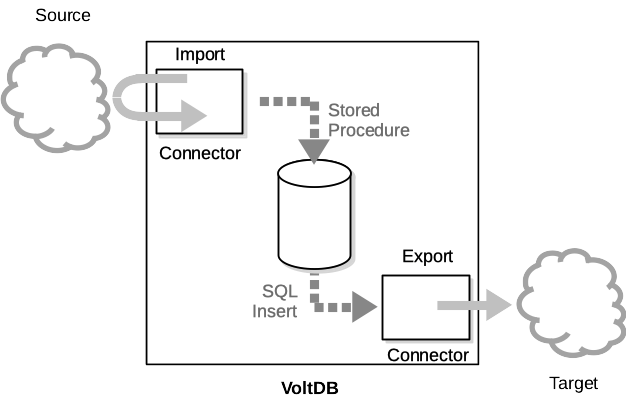
Overview of Data Streaming

Which streaming features you use depend on your business requirements. The key point is that orchestrating multiple disparate systems is complex and error prone and the VoltDB streaming services free you from these complexities by ensuring that all operations start and stop automatically as part of the server process, the data in flight is made durable across database sessions, and that all data is delivered at least once or retained until delivery is possible.

The following sections provide an overview of each service. Later sections describe the services and built-in connectors in more detail. You can also define your own custom import and export connectors, as described in the VoltDB Guide to Performance and Customization.

16.1.1. Understanding Import

To import data into VoltDB from an external system you have two options: you can use one of the standard VoltDB data loading utilities (such as csvloader) or you can define an import connector in the database configuration that associates the external source with a stored procedure. The data loading utilities are standalone external applications that push data into the VoltDB database. VoltDB import connectors use a pull model. In other words, the connector periodically checks the data source to determine if new content is available. If so, the connector retrieves the data and passes it to the stored procedure where it can analyze the data, validate it, manipulate it, insert it into the database, or even pass it along to an export stream; whatever your application needs.

The creation of the import connector is done using the import property and the list elements of the configurations subproperty in the configuration. The child properties of the configurations elements specify the type of import connector to use (Kafka or custom) and, optionally, the input format (CSV by default). Within the connector definition, the properties list elements specify the actual data source, the stored procedure to use as a destination, and any other connector-specific attributes you wish to set.

For example, to process data from a Kafka topic, the connector definition must specify the type (Kafka), the addresses of one or more Kafka brokers as the source, the name of the topic (or topics), and the stored procedure to process the data. If the data does not need additional processing, you can use the default stored procedure that VoltDB generates for each table to insert the data directly into the database. The following configuration reads the Kafka topics nyse and nasdaq in CSV format and inserts records into the stocks table using the default insert procedure:

deployment:
  import:
    configurations:
    - type: kafka
      format: csv
      properties:
      - name: brokers
        value: kafkasvr1:9092,kafkasvr2:9092
      - name: topics
        value: nyse,nasdaq
      - name: procedure
        value: STOCKS.insert

Having the import connectors defined in the configuration lets VoltDB manage the entire import process, from starting and stopping the connectors to making sure the specified stored procedure exists, fetching the data in batches and ensuring nothing is lost in transit. You can even add, delete, or modify the connector definitions on the fly by updating the database configuration while the database is running.

VoltDB provides a built-in import connector for Kafka. Section 16.4, “VoltDB Import Connectors” describes the built-in connector and its required and optional properties. Section 16.5, “VoltDB Import Formatters” provides additional information about the input formatters that prepare the incoming data for the stored procedure.

16.1.2. Understanding Export

To export data from VoltDB to an external system you define a database table or stream as the export source by including the EXPORT TO TARGET clause in the DDL definition and associating that data source with a logical target name. For example, to associate the stream alerts with a target called systemlog, you would declare a stream like so:

CREATE STREAM alerts 
   EXPORT TO TARGET systemlog 
   ( {column-definition} [,...] );

For tables, you can also specify when data is queued for export. By default, data inserted into export tables with the INSERT statement (or UPSERT that results in a new record being inserted) is queued to the target, similar to streams. However, you can customize the export to write on any combination of data manipulation language (DML) statements, using the ON clause. For example, to include updates into the export steam, the CREATE TABLE statement might look like this:

CREATE TABLE orders 
   EXPORT TO TARGET orderprocessing ON INSERT, UPDATE
   ( {column-definition} [,...] );

As soon as you declare a stream or table as exporting to a target, any data written to that source (or in the case of tables, the export actions you specified in the CREATE TABLE statement) is queued for the export stream. You associate the named target with a specific connector and external system in the export section of the database configuration. Note that you can define the target either before or after declaring the source, and you can add, remove, or modify the export configuration at any time before or after the database is started.

In the configuration you define the export connector as a list element of the configurations property, identifying the target name and type of connector to use. You identify the specific external target to use and any necessary connector-specific attributes as properties of the connector. For example, to write export data to files locally on the database servers, you use the file connector and specify attributes such as the file prefix, location, and roll-over frequency as properties:

deployment:
 export:
   configurations:
   - target: systemlog
     type: file
     properties:
     - name: type
       value: csv
     - name: nonce
       value: syslog
     - name: period
       value: 60     # roll every hour (60 minutes)

VoltDB supports built-in connectors for five types of external targets: file, HTTP (including Hadoop), JDBC, Kafka, and Elasticsearch. Each export connector supports different properties specific to that type of target. Section 16.3, “VoltDB Export Connectors” describes the built-in export connectors and the required and optional properties for each.

16.1.3. Understanding Migration

Migration is a special case of export that synchronizes export with the deletion of data in database tables. You can migrate data from either regular database tables or stream views.

When you migrate a record, VoltDB ensures the data is successfully transmitted to (and acknowledged by) the target before the data is deleted from the database. VoltDB waits until export receives acknowledgement that the data has reached the external system before deleting it. This way, migration ensures that the data is always available from one of the two systems — it cannot temporarily "disappear" during the move.

You define a VoltDB table as a source of migration using the MIGRATE TO... clause, the same way you define an export source with the EXPORT TO... clause. For example, the following CREATE TABLE statement defines the orders table as a source for migration to the oldorders target connector:

CREATE TABLE orders 
   MIGRATE TO TARGET oldorders
   ( {column-definition} [,...] );

Migration uses the export subsystem to perform the interaction with the external data store. So you can use any of the supported connectors to configure the target of the migration; and you do so the exact same way you do for any other export target. The difference is that rather than exporting the data when it is inserted into the table, the data is exported when you initiate migration.

You trigger migration at run time using the MIGRATE SQL statement and a WHERE clause to identify the specific rows to move. For example, to migrate all of the orders for a specific customer, you could use the following MIGRATE statement:

MIGRATE FROM orders
   WHERE customer_id = ? AND NOT MIGRATING;

Note the use of NOT MIGRATING. MIGRATING is a special function that identifies all rows that are currently being migrated; that is, where migration (and deletion) has not yet completed. Although not required — VoltDb will skip rows that are already migrating — adding AND NOT MIGRATING to a MIGRATE statement can improve performance by reducing the number of rows evaluated by the expression.

Once the rows are migrated and the external target acknowledges receipt, the rows are deleted from the database.

To further automate the migration of data to external targets, you can use the MIGRATE TO... clause with USING TTL. USING TTL automates the deletion of records based on a TTL value and a TIMESTAMP column in the table. For example, adding the clause USING TTL 12 HOURS ON COLUMN created to a table where the created column defaults to NOW, means that records will be deleted from the table 12 hours after they are inserted. By adding the MIGRATE TO TARGET clause, you can tell VoltDB to migrate the data to the specified target before removing it when its TTL expiration is reached.

CREATE TABLE sessions
   MIGRATE TO TARGET sessionlog
   ( session_id BIGINT NOT NULL,
     created TIMESTAMP DEFAULT NOW [,...]
   )
   USING TTL 12 HOURS ON COLUMN created;
CREATE INDEX sessions_ttl_index ON sessions (created);
CREATE INDEX sessions_migrate_index ON sessions (created) WHERE NOT MIGRATING;

When you combine USING TTL with MIGRATE TO TARGET, two indexes are required for the automated migration to occur: an index that includes the TTL column (used by USING TTL to find expired rows) and a separate partial index on the TTL column that includes a WHERE NOT MIGRATING clause (used to find and schedule the expired rows for migration). Without both indexes the CREATE TABLE statement still succeeds, but expired rows are never migrated or deleted and a warning is logged on the server. Note that the WHERE NOT MIGRATING partial index must be created while the table is empty, so declare it as part of the initial schema before loading any data.

You are visitor 01402775 — GeezerVison does not store the pages you look up.
Best viewed with Netscape Navigator 4.7 or Internet Explorer 6 at 800×600. No cookies required.