GeezerVisonThe World Wide Web, restored to 800 pixels of glory. |
| Home|About|Gaming cabinet|Archives|How it works|Starter sites |
GeezerVison is showing university.voltdb.com — Chapter 12. Active(N) Database Replication Using VoltDBChapter 12. Active(N) Database ReplicationThere are times when it is useful to create multiple copies of a database. Not just a snapshot of a moment in time, but live, constantly updated copies. K-safety maintains redundant copies of partitions within a single VoltDB database, which helps protect the database cluster against individual node failure. Database replication also creates a copy. However, database replication creates and maintains copies in separate, often remote, databases. Volt Active Data uses Active(N)® to replicate databases. Unlike passive, or one-way database replication where there is a master database and a read-only replica that only receives changes from the master, Active(N) creates multiple active databases (also known as cross datacenter replication, or XDCR) that are synchronized in both directions. Which means you can create an Active(N) network of two or more databases all of which can process database transactions and update the contents simultaneously, and those changes are replicated to all the participating database clusters. Figure 12.1. Active(N) Cross Datacenter Replication 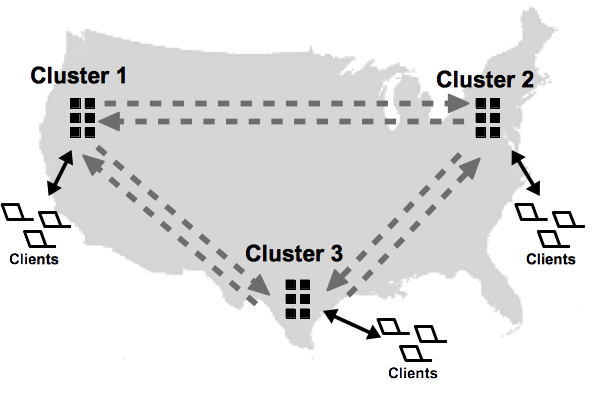 Of course, you can implement passive replication using Active(N), simply by creating a two cluster relationship and pausing the "replica" cluster to make it read-only. This can be useful for certain business applications, such as disaster recovery, where you want to maintain a read-only copy of the active database in a different geographic location in case the primary database becomes physically disabled in some way. Or if you want to maintain a read-only copy for reporting purposes and to offload these potentially complex queries from the active database. Active(N) database replication (XDCR) solves two key business problems:
It is important to note, however, that database replication is not instantaneous. The transactions are committed locally, then copied to the other database or databases. So when using XDCR to maintain multiple active clusters you must be careful to design your applications to avoid possible conflicts when transactions change the same record in two databases at approximately the same time. See Section 12.2.7, “Understanding Conflict Resolution” for more information about conflict resolution. The remainder of this chapter discusses the following topics: 12.1. How Database Replication WorksDatabase replication (DR) involves duplicating the contents of selected tables between two database clusters. You identify which tables to replicate in the schema, by specifying the table name in a DR TABLE statement. For example, to replicate all tables in the voter sample application, you would execute three DR TABLE statements when defining the database schema: DR TABLE contestants; DR TABLE votes; DR TABLE area_code_state; 12.1.1. Starting Database ReplicationYou enable DR using the
For example: deployment:
dr:
id: 2
role: xdcr
connection:
source: serverA1,serverA2Each cluster must have a unique ID. All clusters must also include the Note that you must specify the cluster The actual replication process is performed in multiple parallel streams; each unique partition on one cluster sends a binary log of completed transactions to the other clusters. Replicating by partition has two key advantages:
If data already exists in one of the clusters before database replication starts for the first time, that database sends a snapshot of the existing data to the other, as shown in Figure 12.2, “Replicating an Existing Database”. Once the snapshot is received and applied (and the two clusters are in sync), the partitions start sending binary logs of transaction results to keep the clusters synchronized. Figure 12.2. Replicating an Existing Database 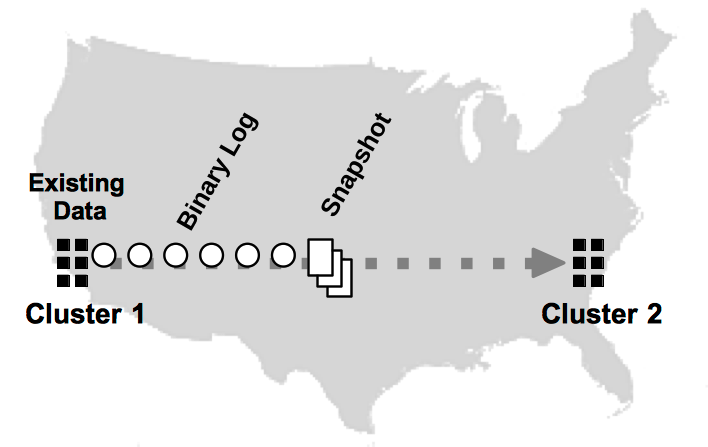 For XDCR, the first database that is started can have data in the DR tables. If other clusters contain data, replication cannot start. Once DR has started, the databases can stop and recover using command logging without having to restart DR from the beginning. 12.1.2. Database Replication, Availability, and Disaster RecoveryOnce replication begins, the DR process is designed to withstand normal failures and operational downtime. When using K-safety, if a node fails on any cluster, you can rejoin the node (or a replacement) using the voltdb start command without breaking replication. Similarly, if a cluster shuts down, you can use voltdb start to restart the database and restart replication where it left off. The ability to restart DR assumes you are using command logging. Specifically, synchronous command logging is recommended to ensure complete durability. If unforeseen events occur that make a database unreachable, database replication lets you replace the missing database with its copy. This process is known as disaster recovery. For cross datacenter replication (XDCR), you simply need to redirect your client applications to the remaining cluster(s). If one of the databases was being used as a read-only copy, you can use the voltadmin resume command to switch it from read-only mode to a fully operational database. Figure 12.3. Disaster Recovery 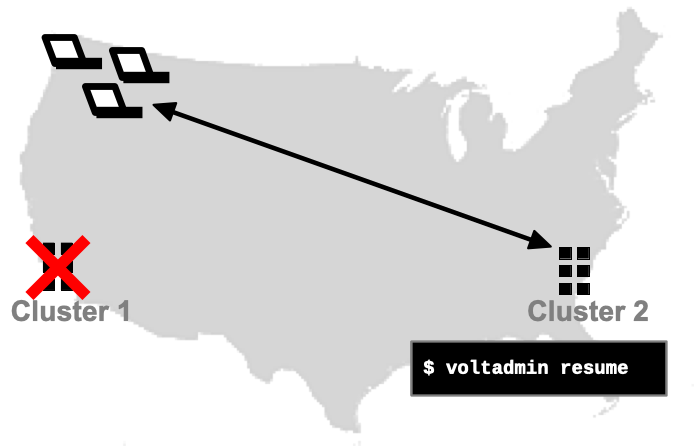 12.1.3. Database Replication and CompletenessIt is important to note that, unlike K-safety where multiple copies of each partition are updated simultaneously, database replication involves shipping the results of completed transactions from one database to another. Because replication happens after the fact, there is no guarantee that the contents of the clusters are identical at any given point in time. Instead, the receiving database (or consumer) "catches up" with the sending database (or producer) after the binary logs are received and applied by each partition. Also, because DR occurs on a per partition basis, changes to partitions may not occur in the same order on the consumer, since one partition may replicate faster than another. Normally this is not a problem because the results of all transactions are atomic in the binary log. However, if the producer cluster crashes, there is no guarantee that the consumer has managed to retrieve all the logs that were queued. Therefore, it is possible that some transactions that completed on the producer are not reflected on the consumer. Fortunately, using command logging, when you restart the failed cluster, any unacknowledged transactions will be replayed from the failed cluster's disk-based DR cache, allowing the clusters to recover and resume DR where they left off. To ensure effective recovery, the use of synchronous command logging is recommended. Synchronous command logging guarantees that all transactions are recorded in the command log and no transactions are lost. If you use asynchronous command logging, there is a possibility that a binary log is applied but not captured by the command log before the cluster crashes. Then when the database recovers, the clusters will not agree on the last acknowledged DR transaction, and DR will not be able to resume. At this point, you will need to decide which cluster to use as the authoritative source, then reinitialize and restart DR from scratch for the other cluster. |
| You are visitor 01402775 — GeezerVison does not store the pages you look up. Best viewed with Netscape Navigator 4.7 or Internet Explorer 6 at 800×600. No cookies required. |