GV

GeezerVison

The World Wide Web, restored to 800 pixels of glory.

Home|About|Gaming cabinet|Archives|How it works|Starter sites

On this site

  • Python Tutorial
  • Data Types
  • Interview Questions
  • Examples
  • Quizzes
  • DSA Python
  • Data Science
  • NumPy
  • Pandas
  • Practice
  • Django
  • Flask
  • continue statement
  • pass statement

This view

  • Original page
  • New address

GeezerVison is showing www.geeksforgeeks.org — Python Break Statement - GeeksforGeeks

geeksforgeeks
search icon
  • Courses
  • Tutorials
  • Interview Prep
  • Python Tutorial
  • Data Types
  • Interview Questions
  • Examples
  • Quizzes
  • DSA Python
  • Data Science
  • NumPy
  • Pandas
  • Practice
  • Django
  • Flask

Python Break Statement

Last Updated : 5 Jun, 2026

The break statement in Python is used to immediately terminate a for or while loop when a specified condition is met. After the loop exits, program execution continues with the next statement following the loop.

Example: Let's start with an example to understand how break works in a loop.

Python
a = [1, 3, 5, 7, 9, 11]
val = 7

for i in a:
    if i == val:
        print(f"Found at {i}!")
        break
else:
    print(f"not found")

Output
Found at 7!

Explanation:

  • The loop iterates through each number in the list.
  • When the number 7 is found, it prints a confirmation message and executes break, exiting the loop immediately.
  • If the loop completes without finding the number, the else block is executed.

Let's understand the break statement with a loop using a flowchart:
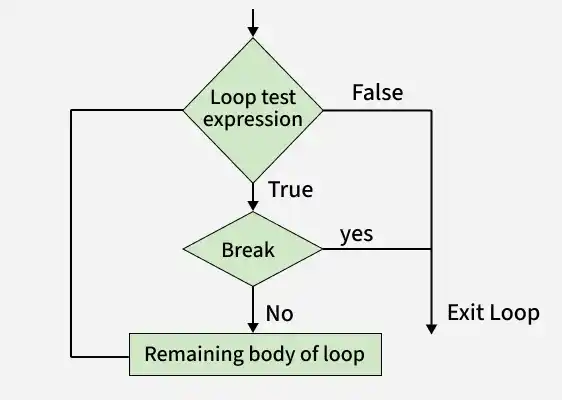
loop
Break statement Flow

Break Statement with for Loop

A for loop in Python iterates over a sequence (like a list, tuple, string or range) and executes a block of code for each item in that sequence. The break statement can be used within a for loop to exit the loop before it has iterated over all items, based on a specified condition.

Python
for i in range(10):
    print(i)
    if i == 6:
        break

Output
0
1
2
3
4
5
6

Break Statement with while Loop

A while loop in Python repeatedly executes a block of code as long as a specified condition is True. The break statement can be used within a while loop to exit the loop based on dynamic conditions that may not be known beforehand.

Python
c = 5

while True:
    print(c)
    c -= 1
    if c == 0:
        print("Countdown finished!")
        break  # Exit the loop

Output
5
4
3
2
1
Countdown finished!

Using break in Nested Loops

Nested loops are loops within loops, allowing for more complex iterations, such as iterating over multi-dimensional data structures. When using the break statement within nested loops, it's essential to understand its scope:

  • Innermost Loop Exit: A break statement will only exit the loop in which it is directly placed (the nearest enclosing loop).
  • Exiting Multiple Loops: To exit multiple levels of nested loops, additional strategies are required, such as using flags or encapsulating loops within functions.

Example: If we have a list of lists (a 2D list) and we want to find a specific number. Once we find the number, we want to stop searching in both the inner and outer loops.

Python
matrix = [
    [1, 2, 3],
    [4, 5, 6],
    [7, 8, 9]
]
val = 5
found = False

for r in matrix:
    for n in r:
        if n == val:
            print(f"{val} found!")
            found = True
            break  # Exit the inner loop
    if found:
        break  # Exit the outer loop

Output
5 found!

Explanation:

  • Outer loop iterates through each row in the matrix.
  • Inner loop checks each number in the current row.
  • When the value 5 is found, the message "5 found!" is printed and found variable is set to True and break exits the inner loop immediately.

Loops in Python help automate repetitive tasks, but sometimes you may need to exit a loop, skip an iteration, or alter the normal flow of execution. These actions are handled using loop control statements. Python supports the following control/jump statements:

  • continue statement
  • break statement
  • pass statement

Related Articles

  • Nested loops
  • while loop in Python
  • for loop in Python
Comment

Explore

    Python Fundamentals
    • Introduction1 min read
    • Input & Output2 min read
    • Variables4 min read
    • Operators4 min read
    • Keywords2 min read
    • Data Types4 min read
    • Conditional Statements3 min read
    • Loops3 min read
    • Functions4 min read
    Python Data Structures
    • String4 min read
    • List3 min read
    • Tuples3 min read
    • Dictionary3 min read
    • Set2 min read
    • Arrays5 min read
    Advanced Python
    • OOP Concepts3 min read
    • Exception Handling5 min read
    • File Handling4 min read
    • Python Database2 min read
    • MongoDB3 min read
    • MySQL7 min read
    • Packages4 min read
    • Modules3 min read
    • DSA Libraries5 min read
    • Python GUI2 min read
    Data Science with Python
    • Numpy3 min read
    • Pandas4 min read
    • Matplotlib3 min read
    • Seaborn3 min read
    • StatsModel2 min read
    • Model Building6 min read
    • TensorFlow2 min read
    • PyTorch5 min read
    Web Development with Python
    • Flask3 min read
    • Django5 min read
    • Django ORM4 min read
    • Jinja2 Templating5 min read
    • Django Templates5 min read
    • REST API3 min read
    • Build API with DRF4 min read
    Python Practice
    • Quiz1 min read
    • Practice Problems2 min read
    • Interview Q & A15+ min read
    Courses
    • Placement 360 Course2 min read
    • Data Science 360 Course2 min read
    • AI Engg Course2 min read
You are visitor 01402520 — GeezerVison does not store the pages you look up.
Best viewed with Netscape Navigator 4.7 or Internet Explorer 6 at 800×600. No cookies required.