GV

GeezerVison

The World Wide Web, restored to 800 pixels of glory.

Home|About|Gaming cabinet|Archives|How it works|Starter sites

On this site

  • Python Tutorial
  • Data Types
  • Interview Questions
  • Examples
  • Quizzes
  • DSA Python
  • Data Science
  • NumPy
  • Pandas
  • Practice
  • Django
  • Flask
  • Introduction1 min read
  • Input & Output2 min read

This view

  • Original page
  • New address

GeezerVison is showing www.geeksforgeeks.org — Python While Loop - GeeksforGeeks

geeksforgeeks
search icon
  • Courses
  • Tutorials
  • Interview Prep
  • Python Tutorial
  • Data Types
  • Interview Questions
  • Examples
  • Quizzes
  • DSA Python
  • Data Science
  • NumPy
  • Pandas
  • Practice
  • Django
  • Flask

Python While Loop

Last Updated : 5 Oct, 2026

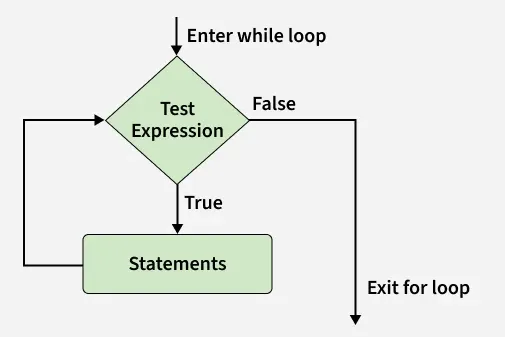
While Loop is used to execute a block of statements repeatedly until a given condition is satisfied. When the condition becomes false, the line immediately after the loop in the program is executed.

Here, the condition for while will be True as long as the counter variable (count) is less than 3. 

Python
count = 0
while count < 3:
    count = count + 1
    print("Hello Geek")

Output
Hello Geek
Hello Geek
Hello Geek

Syntax

while expression:
statement(s)

Parameters:

  • condition a boolean expression. If it evaluates to True, code inside the loop will execute.
  • statement(s) that will be executed during each iteration of the loop.

Flowchart of While Loop

whileloop
While Loop

Infinite while Loop

An infinite loop is a loop that keeps running continuously because its condition always remains True. Such loops do not stop on their own and continue executing until the program is manually terminated.

Python
age = 28
while age > 19:
    print('Infinite Loop')

Explanation: Here, the condition age > 19 is always True because the value of age never changes inside the loop. Therefore, the loop runs infinitely.

Using with continue statement

Continue statement is used to skip the current iteration of the loop and move directly to the next iteration.

Python
i = 0
a = 'geeksforgeeks'

while i < len(a):
    if a[i] == 'e' or a[i] == 's':
        i += 1
        continue
    print(a[i])
    i += 1

Output
g
k
f
o
r
g
k

Explanation: Here, whenever the character is 'e' or 's', the loop skips printing it and continues with the next character.

Using with break statement

Break statement is used to immediately terminate the loop when a specific condition becomes True.

Python
i = 0
a = 'geeksforgeeks'

while i < len(a):
    if a[i] == 'e' or a[i] == 's':
        i += 1
        break
    print(a[i])
    i += 1

Output
g

Explanation: Here, the loop stops as soon as it encounters the character 'e' or 's'.

Using with pass statement

pass statement is a null statement. It does nothing when executed and is mainly used as a placeholder for future code.

Python
a = 'geeksforgeeks'
i = 0
while i < len(a):
    i += 1
    pass
  
print('Value of i :', i)

Output
Value of i : 13

Explanation: Here, the loop runs through all characters of the string, but the pass statement performs no action inside the loop body.

Using with else

else block in a while loop executes only when the loop finishes normally without encountering a break statement. In first example, loop completes all iterations, so the else block executes. In second example, loop stops because of break, so the else block is skipped.

Python
i = 0
while i < 4:
    i += 1
    print(i)
else:
    print("No Break\n")

i = 0
while i < 4:
    i += 1
    print(i)
    break
else:
    print("No Break")

Output
1
2
3
4
No Break

1
Comment

Explore

    Python Fundamentals
    • Introduction1 min read
    • Input & Output2 min read
    • Variables4 min read
    • Operators4 min read
    • Keywords2 min read
    • Data Types4 min read
    • Conditional Statements3 min read
    • Loops3 min read
    • Functions4 min read
    Python Data Structures
    • String4 min read
    • List3 min read
    • Tuples3 min read
    • Dictionary3 min read
    • Set2 min read
    • Arrays5 min read
    Advanced Python
    • OOP Concepts3 min read
    • Exception Handling5 min read
    • File Handling4 min read
    • Python Database2 min read
    • MongoDB3 min read
    • MySQL7 min read
    • Packages4 min read
    • Modules3 min read
    • DSA Libraries5 min read
    • Python GUI2 min read
    Data Science with Python
    • Numpy3 min read
    • Pandas4 min read
    • Matplotlib3 min read
    • Seaborn3 min read
    • StatsModel2 min read
    • Model Building6 min read
    • TensorFlow2 min read
    • PyTorch5 min read
    Web Development with Python
    • Flask3 min read
    • Django5 min read
    • Django ORM4 min read
    • Jinja2 Templating5 min read
    • Django Templates5 min read
    • REST API3 min read
    • Build API with DRF4 min read
    Python Practice
    • Quiz1 min read
    • Practice Problems2 min read
    • Interview Q & A15+ min read
    Courses
    • Placement 360 Course2 min read
    • Data Science 360 Course2 min read
    • AI Engg Course2 min read
You are visitor 01402503 — GeezerVison does not store the pages you look up.
Best viewed with Netscape Navigator 4.7 or Internet Explorer 6 at 800×600. No cookies required.