GV

GeezerVison

The World Wide Web, restored to 800 pixels of glory.

Home|About|Gaming cabinet|Archives|How it works|Starter sites

On this site

  • 首页
  • HTML
  • JavaScript
  • CSS
  • React
  • Python3
  • Java
  • C
  • C++
  • C#
  • Go
  • SQL
  • Linux
  • VS Code

This view

  • Original page
  • New address

GeezerVison is showing www.runoob.com — Python 组合模式 | 菜鸟教程

菜鸟教程 -- 学的不仅是技术,更是梦想!

  • Vue3 教程
  • Vue2 教程
  • Bootstrap3
  • Bootstrap4
  • Bootstrap5
  • 机器学习
  • PyTorch
  • TensorFlow
  • Sklearn
  • NLP
  • AI Agent
  • Ollama
  • Coding Plan
Python 设计模式
设计模式 Python 设计模式 Python 工厂模式 Python 单例模式 Python 建造者模式 Python 原型模式 Python 适配器模式 Python 装饰器模式 Python 代理模式 Python 外观模式 Python 桥接模式 Python 组合模式 Python 享元模式 Python 观察者模式 Python 策略模式 Python 命令模式 Python 模板方法模式 Python 迭代器模式 Python 责任链模式 Python 状态模式 Python 访问者模式 Python 中介者模式 Python 备忘录模式 Python 解释器模式
Python 桥接模式
Python 享元模式

Python 组合模式

组合模式是一种结构型设计模式,它允许你将对象组合成树形结构来表示"部分-整体"的层次结构。组合模式让客户端可以统一地处理单个对象和对象组合,无需关心处理的是单个对象还是整个组合结构。

生活中的类比

想象一下文件系统的组织结构:

  • 单个文件:是最基本的单位
  • 文件夹:可以包含多个文件或其他文件夹
  • 无论你操作的是文件还是文件夹,都可以进行"打开"、"删除"、"重命名"等操作

这种"部分-整体"的层次关系就是组合模式的典型应用场景。


组合模式的核心组件

1. 组件接口(Component)

这是组合模式的核心,定义了所有对象(包括叶子节点和组合节点)的通用接口。

实例

from abc import ABC, abstractmethod
from typing import List

class FileSystemComponent(ABC):
    """文件系统组件抽象基类"""
   
    def __init__(self, name: str):
        self.name = name
        self.parent = None
   
    @abstractmethod
    def display(self, indent: int = 0) -> None:
        """显示组件信息"""
        pass
   
    @abstractmethod
    def get_size(self) -> int:
        """获取组件大小"""
        pass
   
    def get_path(self) -> str:
        """获取完整路径"""
        if self.parent:
            return f"{self.parent.get_path()}/{self.name}"
        return self.name

2. 叶子节点(Leaf)

表示组合中的叶子对象,叶子节点没有子节点。

实例

class File(FileSystemComponent):
    """文件类 - 叶子节点"""
   
    def __init__(self, name: str, size: int):
        super().__init__(name)
        self._size = size
   
    def display(self, indent: int = 0) -> None:
        """显示文件信息"""
        spaces = "  " * indent
        print(f"{spaces}📄 {self.name} ({self._size} bytes)")
   
    def get_size(self) -> int:
        """返回文件大小"""
        return self._size

3. 组合节点(Composite)

表示可以包含子组件的组合对象,定义了存储子组件的方法。

实例

class Directory(FileSystemComponent):
    """目录类 - 组合节点"""
   
    def __init__(self, name: str):
        super().__init__(name)
        self._children: List[FileSystemComponent] = []
   
    def add(self, component: FileSystemComponent) -> None:
        """添加子组件"""
        component.parent = self
        self._children.append(component)
   
    def remove(self, component: FileSystemComponent) -> None:
        """移除子组件"""
        self._children.remove(component)
        component.parent = None
   
    def display(self, indent: int = 0) -> None:
        """显示目录及其所有子组件"""
        spaces = "  " * indent
        print(f"{spaces}📁 {self.name}/")
       
        # 递归显示所有子组件
        for child in self._children:
            child.display(indent + 1)
   
    def get_size(self) -> int:
        """计算目录总大小(包含所有子组件)"""
        total_size = 0
        for child in self._children:
            total_size += child.get_size()
        return total_size
   
    def find_component(self, name: str) -> FileSystemComponent:
        """查找指定名称的组件"""
        for child in self._children:
            if child.name == name:
                return child
            if isinstance(child, Directory):
                found = child.find_component(name)
                if found:
                    return found
        return None

完整示例:文件系统模拟

让我们通过一个完整的例子来演示组合模式的实际应用:

实例

def demonstrate_composite_pattern():
    """演示组合模式的使用"""
   
    # 创建根目录
    root = Directory("root")
   
    # 创建子目录
    documents = Directory("documents")
    pictures = Directory("pictures")
    music = Directory("music")
   
    # 创建文件
    readme = File("README.txt", 1024)
    notes = File("notes.md", 2048)
    photo1 = File("vacation.jpg", 1536000)
    photo2 = File("family.png", 2048000)
    song1 = File("song1.mp3", 4096000)
    song2 = File("song2.mp3", 5120000)
   
    # 构建目录结构
    root.add(readme)
    root.add(documents)
    root.add(pictures)
    root.add(music)
   
    documents.add(notes)
   
    pictures.add(photo1)
    pictures.add(photo2)
   
    music.add(song1)
    music.add(song2)
   
    # 显示整个文件系统结构
    print("=== 文件系统结构 ===")
    root.display()
   
    print("\n=== 大小统计 ===")
    print(f"根目录总大小: {root.get_size()} bytes")
    print(f"图片目录大小: {pictures.get_size()} bytes")
    print(f"音乐目录大小: {music.get_size()} bytes")
   
    print("\n=== 路径信息 ===")
    print(f"文件路径: {photo1.get_path()}")
    print(f"目录路径: {pictures.get_path()}")
   
    print("\n=== 查找组件 ===")
    found = root.find_component("song1.mp3")
    if found:
        print(f"找到文件: {found.get_path()}")

# 运行演示
if __name__ == "__main__":
    demonstrate_composite_pattern()

运行上述代码,你将看到以下输出:


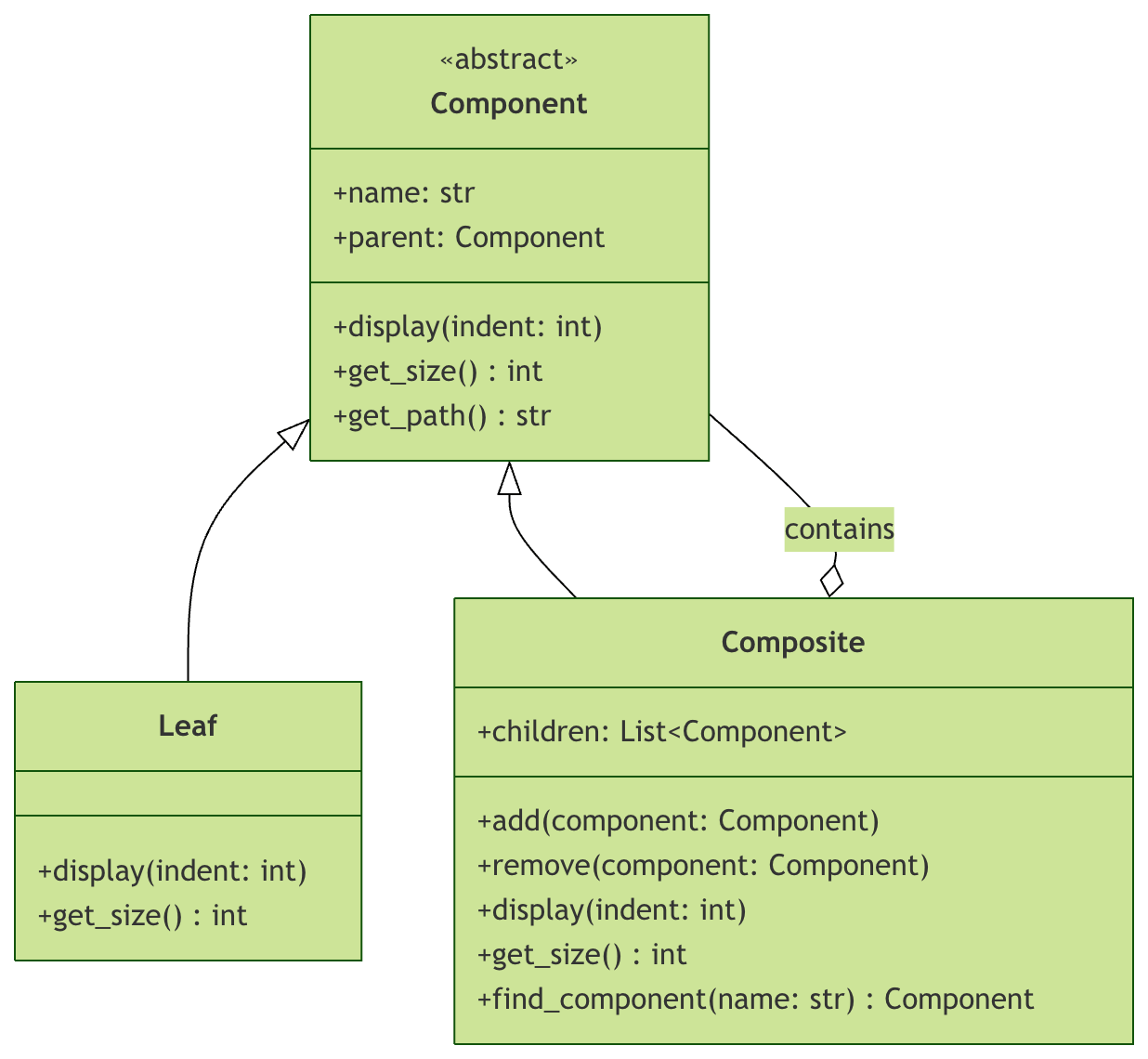
组合模式的 UML 类图


组合模式的优缺点

优点

  1. 统一的接口:客户端可以一致地使用单个对象和组合对象
  2. 开闭原则:容易添加新类型的组件,无需修改现有代码
  3. 简化客户端代码:客户端不需要判断处理的是单个对象还是组合
  4. 灵活的层次结构:可以构建复杂的树形结构

缺点

  1. 设计复杂性:过度通用化的设计可能使系统变得复杂
  2. 类型安全问题:在某些情况下,可能需要运行时类型检查
  3. 性能考虑:对于大型层次结构,递归操作可能影响性能

实际应用场景

1. GUI 组件系统

实例

class UIComponent:
    """UI 组件基类"""
    def render(self):
        pass
    def add(self, component):
        pass

class Button(UIComponent):
    """按钮 - 叶子节点"""
    def render(self):
        print("渲染按钮")

class Panel(UIComponent):
    """面板 - 组合节点"""
    def __init__(self):
        self.children = []
   
    def add(self, component):
        self.children.append(component)
   
    def render(self):
        print("开始渲染面板")
        for child in self.children:
            child.render()
        print("结束渲染面板")

2. 组织架构管理

实例

class Employee:
    """员工基类"""
    def get_salary(self):
        pass

class Developer(Employee):
    """开发人员 - 叶子节点"""
    def __init__(self, salary):
        self.salary = salary
   
    def get_salary(self):
        return self.salary

class Department(Employee):
    """部门 - 组合节点"""
    def __init__(self):
        self.employees = []
   
    def add(self, employee):
        self.employees.append(employee)
   
    def get_salary(self):
        return sum(emp.get_salary() for emp in self.employees)

实践练习

练习 1:扩展文件系统

为文件系统添加以下功能:

  1. 实现文件复制功能
  2. 添加文件类型过滤搜索
  3. 实现目录深度限制显示

练习 2:菜单系统设计

设计一个餐厅菜单系统,要求:

  • 菜单可以包含菜品或子菜单
  • 能够计算总价格
  • 支持按类别筛选菜品

练习 3:组织结构图

创建一个公司组织结构系统:

  • 员工可以是个人或部门
  • 部门可以包含其他员工或子部门
  • 能够计算部门总人数和总薪资

总结

组合模式通过统一的接口来处理单个对象和对象组合,使得客户端代码更加简洁和灵活。这种模式特别适用于具有层次结构的场景,如文件系统、GUI 组件、组织架构等。

关键要点:

  • 组件接口定义了所有对象的通用操作
  • 叶子节点实现基础功能
  • 组合节点管理子组件并提供聚合操作
  • 客户端无需区分单个对象和对象组合
AI 思考中...
Python 桥接模式
Python 享元模式

点我分享笔记

取消

  • 昵称 (必填)
  • 邮箱 (必填)
  • 引用地址
分类导航
  • Python / 数据科学
    • Python 教程
    • Python2.x 教程
    • FastAPI 教程
    • Flask 教程
    • Django 教程
    • NumPy 教程
    • Pandas 教程
    • SciPy 教程
    • Matplotlib 教程
    • Dash 教程
    • Jupyter Notebook 教程
    • Pillow 教程
    • 量化交易
    • R 教程
    • Julia 教程
  • AI / 智能开发
    • AI Agent(智能体)
    • AI(人工智能)
    • AI 应用案例
    • Codex 教程
    • Vibe Coding 教程
    • Claude Code
    • OpenCode
    • Skills(技能)
    • Ollama 教程
    • Hermes Agent
    • DeepSeek Harness
    • Pi Agent
    • AI 数学基础
    • TensorFlow 教程
    • PyTorch 教程
    • Scikit-learn 教程
    • 机器 教程
    • LangChain
    • 自然语言处理 NLP
    • OpenCV 教程
    • Selenium 教程
    • Playwright 教程
  • 前端开发
    • HTML 教程
    • HTML5 教程
    • CSS 教程
    • CSS3 教程
    • JavaScript 教程
    • HTML DOM 教程
    • TypeScript 教程
    • AJAX 教程
    • JSON 教程
    • Tailwind CSS 教程
    • Bootstrap4 教程
    • Bootstrap5 教程
    • Foundation 教程
    • Vue.js 教程
    • Vue3 教程
    • React 教程
    • Next.js 教程
    • Three.js 教程
    • AngularJS 教程
    • Angular 教程
    • jQuery 教程
    • jQuery UI 教程
    • jQuery EasyUI 教程
    • ECharts 教程
    • Chart.js 教程
    • Highcharts 教程
    • Google 地图 教程
    • SVG 教程
    • Font Awesome 教程
  • 后端开发
    • Node.js 教程
    • Electron 教程
    • PHP 教程
    • Java 教程
    • Go 教程
    • Rust 教程
    • C# 教程
    • Unity 教程
    • Servlet 教程
    • JSP 教程
    • ASP 教程
    • AppML 教程
    • VBScript 教程
    • Swagger 教程
    • RESTful API 教程
    • Docker 教程
    • Linux 教程
    • ZooKeeper 教程
  • 数据库
    • SQL 教程
    • MySQL 教程
    • PostgreSQL 教程
    • SQLite 教程
    • MongoDB 教程
    • Redis 教程
    • Memcached 教程
  • 移动开发
    • Android 教程
    • Flutter 教程
    • Ionic 教程
    • jQuery Mobile 教程
    • Swift 教程
    • Kotlin 教程
  • DevOps / 工程化
    • Git 教程
    • SVN 教程
    • CMake 教程
    • Maven 教程
    • VS Code 教程
    • Obsidian 教程
    • PyCharm 教程
    • Eclipse 教程
    • Markdown 教程
    • LaTeX 教程
  • 编程语言
    • C 教程
    • C++ 教程
    • Zig 教程
    • Scala 教程
    • Ruby 教程
    • Perl 教程
    • Lua 教程
    • Dart 教程
    • 汇编语言 教程
    • Verilog 教程
  • 计算机基础
    • 计算机组成原理
    • 数据结构与算法
    • C 语言数据结构与算法
    • 设计模式
    • Python 设计模式
    • 正则表达式
    • HTTP 教程
    • TCP/IP 教程
    • 网络协议
    • W3C 教程
  • XML / Web Service
    • XML 教程
    • DTD 教程
    • XML DOM 教程
    • XSLT 教程
    • XPath 教程
    • XQuery 教程
    • XLink 教程
    • XPointer 教程
    • XML Schema 教程
    • XSL-FO 教程
    • Web Service 教程
    • WSDL 教程
    • SOAP 教程
    • RSS 教程
    • RDF 教程
  • .NET
    • ASP.NET 教程
    • MVC 教程
    • Razor 教程
    • Web Forms 教程
    • Web Pages 教程
    • PowerShell 教程
  • 网站建设
    • 网站建设指南
    • 浏览器信息
    • 网站主机教程
    • 网站品质

字节 Coding Plan 限时 9.9 元起,支持 Deepseek-V4、GLM-5.3、Doubao-Seed-Evolving、Kimi-K3。
百度 Dumate 百度推出的桌面级 AI 智能体。 输入激活码送 4000 积分
使用文档
Trae AI 原生开发环境,让编程更高效。新用户注册赠2500积分,管理项目,也交付成果。
Advertisement
You are visitor 01402775 — GeezerVison does not store the pages you look up.
Best viewed with Netscape Navigator 4.7 or Internet Explorer 6 at 800×600. No cookies required.