GeezerVisonThe World Wide Web, restored to 800 pixels of glory. |
| Home|About|Gaming cabinet|Archives|How it works|Starter sites |
GeezerVison is showing www.runoob.com — Python 外观模式 | 菜鸟教程
Python 设计模式
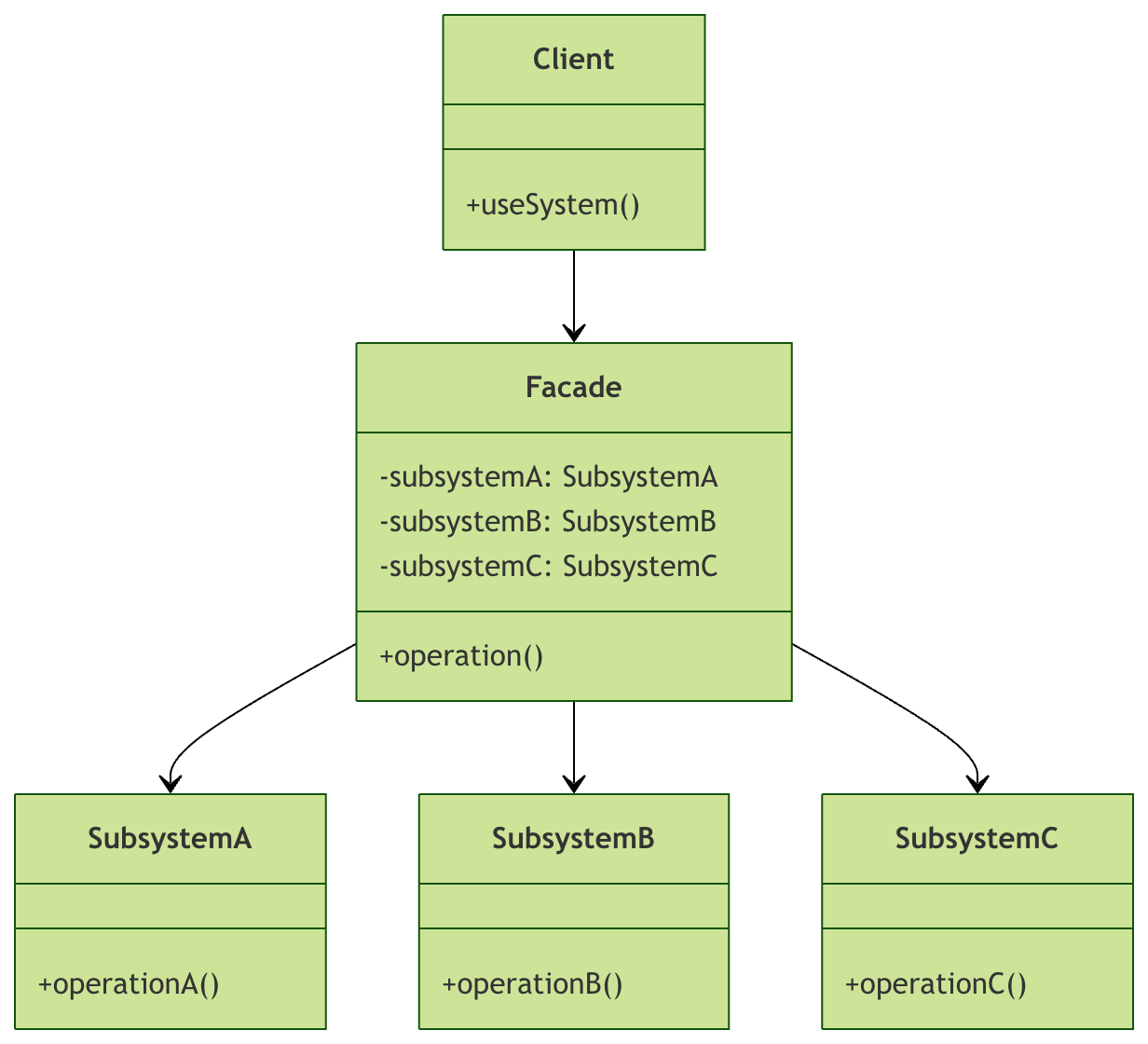
Python 外观模式外观模式(Facade Pattern)是一种结构型设计模式,它为复杂的子系统提供一个简化的接口。想象一下你去餐厅吃饭:你不需要了解厨房里厨师如何切菜、炒菜、摆盘的所有细节,只需要告诉服务员你想吃什么,服务员就会协调后厨完成所有工作。这个服务员就扮演了"外观"的角色。 在软件开发中,外观模式通过创建一个统一的接口,来隐藏子系统的复杂性,让客户端代码更容易使用。 外观模式的核心思想简化复杂系统当系统变得越来越复杂时,类之间的依赖关系也会变得错综复杂。外观模式通过提供一个高层接口,降低了系统与客户端之间的耦合度。 提供统一入口外观类作为子系统的唯一入口,客户端只需要与外观类交互,而不需要了解子系统内部的复杂结构。 降低使用门槛对于不熟悉系统内部结构的开发者来说,外观模式让他们能够快速上手使用系统功能。 外观模式的结构
从图中可以看到:
实际应用示例:家庭影院系统让我们通过一个家庭影院的例子来理解外观模式的实际应用。 子系统类首先,我们创建家庭影院中的各个设备类: 实例
class Amplifier:
"""功放类""" def on(self): print("功放已开启") def set_volume(self, level): print(f"音量设置为 {level}") def off(self): print("功放已关闭") class DVDPlayer: """DVD播放器类""" def on(self): print("DVD播放器已开启") def play(self, movie): print(f"开始播放电影: {movie}") def stop(self): print("DVD播放器已停止") def off(self): print("DVD播放器已关闭") class Projector: """投影仪类""" def on(self): print("投影仪已开启") def set_input(self, source): print(f"投影仪输入源设置为: {source}") def off(self): print("投影仪已关闭") class Lights: """灯光类""" def dim(self, level): print(f"灯光调暗到 {level}%") def on(self): print("灯光全开") class Screen: """屏幕类""" def down(self): print("屏幕已降下") def up(self): print("屏幕已升起") 外观类现在创建外观类,它封装了所有设备的复杂操作: 实例
class HomeTheaterFacade:
"""家庭影院外观类""" def __init__(self): self.amplifier = Amplifier() self.dvd_player = DVDPlayer() self.projector = Projector() self.lights = Lights() self.screen = Screen() def watch_movie(self, movie): """观看电影 - 一键完成所有准备工作""" print("\n=== 开始家庭影院模式 ===") # 按正确顺序启动设备 self.lights.dim(10) # 调暗灯光 self.screen.down() # 降下屏幕 self.projector.on() # 打开投影仪 self.projector.set_input("DVD") self.amplifier.on() # 打开功放 self.amplifier.set_volume(5) # 设置音量 self.dvd_player.on() # 打开DVD播放器 self.dvd_player.play(movie) # 播放电影 print("=== 家庭影院准备就绪 ===\n") def end_movie(self): """结束观影 - 一键关闭所有设备""" print("\n=== 结束家庭影院模式 ===") # 按正确顺序关闭设备 self.dvd_player.stop() # 停止DVD self.dvd_player.off() # 关闭DVD self.amplifier.off() # 关闭功放 self.projector.off() # 关闭投影仪 self.screen.up() # 升起屏幕 self.lights.on() # 打开灯光 print("=== 所有设备已关闭 ===\n") 客户端代码现在看看客户端如何使用这个简化的接口: 实例
def main():
# 创建家庭影院外观实例 home_theater = HomeTheaterFacade() # 观看电影 - 只需要调用一个方法! home_theater.watch_movie("阿凡达") # 模拟观影过程... print("正在享受电影时光...\n") # 结束观影 - 同样只需要调用一个方法! home_theater.end_movie() if __name__ == "__main__": main() 运行结果: === 开始家庭影院模式 === 灯光调暗到 10% 屏幕已降下 投影仪已开启 投影仪输入源设置为: DVD 功放已开启 音量设置为 5 DVD播放器已开启 开始播放电影: 阿凡达 === 家庭影院准备就绪 === 正在享受电影时光... === 结束家庭影院模式 === DVD播放器已停止 DVD播放器已关闭 功放已关闭 投影仪已关闭 屏幕已升起 灯光全开 === 所有设备已关闭 === 外观模式的优势1. 简化客户端代码客户端不再需要了解所有子系统的细节和启动顺序: 实例
# 没有外观模式 - 复杂的客户端代码
def watch_movie_manual(): lights = Lights() screen = Screen() projector = Projector() amplifier = Amplifier() dvd_player = DVDPlayer() lights.dim(10) screen.down() projector.on() projector.set_input("DVD") amplifier.on() amplifier.set_volume(5) dvd_player.on() dvd_player.play("阿凡达") # 使用外观模式 - 简化的客户端代码 def watch_movie_simple(): home_theater = HomeTheaterFacade() home_theater.watch_movie("阿凡达") 2. 降低耦合度子系统发生变化时,只需要修改外观类,客户端代码无需改动。 3. 提高代码可维护性将复杂的子系统操作封装在一个地方,便于维护和调试。 更多实际应用场景场景1:数据库操作外观实例
class DatabaseFacade:
"""数据库操作外观类""" def __init__(self, connection_string): self.connection_string = connection_string def execute_query(self, query, params=None): """执行查询的简化接口""" # 连接数据库 connection = self._connect() cursor = connection.cursor() try: # 执行查询 if params: cursor.execute(query, params) else: cursor.execute(query) # 获取结果 result = cursor.fetchall() return result except Exception as e: print(f"查询执行失败: {e}") return None finally: # 关闭连接 cursor.close() connection.close() def _connect(self): """内部连接方法 - 对客户端隐藏""" # 实际的数据库连接逻辑 print("连接到数据库...") return "模拟数据库连接" 场景2:文件处理外观实例
class FileProcessorFacade:
"""文件处理外观类""" def process_file(self, file_path): """处理文件的简化接口""" try: # 验证文件 if not self._validate_file(file_path): return False # 读取文件 content = self._read_file(file_path) # 处理内容 processed_content = self._process_content(content) # 保存结果 self._save_result(processed_content) return True except Exception as e: print(f"文件处理失败: {e}") return False def _validate_file(self, file_path): """验证文件""" print(f"验证文件: {file_path}") return True def _read_file(self, file_path): """读取文件""" print(f"读取文件: {file_path}") return "文件内容" def _process_content(self, content): """处理内容""" print("处理文件内容...") return "处理后的内容" def _save_result(self, content): """保存结果""" print("保存处理结果...") 外观模式的最佳实践1. 合理设计接口外观类应该提供真正有用的简化接口,而不是简单地包装所有子系统方法。 2. 保持单一职责每个外观类应该专注于一个特定的功能领域。 3. 不要过度使用如果系统本身就不复杂,使用外观模式可能会增加不必要的抽象层。 4. 考虑扩展性设计时要考虑未来可能添加的新功能。 实践练习现在轮到你了!尝试完成以下练习来巩固所学知识: 练习1:改进家庭影院系统为
练习2:创建电商订单处理外观设计一个电商系统的订单处理外观,包含以下子系统:
练习3:调试技巧在外观类中添加日志功能,记录每个方法的调用时间和参数,便于调试。 总结外观模式是一个强大的工具,它通过提供简化的接口来隐藏系统的复杂性。就像餐厅的服务员一样,外观类作为客户端和子系统之间的中介,让使用复杂系统变得简单直观。 关键要点:
AI 思考中...
点我分享笔记取消
分类导航
 字节 Coding Plan
限时 9.9 元起,支持 Deepseek-V4、GLM-5.3、Doubao-Seed-Evolving、Kimi-K3。  Trae
AI 原生开发环境,让编程更高效。新用户注册赠2500积分,管理项目,也交付成果。
Advertisement
|
| You are visitor 01402775 — GeezerVison does not store the pages you look up. Best viewed with Netscape Navigator 4.7 or Internet Explorer 6 at 800×600. No cookies required. |