GeezerVisonThe World Wide Web, restored to 800 pixels of glory. |
| Home|About|Gaming cabinet|Archives|How it works|Starter sites |
GeezerVison is showing www.runoob.com — Python 装饰器模式 | 菜鸟教程
Python 设计模式
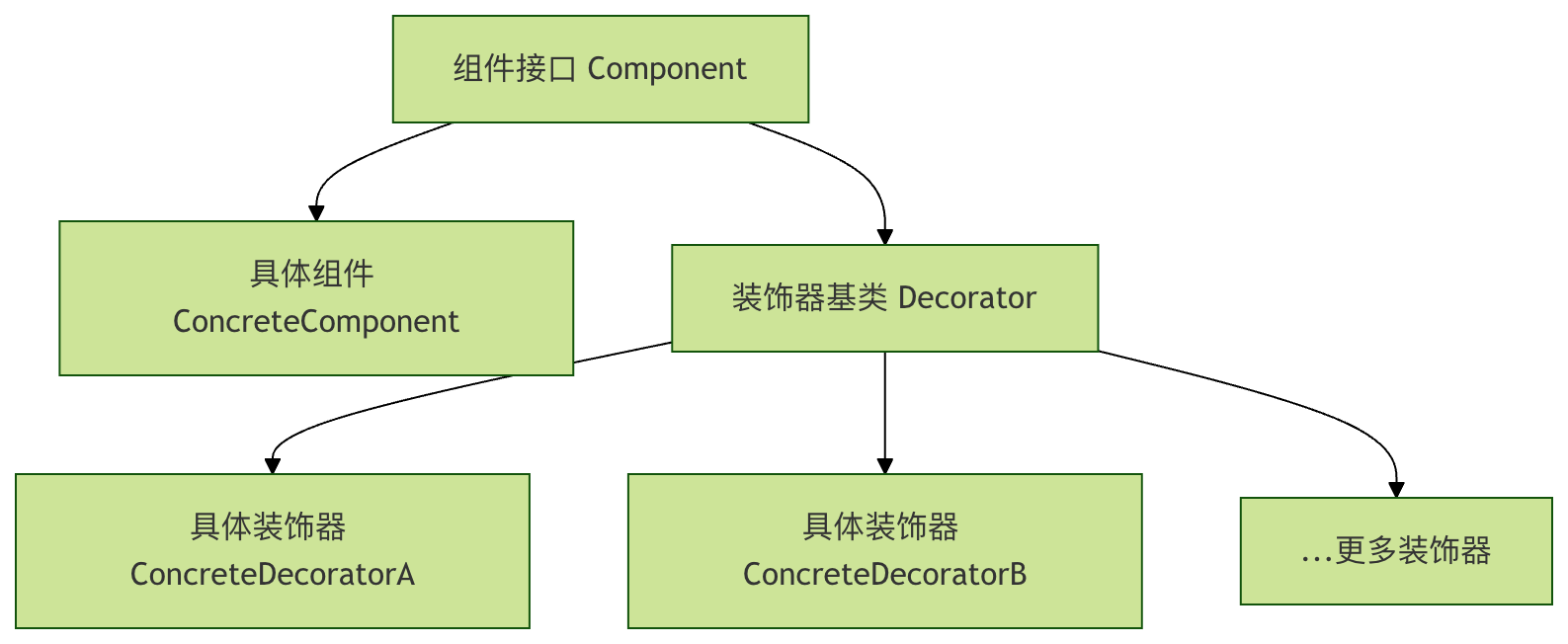
Python 装饰器模式装饰器模式的核心思想是包装——通过创建一个包装对象(装饰器)来包裹原始对象,从而在不修改原始对象的前提下扩展其功能。 基本概念装饰器模式包含四个主要角色:
装饰器的基本语法函数装饰器函数装饰器是最常见的装饰器形式,它接收一个函数作为参数,并返回一个新的函数。 实例
def my_decorator(func):
def wrapper(*args, **kwargs): print("函数执行前的一些操作") result = func(*args, **kwargs) print("函数执行后的一些操作") return result return wrapper @my_decorator def say_hello(name): print(f"Hello, {name}!") # 使用装饰器 say_hello("Alice") 输出结果: 函数执行前的一些操作 Hello, Alice! 函数执行后的一些操作 带参数的装饰器如果需要向装饰器传递参数,需要再嵌套一层函数: 实例
def repeat(times):
def decorator(func): def wrapper(*args, **kwargs): for i in range(times): print(f"第 {i+1} 次执行:") result = func(*args, **kwargs) return result return wrapper return decorator @repeat(times=3) def greet(name): print(f"你好, {name}!") greet("Bob") 类装饰器除了函数装饰器,Python 还支持类装饰器。类装饰器通过实现 基本的类装饰器实例
class TimerDecorator:
def __init__(self, func): self.func = func def __call__(self, *args, **kwargs): import time start_time = time.time() result = self.func(*args, **kwargs) end_time = time.time() print(f"函数 {self.func.__name__} 执行耗时: {end_time - start_time:.4f} 秒") return result @TimerDecorator def calculate_sum(n): return sum(range(n)) result = calculate_sum(1000000) print(f"计算结果: {result}") 带参数的类装饰器实例
class LogDecorator:
def __init__(self, level="INFO"): self.level = level def __call__(self, func): def wrapper(*args, **kwargs): print(f"[{self.level}] 调用函数: {func.__name__}") print(f"[{self.level}] 参数: args={args}, kwargs={kwargs}") result = func(*args, **kwargs) print(f"[{self.level}] 返回值: {result}") return result return wrapper @LogDecorator(level="DEBUG") def multiply(a, b): return a * b multiply(5, 3) 内置装饰器Python 提供了一些有用的内置装饰器: @staticmethod 和 @classmethod实例
class Calculator:
@staticmethod def add(x, y): return x + y @classmethod def multiply(cls, x, y): return x * y # 使用静态方法 result1 = Calculator.add(5, 3) print(f"静态方法结果: {result1}") # 使用类方法 result2 = Calculator.multiply(5, 3) print(f"类方法结果: {result2}") @property实例
class Circle:
def __init__(self, radius): self._radius = radius @property def radius(self): return self._radius @radius.setter def radius(self, value): if value <= 0: raise ValueError("半径必须为正数") self._radius = value @property def area(self): return 3.14159 * self._radius ** 2 circle = Circle(5) print(f"半径: {circle.radius}") print(f"面积: {circle.area}") circle.radius = 10 print(f"新半径: {circle.radius}") print(f"新面积: {circle.area}") 装饰器的实际应用场景1. 日志记录实例
def log_execution(func):
def wrapper(*args, **kwargs): print(f"开始执行: {func.__name__}") try: result = func(*args, **kwargs) print(f"成功完成: {func.__name__}") return result except Exception as e: print(f"执行失败: {func.__name__}, 错误: {e}") raise return wrapper @log_execution def process_data(data): # 模拟数据处理 if not data: raise ValueError("数据不能为空") return [x * 2 for x in data] # 测试 data = [1, 2, 3] result = process_data(data) print(f"处理结果: {result}") 2. 权限验证实例
def require_login(func):
def wrapper(user, *args, **kwargs): if not user.get('is_authenticated', False): raise PermissionError("用户未登录") return func(user, *args, **kwargs) return wrapper @require_login def view_profile(user): return f"查看用户 {user['username']} 的个人资料" # 测试 user1 = {'username': 'alice', 'is_authenticated': True} user2 = {'username': 'bob', 'is_authenticated': False} print(view_profile(user1)) # 正常执行 # print(view_profile(user2)) # 会抛出 PermissionError 3. 缓存装饰器实例
def cache_results(func):
cache = {} def wrapper(*args): if args in cache: print(f"从缓存中获取结果: {args}") return cache[args] result = func(*args) cache[args] = result print(f"计算并缓存结果: {args} -> {result}") return result return wrapper @cache_results def fibonacci(n): if n <= 1: return n return fibonacci(n-1) + fibonacci(n-2) # 测试缓存效果 print(fibonacci(5)) print(fibonacci(5)) # 这次会从缓存中获取 多个装饰器的执行顺序当使用多个装饰器时,它们的执行顺序是从下往上: 实例
def decorator1(func):
def wrapper(): print("装饰器1 - 前") func() print("装饰器1 - 后") return wrapper def decorator2(func): def wrapper(): print("装饰器2 - 前") func() print("装饰器2 - 后") return wrapper @decorator1 @decorator2 def my_function(): print("原始函数") my_function() 输出结果: 装饰器1 - 前 装饰器2 - 前 原始函数 装饰器2 - 后 装饰器1 - 后 保留函数元信息使用装饰器时,原始函数的元信息(如函数名、文档字符串等)会被包装函数覆盖。可以使用 实例
from functools import wraps
def preserve_metadata(func): @wraps(func) def wrapper(*args, **kwargs): """包装函数的文档字符串""" return func(*args, **kwargs) return wrapper @preserve_metadata def example_function(): """这是原始函数的文档字符串""" pass print(f"函数名: {example_function.__name__}") print(f"文档字符串: {example_function.__doc__}") 实践练习练习 1:创建性能监控装饰器编写一个装饰器,用于监控函数的执行时间和内存使用情况。 实例
import time
import tracemalloc def performance_monitor(func): @wraps(func) def wrapper(*args, **kwargs): # 开始内存跟踪 tracemalloc.start() # 记录开始时间 start_time = time.time() # 执行函数 result = func(*args, **kwargs) # 记录结束时间 end_time = time.time() # 获取内存使用情况 current, peak = tracemalloc.get_traced_memory() tracemalloc.stop() print(f"函数 {func.__name__} 性能报告:") print(f"执行时间: {end_time - start_time:.4f} 秒") print(f"内存使用: 当前 {current/1024:.2f} KB, 峰值 {peak/1024:.2f} KB") return result return wrapper @performance_monitor def process_large_data(): """模拟处理大量数据""" data = [i**2 for i in range(100000)] return sum(data) process_large_data() 练习 2:实现重试机制装饰器创建一个装饰器,在函数执行失败时自动重试指定次数。 实例
def retry(max_attempts=3, delay=1):
def decorator(func): @wraps(func) def wrapper(*args, **kwargs): attempts = 0 while attempts < max_attempts: try: return func(*args, **kwargs) except Exception as e: attempts += 1 if attempts == max_attempts: print(f"函数 {func.__name__} 执行失败,已达到最大重试次数") raise print(f"函数 {func.__name__} 第 {attempts} 次执行失败: {e}") print(f"等待 {delay} 秒后重试...") time.sleep(delay) return None return wrapper return decorator @retry(max_attempts=3, delay=2) def unstable_operation(): """模拟不稳定的操作""" import random if random.random() < 0.7: # 70% 的概率失败 raise ValueError("随机失败") return "操作成功" # 测试重试机制 result = unstable_operation() print(f"最终结果: {result}") 总结Python 装饰器是一个强大而灵活的工具,它提供了以下优势:
使用装饰器的最佳实践:
AI 思考中...
点我分享笔记取消
分类导航
 字节 Coding Plan
限时 9.9 元起,支持 Deepseek-V4、GLM-5.3、Doubao-Seed-Evolving、Kimi-K3。  Trae
AI 原生开发环境,让编程更高效。新用户注册赠2500积分,管理项目,也交付成果。
Advertisement
|
| You are visitor 01402775 — GeezerVison does not store the pages you look up. Best viewed with Netscape Navigator 4.7 or Internet Explorer 6 at 800×600. No cookies required. |