GV

GeezerVison

The World Wide Web, restored to 800 pixels of glory.

Home|About|Gaming cabinet|Archives|How it works|Starter sites

On this site

  • Python Technologies
  • Databases
  • Computer Programming
  • Web Development
  • Java Technologies
  • Computer Science
  • Mobile Development
  • Big Data & Analytics
  • Microsoft Technologies
  • DevOps
  • Latest Technologies
  • Machine Learning
  • Digital Marketing
  • Software Quality

This view

  • Original page
  • New address

GeezerVison is showing www.tutorialspoint.com — JavaScript - if...else Statement

Javascript Tutorial
  • Javascript Basics Tutorial
  • Javascript - Home
  • JavaScript - Roadmap
  • JavaScript - Overview
  • JavaScript - Features
  • JavaScript - Enabling
  • JavaScript - Placement
  • JavaScript - Syntax
  • JavaScript - Hello World
  • JavaScript - Console.log()
  • JavaScript - Comments
  • JavaScript - Variables
  • JavaScript - let Statement
  • JavaScript - Constants
  • JavaScript - Data Types
  • JavaScript - Type Conversions
  • JavaScript - Strict Mode
  • JavaScript - Reserved Keywords
  • JavaScript Operators
  • JavaScript - Operators
  • JavaScript - Arithmetic Operators
  • JavaScript - Comparison Operators
  • JavaScript - Logical Operators
  • JavaScript - Bitwise Operators
  • JavaScript - Assignment Operators
  • JavaScript - Conditional Operators
  • JavaScript - typeof Operator
  • JavaScript - Nullish Coalescing Operator
  • JavaScript - Safe Assignment Operator
  • JavaScript - Delete Operator
  • JavaScript - Comma Operator
  • JavaScript - Grouping Operator
  • JavaScript - Yield Operator
  • JavaScript - Spread Operator
  • JavaScript - Exponentiation Operator
  • JavaScript - Operator Precedence
  • JavaScript Control Flow
  • JavaScript - If...Else
  • JavaScript - While Loop
  • JavaScript - For Loop
  • JavaScript - For...in
  • Javascript - For...of
  • JavaScript - Loop Control
  • JavaScript - Break Statement
  • JavaScript - Continue Statement
  • JavaScript - Switch Case
  • JavaScript - User Defined Iterators
  • JavaScript Functions
  • JavaScript - Functions
  • JavaScript - Function Expressions
  • JavaScript - Function Parameters
  • JavaScript - Default Parameters
  • JavaScript - Function() Constructor
  • JavaScript - Function Hoisting
  • JavaScript - Self-Invoking Functions
  • JavaScript - Arrow Functions
  • JavaScript - Function Invocation
  • JavaScript - Function call()
  • JavaScript - Function apply()
  • JavaScript - Function bind()
  • JavaScript - Closures
  • JavaScript - Variable Scope
  • JavaScript - Global Variables
  • JavaScript - Smart Function Parameters
  • JavaScript Objects
  • JavaScript - Number
  • JavaScript - Boolean
  • JavaScript - Strings
  • JavaScript - Arrays
  • JavaScript - Date
  • JavaScript - DataView
  • JavaScript - Handler
  • JavaScript - Math
  • JavaScript - RegExp
  • JavaScript - Symbol
  • JavaScript - Sets
  • JavaScript - WeakSet
  • JavaScript - Maps
  • JavaScript - WeakMap
  • JavaScript - Iterables
  • JavaScript - Reflect
  • JavaScript - TypedArray
  • JavaScript - Template Literals
  • JavaScript - Tagged Templates
  • Object Oriented JavaScript
  • JavaScript - Objects
  • JavaScript - Classes
  • JavaScript - Object Properties
  • JavaScript - Object Methods
  • JavaScript - Static Methods
  • JavaScript - Display Objects
  • JavaScript - Object Accessors
  • JavaScript - Object Constructors
  • JavaScript - Native Prototypes
  • JavaScript - ES5 Object Methods
  • JavaScript - Encapsulation
  • JavaScript - Inheritance
  • JavaScript - Abstraction
  • JavaScript - Polymorphism
  • JavaScript - Destructuring
  • JavaScript - Destructuring Assignment
  • JavaScript - Object Destructuring
  • JavaScript - Array Destructuring
  • JavaScript - Nested Destructuring
  • JavaScript - Optional Chaining
  • JavaScript - Global Object
  • JavaScript - Mixins
  • JavaScript - Proxies
  • JavaScript Versions
  • JavaScript - History
  • JavaScript - Versions
  • JavaScript - ES5
  • JavaScript - ES6
  • ECMAScript 2016
  • ECMAScript 2017
  • ECMAScript 2018
  • ECMAScript 2019
  • ECMAScript 2020
  • ECMAScript 2021
  • ECMAScript 2022
  • JavaScript Asynchronous
  • JavaScript - Asynchronous
  • JavaScript - Callback Functions
  • JavaScript - Promises
  • JavaScript - Async/Await
  • JavaScript - Microtasks
  • JavaScript - Promisification
  • JavaScript - Promises Chaining
  • JavaScript - Timing Events
  • JavaScript - setTimeout()
  • JavaScript - setInterval()
  • JavaScript Cookies
  • JavaScript - Cookies
  • JavaScript - Cookie Attributes
  • JavaScript - Deleting Cookies
  • JavaScript Browser BOM
  • JavaScript - Browser Object Model
  • JavaScript - Window Object
  • JavaScript - Document Object
  • JavaScript - Screen Object
  • JavaScript - History Object
  • JavaScript - Navigator Object
  • JavaScript - Location Object
  • JavaScript - Console Object
  • JavaScript Web APIs
  • JavaScript - Web API
  • JavaScript - History API
  • JavaScript - Storage API
  • JavaScript - Forms API
  • JavaScript - Worker API
  • JavaScript - Fetch API
  • JavaScript - Geolocation API
  • JavaScript Events
  • JavaScript - Events
  • JavaScript - DOM Events
  • JavaScript - addEventListener()
  • JavaScript - Mouse Events
  • JavaScript - Keyboard Events
  • JavaScript - Form Events
  • JavaScript - Window/Document Events
  • JavaScript - Event Delegation
  • JavaScript - Event Bubbling
  • JavaScript - Event Capturing
  • JavaScript - Custom Events
  • JavaScript Error Handling
  • JavaScript - Error Handling
  • JavaScript - try...catch
  • JavaScript - Debugging
  • JavaScript - Custom Errors
  • JavaScript - Extending Errors
  • JavaScript Important Keywords
  • JavaScript - this Keyword
  • JavaScript - void Keyword
  • JavaScript - new Keyword
  • JavaScript - var Keyword
  • JavaScript HTML DOM
  • JavaScript - HTML DOM
  • JavaScript - DOM Methods & Properties
  • JavaScript - DOM Document
  • JavaScript - DOM Elements
  • JavaScript - DOM Attributes (Attr)
  • JavaScript - DOM Forms
  • JavaScript - Changing HTML
  • JavaScript - Changing CSS
  • JavaScript - DOM Animation
  • JavaScript - DOM Navigation
  • JavaScript - DOM Collections
  • JavaScript - DOM NodeList
  • JavaScript - DOM DOMTokenList
  • JavaScript Advanced Chapters
  • JavaScript - Bubble Sort Algorithm
  • JavaScript - Circular Reference Error
  • JavaScript - Code Testing with Jest
  • JavaScript - CORS Handling
  • JavaScript - Data Analysis
  • JavaScript - Dead Zone
  • JavaScript - Design Patterns
  • JavaScript - Engine and Runtime
  • JavaScript - Execution Context
  • JavaScript - Function Composition
  • JavaScript - Immutability
  • JavaScript - Kaboom.js
  • JavaScript - Lexical Scope
  • JavaScript - Local Storage
  • JavaScript - Memoization
  • JavaScript - Minifying JS
  • JavaScript - Mutability vs Immutability
  • JavaScript - Package Manager
  • JavaScript - Parse S-Expressions
  • JavaScript - Prototypal Inheritance
  • JavaScript - Reactivity
  • JavaScript - Require Function
  • JavaScript - Selection API
  • JavaScript - Session Storage
  • JavaScript - SQL CRUD Operations
  • JavaScript - Supercharged Sorts
  • JavaScript - Temporal Dead Zone
  • JavaScript - Throttling
  • JavaScript - TRPC Library
  • JavaScript - Truthy and Falsy Values
  • JavaScript - Upload Files
  • JavaScript - Date Comparison
  • JavaScript - Recursion
  • JavaScript - Data Structures
  • JavaScript - Base64 Encoding
  • JavaScript - Callback Function
  • JavaScript - Current Date/Time
  • JavaScript - Date Validation
  • JavaScript - Filter Method
  • JavaScript - Generating Colors
  • JavaScript - HTTP Requests
  • JavaScript - Insertion Sort
  • JavaScript - Lazy Loading
  • JavaScript - Linked List
  • JavaScript - Nested Loop
  • JavaScript - Null Checking
  • JavaScript - Get Current URL
  • JavaScript - Graph Algorithms
  • JavaScript - Higher Order Functions
  • JavaScript - Empty String Check
  • JavaScript - Form Handling
  • JavaScript - Functional Programming
  • JavaScript - Parameters vs Arguments
  • JavaScript - Prototype
  • JavaScript - Reactive Programming
  • JavaScript - Reduce Method
  • JavaScript - Rest Operator
  • JavaScript - Short Circuiting
  • JavaScript - Undefined Check
  • JavaScript - Unit Testing
  • JavaScript - Validate URL
  • JavaScript Miscellaneous
  • JavaScript - Ajax
  • JavaScript - Async Iteration
  • JavaScript - Atomics Objects
  • JavaScript - Rest Parameter
  • JavaScript - Page Redirect
  • JavaScript - Dialog Boxes
  • JavaScript - Page Printing
  • JavaScript - Validations
  • JavaScript - Animation
  • JavaScript - Multimedia
  • JavaScript - Image Map
  • JavaScript - Browsers
  • JavaScript - JSON
  • JavaScript - Multiline Strings
  • JavaScript - Date Formats
  • JavaScript - Get Date Methods
  • JavaScript - Set Date Methods
  • JavaScript - Modules
  • JavaScript - Dynamic Imports
  • JavaScript - BigInt
  • JavaScript - Blob
  • JavaScript - Unicode
  • JavaScript - Shallow Copy
  • JavaScript - Call Stack
  • JavaScript - Reference Type
  • JavaScript - IndexedDB
  • JavaScript - Clickjacking Attack
  • JavaScript - Currying
  • JavaScript - Graphics
  • JavaScript - Canvas
  • JavaScript - Debouncing
  • JavaScript - Performance
  • JavaScript - Style Guide
  • JavaScript Useful Resources
  • JavaScript - Questions And Answers
  • JavaScript - Quick Guide
  • JavaScript - Cheatsheet
  • JavaScript - Functions
  • JavaScript - Resources
  • JavaScript - Online Editor
Selected Reading
  • UPSC IAS Exams Notes
  • Developer's Best Practices
  • Questions and Answers
  • Online Resume Builder
  • HR Interview Questions
  • Computer Glossary
  • Who is Who

JavaScript - if...else Statement


Previous
Quiz
Next

The JavaScript if...else statement executes a block of code when the specified condition is true. When the condition is false the else block will be executed. The if-else statements can be used to control the flow of execution of a program based on different conditions.

While writing a program, there may be a situation when you need to adopt one out of a given set of paths. In such cases, you need to use conditional statements that allow your program to make correct decisions and perform the right actions.

JavaScript supports conditional statements used to perform different actions based on different conditions. Here we will explain the if...else statement.

Flow Chart of if-else

The following flow chart shows how the if-else statement works.
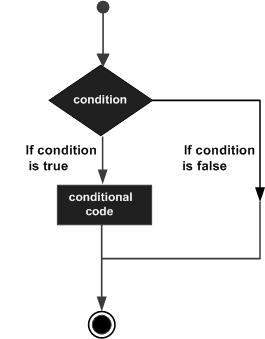
Decision Making

JavaScript supports the following forms of if...else statement −

  • if statement

  • if...else statement

  • if...else if... statement.

JavaScript if statement

The if statement is the fundamental control statement that allows JavaScript to make decisions and execute statements conditionally.

Syntax

The syntax for a basic if statement is as follows −

if (expression) {
   Statement(s) to be executed if expression is true
}

Here a JavaScript expression is evaluated. If the resulting value is true, the given statement(s) are executed. If the expression is false, then no statement would be not executed. Most of the times, you will use comparison operators while making decisions.

Example

Try the following example to understand how the if statement works.

<html>
<body>     
   <div id ='output'> </div>
   <script type = "text/javascript">
      let result;
      let age = 20;
      if( age > 18 ) {
         result = "Qualifies for driving";
      }
	  document.getElementById("output").innerHTML = result;
   </script>      
<p> Set the variable to a different value and then try... </p>
</body>
</html>

Output

Qualifies for driving
Set the variable to different value and then try...

JavaScript if...else statement

The 'if...else' statement is the next form of control statement that allows JavaScript to execute statements in a more controlled way.

Syntax

if (expression) {
   Statement(s) to be executed if expression is true
} else {
   Statement(s) to be executed if expression is false
}

Here JavaScript expression is evaluated. If the resulting value is true, the given statement(s) in the if block, are executed. If the expression is false, then the given statement(s) in the else block are executed.

Example

Try the following code to learn how to implement an if-else statement in JavaScript.

<html>
<body>
   <div id ='output'> </div>
   <script type = "text/javascript">
	  let result;
      let age = 15;
      if( age > 18 ) {
         result = "Qualifies for driving";
      } else {
         result = "Does not qualify for driving";
      }
      document.getElementById("output").innerHTML = result;
   </script>     
   <p> Set the variable to a different value and then try... </p>
</body>
</html>

Output

Does not qualify for driving
Set the variable to different value and then try...

JavaScript if...else if... statement

The if...else if... statement (also called as if...else ladder)is an advanced form of ifelse that allows JavaScript to make a correct decision out of several conditions.

Syntax

The syntax of an if-else-if statement is as follows −

if (expression 1) {
   Statement(s) to be executed if expression 1 is true
} else if (expression 2) {
   Statement(s) to be executed if expression 2 is true
} else if (expression 3) {
   Statement(s) to be executed if expression 3 is true
} else {
   Statement(s) to be executed if no expression is true
}

There is nothing special about this code. It is just a series of if statements, where each if is a part of the else clause of the previous statement. Statement(s) are executed based on the true condition, if none of the conditions is true, then the else block is executed.

Example

Try the following code to learn how to implement an if-else-if statement in JavaScript.

<html>
<body>
   <div id ="demo"></div>
   <script type="text/javascript">
	  const output = document.getElementById("demo")
      let book = "maths";
      if (book == "history") {
         output.innerHTML="<b>History Book</b>";
      } else if (book == "maths") {
         output.innerHTML="<b>Maths Book</b>";
      } else if (book == "economics") {
         output.innerHTML="<b>Economics Book</b>";
      } else {
         output.innerHTML="<b>Unknown Book</b>";
      }
    </script>
    <p> Set the variable to a different value and then try... </p>
</body>
<html>

Output

Maths Book
Set the variable to different value and then try...

Tutorix - AI Tutor
Previous Quiz Next
Advertisements
You are visitor 01402503 — GeezerVison does not store the pages you look up.
Best viewed with Netscape Navigator 4.7 or Internet Explorer 6 at 800×600. No cookies required.
