GeezerVisonThe World Wide Web, restored to 800 pixels of glory. |
| Home|About|Gaming cabinet|Archives|How it works|Starter sites |
GeezerVison is showing www.tutorialspoint.com — JavaScript - Throttling 
Selected Reading
JavaScript - ThrottlingWhat is Throttling?Throttling is a technique that limits how many times a function can be called in a specific period of time. It improves the speed and responsiveness of web sites by implementing event listeners that do heavy or expensive tasks such as animations, scrolling, resizing, getting data, etc. For example, if you have a function that collects data from an API every time the user scrolls down the page, you can throttle it so that it only makes one request per second instead of hundreds as the user scrolls. This prevents you from overloading the server or browser with unnecessary queries, hence reducing bandwidth usage. Why use Throttling in JavaScript?JavaScript Throttling can increase application performance by setting a set rate of function execution. A Throttle function generates function calls at predefined intervals, keeping the program from lagging or becoming overloaded. As a result the server will handle requests in a certain order and at a predetermined time. Implement Throttling in JavaScriptHere are the steps you can follow to create Throttling in JavaScript −
How Throttling work in JavaScript?Let us look at an example to better understand JavaScript and throttling. Consider this scenario: we have added a scroll event listener to a web page and configured it such that when the user scrolls, he sees the desired information. But if the user scrolls frequently, the web page will soon generate hundreds of events. To address this issue, we will throttle the event so that it is only triggered after a second of the previous event. This results in a single callback every second. The end user will see the same results, but they will be far more computationally efficient. Now Let us understand it with the help of the example below. In the following example, we will use the throttle mechanism to distinguish between throttling and non-throttling conditions. Without throttling FunctionWithout throttling, a function can be called too quickly, causing performance issues, excessive resource usage and a possibly unpleasant user experience. ExampleIn this example, we add an event listener to a button without throttling. Each click triggers the callback immediately and sending the message 'button is clicked' to the console with no rate limit. <!DOCTYPE html>
<html lang="en">
<head>
<meta charset="UTF-8">
<meta name="viewport"
content="width=device-width,
initial-scale=1.0">
<title>Document</title>
</head>
<body>
<button id="pressButton">Press Me</button>
<script>
// Selected button with the given id
const button = document.
querySelector("#pressButton");
// Add event listener to the button
// to listen to the click event
button.addEventListener("click", () => {
console.log("The button has been pressed");
});
</script>
</body>
</html>
Output This will produce the below result − 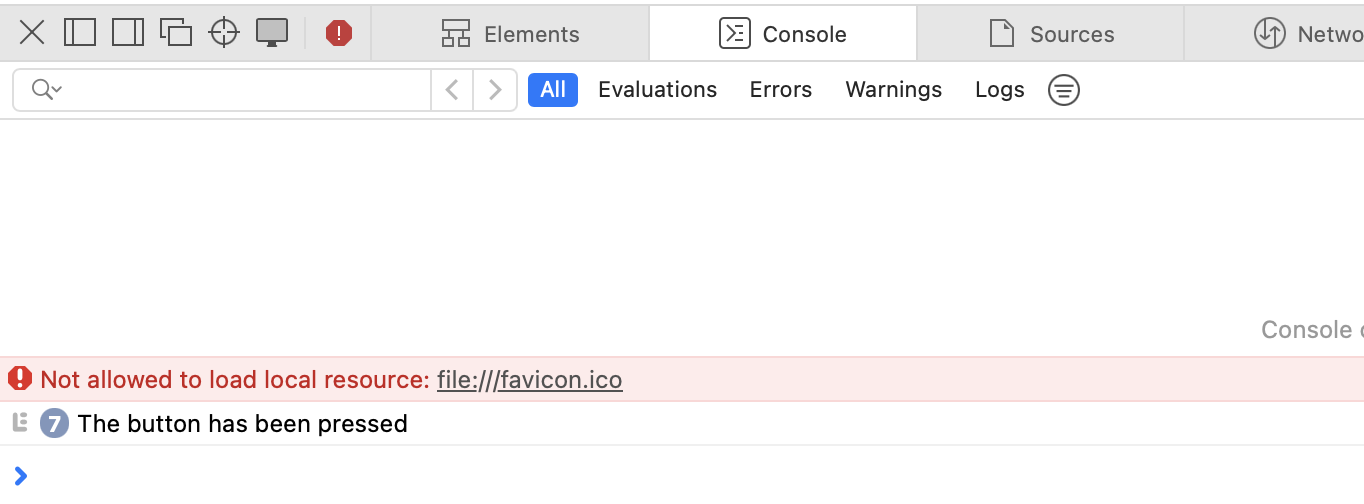
With Throttling FunctionThrottling limits the number of function invocations. For example, you could choose to execute a function at most once per 1500 milliseconds. This prevents the function from being called too frequently, which results in smoother performance. ExampleIn this example we throttle a button click event by limiting the 'Button has been pressed!' log to once per 1500 milliseconds, regardless of how quickly we click. Following is the simple demonstration with throttling function − <!DOCTYPE html>
<html lang="en">
<head>
<meta charset="UTF-8">
<meta name="viewport"
content="width=device-width,
initial-scale=1.0">
<title>Document</title>
</head>
<body>
<button id="pressButton">Press Me</button>
<script>
const button = document.querySelector("#pressButton");
// Throttling Function
const limitFunctionCall = (callback, waitTime) => {
// Previously called time of the function
let lastCalled = 0;
return (...args) => {
// Current called time of the function
let currentTime = new Date().getTime();
// Logging the difference
// between previously called and current called timings
console.log("Time difference:", currentTime - lastCalled, "Wait time:", waitTime);
// If the difference is greater than waitTime, call the function again
if (currentTime - lastCalled > waitTime) {
lastCalled = currentTime;
// Return the function
return callback(...args);
}
}
}
button.addEventListener("click",
limitFunctionCall(() => {
console.log("Button has been pressed!")
}, 1500));
</script>
</body>
</html>
Output This will generate the below result − [Log] Time difference: - 1729667433711 - "Wait time:" - 1500 (example.html, line 28) [Log] Button has been pressed! (example.html, line 41) [Log] Time difference: - 1016 - "Wait time:" - 1500 (example.html, line 28) [Log] Time difference: - 1599 - "Wait time:" - 1500 (example.html, line 28) [Log] Button has been pressed! (example.html, line 41) [Log] Time difference: - 416 - "Wait time:" - 1500 (example.html, line 28) [Log] Time difference: - 866 - "Wait time:" - 1500 (example.html, line 28) Use cases for ThrottlingA throttle function operates at a fixed rate to prevent the app from lagging or overwhelming the server when performing a time-consuming task or request. The following are some common applications for the throttle function.
SummaryJavaScript Throttling is an approach that restricts function execution to a specific number of times. It ensures that a function is executed on a consistent basis, regardless of how many times it has been invoked. 
Advertisements
|
| You are visitor 01402503 — GeezerVison does not store the pages you look up. Best viewed with Netscape Navigator 4.7 or Internet Explorer 6 at 800×600. No cookies required. |