GeezerVisonThe World Wide Web, restored to 800 pixels of glory. |
| Home|About|Gaming cabinet|Archives|How it works|Starter sites |
GeezerVison is showing codescracker.com — Operators in Java with types, lists, and examples
Operators in Java with types, lists, and examplesThe use of operators is a cornerstone of Java and programming in general. Data manipulation tasks like adding, subtracting, and comparing numbers, as well as assigning values to variables, can all be accomplished with the help of special symbols and keywords known as "operators." Learn about the various operators available in Java and how they can be used in your own code to perform various operations on data. Now is the time to dive in and study the many operators Java has to offer. Types of operators in JavaThe following is a list of Java operators organized according to the type of operation they perform.
The "bitwise" and "ternary" operators will be discussed separately in a separate post, whereas all of the other types will be discussed in this post, beginning with the "arithmetic operators," right after this paragraph. Arithmetic operators in JavaTo perform elementary arithmetic operations on numbers, Java provides a set of operators known as "arithmetic operators." Simple arithmetic operations like plus, minus, multiply, divide, and modulo (remainder) can all be performed with these operators.
For example: Java Code
public class ArithmeticOperatorsExample {
    public static void main(String[] args) {
        int num1 = 10;
        int num2 = 5;

        int sum = num1 + num2;
        System.out.println("Addition: " + sum);

        int difference = num1 - num2;
        System.out.println("Subtraction: " + difference);

        int product = num1 * num2;
        System.out.println("Multiplication: " + product);

        int quotient = num1 / num2;
        System.out.println("Division: " + quotient);

        int remainder = num1 % num2;
        System.out.println("Modulo: " + remainder);
    }
}
Output
Addition: 15
Subtraction: 5
Multiplication: 50
Division: 2
Modulo: 0
There are two more operators that fall under these categories, which are the increment (++) and decrement (--) operators. I described these two operators in a separate (next) post. Assignment operators in JavaAssignment operators in Java are used to assign a value to a variable. They allow you to perform operations on a variable's value and store the result back in the same variable.
The following statement: a += 10; is equivalent to a = a+10; Similarly, the following statement: a -= 10; is equivalent to a = a-10; and so on. The left shift, right shift, and bitwise operators are discussed in their separate posts. Comparison operators in JavaJava uses comparison operators to compare values and establish their relationship. Depending on whether the comparison is accurate or inaccurate, they return a boolean value of true or false. Java comparison operators are listed below:
For example: public class JavaProgram {
public static void main(String args[]) {
int num1 = 100, num2 = 200;
System.out.println("num1 == num2 = " + (num1 == num2));
System.out.println("num1 != num2 = " + (num1 != num2));
System.out.println("num1 > num2 = " + (num1 > num2));
System.out.println("num1 < num2 = " + (num1 < num2));
System.out.println("num2 >= num1 = " + (num2 >= num1));
System.out.println("num2 <= num1 = " + (num2 <= num1));
}
}
When the above Java program is compiled and executed, it will produce the following output: 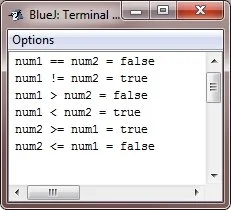
Logical operators in JavaIn Java, logical operators are used to operate on boolean values (true or false). In Java, the following three logical operators are available:
For example: Java Code
public class LogicalOperatorExample {
    public static void main(String[] args) {
        int a = 5;
        int b = 10;
        int c = 15;

        // Logical AND (&&) Operator
        if (a < b && b < c) {
            System.out.println("a < b < c");
        } else {
            System.out.println("a, b, or c is not in ascending order");
        }

        // Logical OR (||) Operator
        if (a < b || a < c) {
            System.out.println("Either a < b or a < c (or both)");
        } else {
            System.out.println("Neither a < b nor a < c");
        }

        // Logical NOT (!) Operator
        boolean isTrue = true;
        if (!isTrue) {
            System.out.println("This will not be executed");
        } else {
            System.out.println("isTrue is true");
        }
    }
}
Output
a < b < c
Either a < b or a < c (or both)
isTrue is true
instanceof operator in JavaJava's instanceof operator compares objects to classes and subclasses. It checks if an object is a class instance or a class that inherits from a class. The instanceof operator has the following syntax: object instanceof class where "object" refers to the reference variable of the object being tested and "class" refers to the class or interface being tested. The instanceof operator returns a boolean value indicating whether the object is an instance of the given class or not. For example: public class JavaProgram {
public static void main(String args[]) {
String str_name = "James";
boolean res = str_name instanceof String;
System.out.println(res);
}
}
Here is the output that the aforementioned Java program produced: 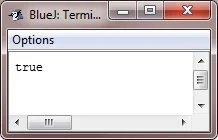
Java operator precedenceThe order in which Java evaluates expressions containing multiple operators is determined by operator precedence. The precedence of operators in Java is as follows, with operators listed from highest to lowest precedence:
Note: To override the default order of operations, use parentheses. The operators enclosed in parentheses are evaluated first. « Previous Tutorial Next Tutorial » Practice Quizzes
Test your programming and computer science knowledge with interactive MCQs and topic-based quizzes. Popular Topics
Explore the most popular programming and computer science tutorials on CodesCracker. |
| You are visitor 01402503 — GeezerVison does not store the pages you look up. Best viewed with Netscape Navigator 4.7 or Internet Explorer 6 at 800×600. No cookies required. |