GeezerVisonThe World Wide Web, restored to 800 pixels of glory. |
| Home|About|Gaming cabinet|Archives|How it works|Starter sites |
GeezerVison is showing codescracker.com — Java ternary or conditional (?:) operator
Java ternary or conditional (?:) operatorJava's ternary operator can be used to create if-else statements more quickly. Because it tests a boolean expression and returns one of two potential values depending on the outcome, it is also known as the conditional operator. Java ternary (?:) operator syntaxThe ternary operator has the following syntax: variable = (condition) ? expressionIfTrue : expressionIfFalse; If the "condition" evaluates to true, "expressionIfTrue" is assigned to variable; otherwise, "expressionIfFalse" is assigned to variable." Java ternary (?:) operator exampleConsider the following: Java program as an example demonstrating the ternary operator. Java Code
public class JavaProgram {
   public static void main(String args[]) {
      int a = 100;
      int b = 200;
      int max = (a > b) ? a : b;
      System.out.println("The maximum value is: " + max);
   }
}
Output
The maximum value is: 200 The program assigns values to two integer variables, a and b, and then compares those values using the ternary operator. The value of "a" is assigned to the variable "max" if "a" is greater than "b"; otherwise, the value of "b" is assigned to "max." The program then uses the "max" variable to print the maximum value. The same program can also be written in this way: public class JavaProgram {
public static void main(String args[]) {
int a = 100, b = 200;
System.out.println("The maximum value is: " + ((a > b) ? a : b));
}
}
The following program is another example that demonstrates the ?: operator. It uses the ternary operator to obtain the absolute value of a variable. public class JavaProgram {
public static void main(String args[]) {
int i = 10, k;
k = i < 0 ? -i : i; // get the absolute value of 'i'
System.out.println("Absolute value of " + i + " is " + k);
i = -10;
k = i < 0 ? -i : i; // get the absolute value of 'i'
System.out.println("Absolute value of " + i + " is " + k);
}
}
When the above Java program is compiled and executed, it will produce the following output: 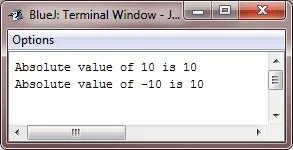
The same program can also be written using the library function in this way: public class JavaProgram {
public static void main(String[] args) {
int i = 10;
int k = Math.abs(i);
System.out.println("Absolute value of " + i + " is " + k);
i = -10;
k = Math.abs(i);
System.out.println("Absolute value of " + i + " is " + k);
}
}
Advantages of the ternary operator (?:) in Java
Disadvantages of the ternary operator (?:) in Java
« Previous Tutorial Next Tutorial » Practice Quizzes
Test your programming and computer science knowledge with interactive MCQs and topic-based quizzes. Popular Topics
Explore the most popular programming and computer science tutorials on CodesCracker. |
| You are visitor 01402503 — GeezerVison does not store the pages you look up. Best viewed with Netscape Navigator 4.7 or Internet Explorer 6 at 800×600. No cookies required. |