GeezerVisonThe World Wide Web, restored to 800 pixels of glory. | ||||||||||||||||||||||||
| Home|About|Gaming cabinet|Archives|How it works|Starter sites | ||||||||||||||||||||||||
GeezerVison is showing codescracker.com — Java Separators
Java SeparatorsUnderstanding and utilizing separators correctly are two essential components of writing Java code that is effective and readable. Different elements of a Java program are separated by separators, which are symbols or characters. Variables, statements, expressions, and method calls are examples of these components. We will examine the various separators in Java and give examples of their use to enhance the readability and functionality of Java code in this blog post. Understanding separators is a crucial part of writing high-quality code that is simple to read, understand, and maintain, whether you are a novice or seasoned Java developer. In Java, there are a few characters that are used as separators. The most commonly used separator in Java is the semicolon (;). As you have seen, it is used to terminate the statements. The separators are listed in the following table:
Java Separators ExampleThe following Java program contains some separators: class JavaProgram
{
public static void main(String args[])
{
// commas are used to separate the variable declarations
int i, j=10, k=11; // semicolon is used to indicate the end of the variable declaration statement
for(i=0; i<j; i++)
{
System.out.println("I am " + i); // semicolon is used to indicate the end of the println statement
} // curly braces are used to enclose the body of the for loop
// parentheses are used to enclose the argument passed to the println method
System.out.println(k + " is biggest here."); // period is used to access the println method of the System.out object
} // curly braces are used to enclose the body of the main method
}
i, j, and k are the three integer variables that the program declares. Initial values for the variables j and k are 10 and 11, respectively. The program then enters a for loop that runs as long as i is less than j. The for loop initializes i to 0, increments i by 1 at the end of each iteration, and prints the value of i to the console using the println method of the System.out object. After the for loop has finished, the program prints the value of k and a string "is biggest here" to the console using the println method of the System.out object. The sample output of the above Java program is shown here: 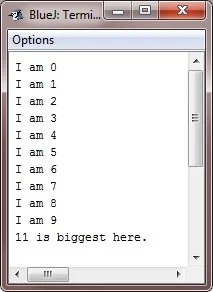
Advantages of separators in Java
Disadvantages of separators in Java
« Previous Tutorial Next Tutorial » Practice Quizzes
Test your programming and computer science knowledge with interactive MCQs and topic-based quizzes. Popular Topics
Explore the most popular programming and computer science tutorials on CodesCracker. | ||||||||||||||||||||||||
| You are visitor 01402503 — GeezerVison does not store the pages you look up. Best viewed with Netscape Navigator 4.7 or Internet Explorer 6 at 800×600. No cookies required. |