The Ulanzi Dial is a small desktop controller with a rotary knob, a push on the knob, three keys along the top and four keys on its sides. AetherSDR reads it directly on Linux, Windows and macOS: the knob tunes (or drives any other wheel action you pick) and every key can run any keyboard-shortcut action or MIDI button action, including press-and-hold transmit and CW keying.
No extra software is needed. The dial does not use the Ulanzi Studio app.
Setup
Open Settings → Radio Setup... → Serial & Controllers and look at the USB Control Surfaces group.
| Setting | Default | What it does |
|---|---|---|
| Use a Ulanzi Dial when detected | On | AetherSDR claims a connected dial and uses it. Turn it off to leave the dial's media keys to the operating system. |
The dial is detected before it is claimed, so nothing happens (and no permission prompt appears) until a dial is actually plugged in.
Upgrading from an older version: an install with no saved Ulanzi setting now claims a connected dial automatically. The built-in MOX and TUNE defaults on the two media-key pills were removed. If you used them, bind them again in the mapper (#5964).
macOS: Input Monitoring
The first time AetherSDR claims a dial, macOS asks for Input Monitoring permission. Allow it in System Settings → Privacy & Security → Input Monitoring. The prompt only appears once a dial is attached.
Linux: Grant access
On Linux the dial's input device is normally readable only by root. If AetherSDR finds a dial it cannot open, the mapper shows "… detected — needs permission" and a Grant access button. Click it and approve the administrator prompt: AetherSDR installs a udev rule (70-ulanzi-dial.rules, via pkexec) that hands the device to the logged-in user, then connects. The offer appears again if a blocked dial is plugged back in.
If pkexec is missing, install polkit, or add your user to the group that owns the input device.
Windows
Windows cannot take exclusive control of the dial, so each key press also still reaches the operating system (for example as a media key) as well as AetherSDR.
Using the mapper
Open Settings → Controllers → Ulanzi Dial Mapping... ("Ulanzi Dial — Control Mapping"). The dialog shows a picture of the dial with a drop-down "pill" on each physical control, plus:
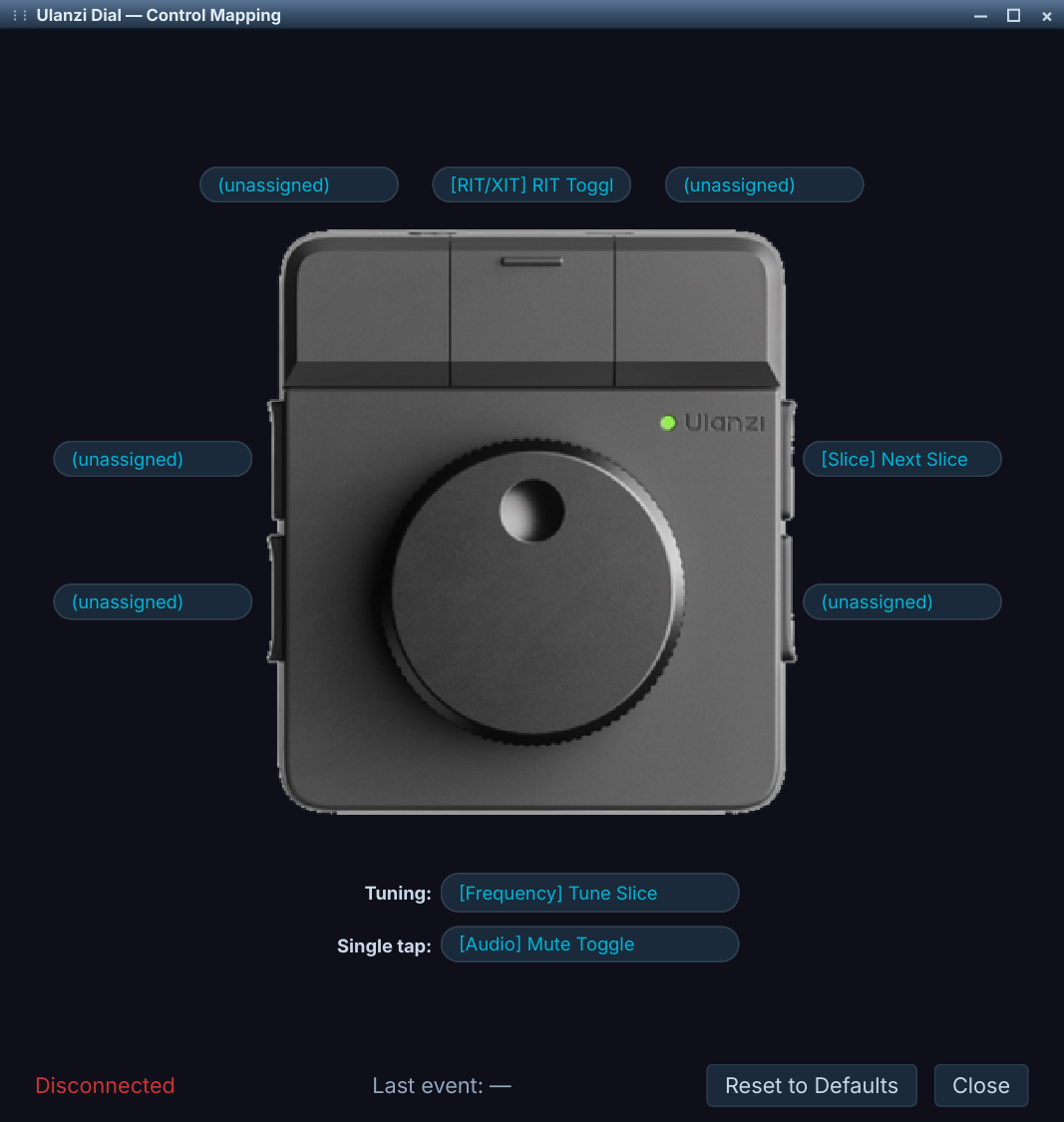
The Ulanzi Dial mapping window with no dial connected.
- a status line (Connected — …, Disconnected, or Turned off in Radio Setup → Serial & Controllers);
- a Last event readout that names the last key or rotation the dial sent and the action it ran;
- Reset to Defaults.
Close it with Close, the corner ✕, Esc or Ctrl+W (⌘W on macOS).
Mappings are saved with your settings and survive a restart; a mapping you clear stays cleared.
Keys and knob press
Each key pill, and the knob press (Single tap:), offers:
- (unassigned);
- every keyboard-shortcut action, listed as
[Category] Name: the same list as Settings → Configure Shortcuts... (see Keyboard Shortcuts); - MIDI button actions (toggles, triggers and press-and-hold "gate" actions, such as
[MIDI Global] RADE Modem), listed as[MIDI Category] Name, in builds with MIDI support.
No default keys the transmitter. MOX, TUNE, PTT and CW keying are only ever bound by you.
Press-and-hold transmit and CW keying
Keys bound to PTT (Hold), the straight key, either paddle, or a held MIDI action work press-and-hold: press to key, release to un-key. Releases are honored even when two keys are held together or arrive out of order, and if the dial is unplugged while it is holding the transmitter, everything it was holding is released immediately (#4611).
Reference
Knob rotation ("Tuning:")
| Option | What the knob does |
|---|---|
| [Frequency] Tune Slice | Tunes the active slice (default) |
| [Filter] Filter Bandwidth | Steps the filter width; a faster turn moves further |
| [Audio] Slice Audio Volume | Active slice's audio level |
| [Audio] Master Volume | The level you are hearing: this computer's audio with PC Audio on, the radio's line out with it off |
| [Audio] Headphone Volume | Headphone level |
| [Display] Panadapter Zoom | Zooms the panadapter (1.25× per detent) |
| [Display] Band Zoom | Band zoom |
| [Display] Segment Zoom | Segment zoom |
| [RIT/XIT] RIT | RIT offset |
| [RIT/XIT] XIT | XIT offset |
| [AGC] AGC-T (Threshold) | AGC threshold |
| [AGC] RF Gain | RF gain |
| [DSP] APF (Audio Peaking Filter) | APF level |
| [CW] CW Speed | Keyer speed |
| [TX] RF Power | RF power |
Zoom and other actions the connected radio cannot perform are refused rather than sent.
Default key actions
| Control | Default action |
|---|---|
| Top Left | (unassigned) |
| Top Middle | RIT Toggle |
| Top Right | (unassigned) |
| Left Top / Left Bottom | (unassigned) |
| Right Top | Next Slice |
| Right Bottom | (unassigned) |
| Dial Press | Mute Toggle |
Known issues
- On macOS, a dial without the Input Monitoring permission shows only Disconnected, with no hint that permission is missing (#5247).
- A Bluetooth-paired Ulanzi D100H stays Disconnected on Windows (#3485).
Troubleshooting
The dial does nothing
The dial is turned off in Radio Setup, or AetherSDR has not claimed it.
- Check that Use a Ulanzi Dial when detected is ticked in Settings → Radio Setup... → Serial & Controllers.
- Open Settings → Controllers → Ulanzi Dial Mapping... and turn the knob: the Last event line should change.
- Turn on the Ext Devices log category (see Support and Logging) to see dial detection and connection events.
Linux: the mapper says "needs permission"
Your user cannot open the dial's input device.
- Click Grant access in the mapper.
- Approve the administrator prompt.
- If
pkexecis missing, install polkit, or add your user to the group that owns the input device.
macOS: the dial does not respond
AetherSDR does not have the Input Monitoring permission. macOS applies a new grant only after AetherSDR quits.
- Open System Settings → Privacy & Security → Input Monitoring and allow AetherSDR.
- Quit and reopen AetherSDR.
macOS: the trackpad or keyboard misbehaves
An older release grabbed other input devices as well as the dial (#5147). Current releases claim only the dial.
- Update to a current release.
See also
- USB Control Surfaces: RC-28, PowerMate, Contour Shuttle, Stream Deck+ and serial keying interfaces
- FlexControl Tuning Knob
- MIDI Controller Mapping
- Keyboard Shortcuts