AetherSDR works with hardware knobs, jog wheels, button decks and keying interfaces connected to the computer. Most of them are set up on one Radio Setup page, Settings → Radio Setup... → Serial & Controllers, which you can also reach from Settings → Controllers → FlexControl Knob & Buttons....
These are host devices: they plug into your computer, not the radio, so the page and its controllers stay available on every radio family. Actions the connected radio cannot perform (for example band zoom on some radios) are refused with a notice rather than sent.
Requirements
- A build with Qt serial-port support: the Serial & Controllers page is only present in those builds.
- For the RC-28, PowerMate, Contour Shuttle, TMate 2 and Stream Deck+: a build with HID support (hidapi).
Tested devices
| Device | Connection | Where it is set up |
|---|---|---|
| FlexRadio FlexControl | USB serial | FlexControl Tuning Knob |
| Icom RC-28 remote encoder | USB HID | Settings → Controllers → Icom RC-28 Remote Encoder... |
| Griffin PowerMate | USB HID | Serial & Controllers → HID encoder groups |
| Contour ShuttleXpress / ShuttlePro v2 | USB HID | Serial & Controllers → HID encoder groups |
| ELAD / WoodBoxRadio TMate 2 | USB HID | Serial & Controllers → TMate 2 groups |
| Elgato Stream Deck+ | USB HID | StreamDeck |
| Ulanzi Dial | USB input device | Ulanzi Dial |
| MIDI controllers | USB MIDI | MIDI Controller Mapping |
| USB-serial PTT/CW interfaces (foot switches, straight keys, paddles, amplifier keying, sequencers) | USB serial | Serial & Controllers → Port Configuration / Pin Assignment |
Other Stream Deck models and other control-surface software can drive AetherSDR through the TCI Server or the Automation Bridge and MCP.
Setup
The USB Control Surfaces group at the top of Serial & Controllers has the switches:
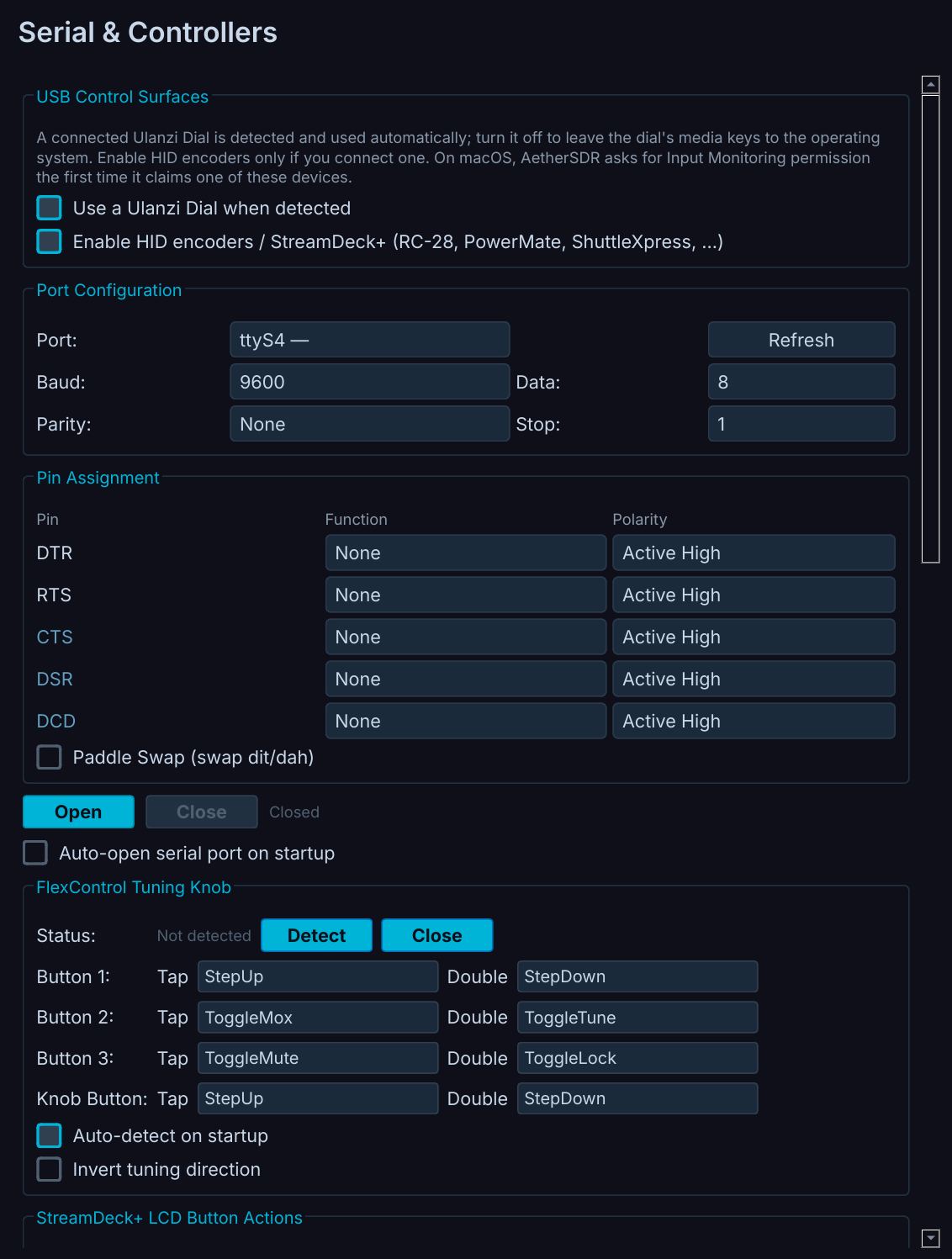
Radio Setup, Serial & Controllers page: USB control surfaces, the serial port and the FlexControl knob.
| Setting | Default | Notes |
|---|---|---|
| Use a Ulanzi Dial when detected | On | See Ulanzi Dial. |
| Enable HID encoders / StreamDeck+ (RC-28, PowerMate, ShuttleXpress, …) | Off | Turns on the RC-28, PowerMate, Contour Shuttle, TMate 2 and Stream Deck+. Only present in builds with HID support (hidapi). |
HID encoders are off by default because, on macOS, the first time AetherSDR opens one the system asks for Input Monitoring permission. Leaving the switch off means that prompt never appears unless you own one of these devices. Allow it in System Settings → Privacy & Security → Input Monitoring.
Linux permissions
On Linux, HID devices are root-only until a udev rule grants access. AetherSDR ships one in the source tree at packaging/linux/60-hid-encoders.rules (RC-28, PowerMate, ShuttleXpress, ShuttlePro v2, Stream Deck+ and TMate 2):
sudo cp 60-hid-encoders.rules /etc/udev/rules.d/
sudo udevadm control --reload-rules && sudo udevadm trigger
Then unplug and replug the device.
The rule deliberately leaves out the aether-pad RC-28 emulator: it uses the Arduino Giga R1's stock USB identity, so a shipped rule would open every Giga on the machine. Add your own rule for it.
Using encoder and button actions
Below the FlexControl group, Serial & Controllers has three groups shared by the HID devices:
- HID Encoder / StreamDeck+ Encoders: what each dial does when turned. Single-encoder devices (RC-28, PowerMate, ShuttleXpress) use Encoder 1 only.
- StreamDeck+ Encoder Push Actions: what each dial does when pressed.
- StreamDeck+ LCD Button Actions: actions for Key 1–8.
The full action lists are under Reference.
Using the Icom RC-28
The RC-28 is a weighted tuning knob with F1, F2 and a TX bar. A community Arduino emulator (aether-pad) that speaks the same protocol is also recognized.
- Tick Enable HID encoders / StreamDeck+ (see Setup).
- Open Settings → Controllers → Icom RC-28 Remote Encoder... ("Icom RC-28 Button Mapping").
The window reopens where you left it (centered on the main window the first time), and you can resize it by dragging any edge. Close it with the corner ✕, Close, Esc or Ctrl+W (⌘W on macOS). Changes take effect as you make them. It has:
| Group | Controls |
|---|---|
| Device | Connection status, VID:PID, path, serial and firmware |
| Transmit (PTT) Button | Momentary (hold to transmit, release to stop) or Latched (press to start, press again to stop) |
| Button Assignments | F1/F2 — short press and F1/F2 — long press |
| Encoder | Invert encoder direction; Auto-snap to nearest 1 kHz after rotation stops; Pulses per step (1–10, higher is less sensitive) |
| Activity | A log of recent button and encoder events |
Defaults: F1 short = Step Up, F1 long = Fast Tuning; F2 short = Step Down, F2 long = Mode.
- Short-press actions: AGC, APF, Band, Band Zoom, Mode, Next/Previous Slice, Segment Zoom, Snap to Nearest 100 Hz / 500 Hz / 1 kHz / 100 kHz / 500 kHz, Step Up/Down, Volume Up/Down (±5).
- Long-press actions: Fine Tuning, Fast Tuning, Mode, Mute, RIT, Slice Lock, XIT.
Tuning speed follows how fast you turn the knob. Auto-snap rounds to the nearest 1 kHz about 600 ms after the knob stops. The TX bar is always PTT, and the RC-28's TX LED follows the real transmit state.
Using the Griffin PowerMate and Contour Shuttle
The PowerMate (one knob with a push) and the Contour ShuttleXpress (5 buttons) and ShuttlePro v2 (15 buttons) work as single-encoder devices. Enable HID encoders, then choose the knob or jog wheel's action as Encoder 1. Their buttons are numbered from 1 and use the Key 1–8 slots in StreamDeck+ LCD Button Actions; the PowerMate's push is Key 1.
Contour reports can contain several button changes together. Every press and release is handled, and turning the jog wheel while pressing a button still tunes normally.
On ShuttlePro v2, buttons 1–8 use Key 1–8, buttons 9–12 use StreamDeck+ Encoder Push Actions, and buttons 13–15 have no action mapping.
Contour shuttle ring
The spring-loaded outer ring tunes continuously while held. A small deflection tunes slowly; full deflection sweeps at about 100 kHz/s at Normal speed. Releasing the ring stops tuning. A new deflection applies its first step after about 60 ms; larger tuning steps have a minimum step rate so the inner positions remain usable.
Set it up under Settings → Radio Setup... → Serial & Controllers → Shuttle Ring (ShuttleXpress / ShuttlePro):
| Setting | Choices | Default |
|---|---|---|
| Action | Tune Slice, RIT (Receive Incremental Tuning), XIT (Transmit Incremental Tuning), None | Tune Slice |
| Speed | Slow (×0.5), Normal, Fast (×2) | Normal |
The ring uses the same direction setting as the jog wheel. Tune Slice respects the active slice's Tune Lock. RIT and XIT move in 10 Hz increments, capped at 1 kHz/s and ±9999 Hz. Unplugging the controller stops ring tuning. The ring does not trigger auto-snap on release.
Using the TMate 2
The TMate 2 (three encoders, six function keys and an LCD) has its own groups on the same page: TMate 2 Key Actions (F1–F6), TMate 2 Encoder Actions, TMate 2 Encoder Push Actions and TMate 2 Display. Its LCD shows the frequency, mode, S-meter and transmit state.
Using serial PTT, CW keys, paddles and foot switches
A USB-serial adapter can carry PTT and CW in both directions using its handshake pins. Set it up under Settings → Radio Setup... → Serial & Controllers:
Port Configuration: Port (with a custom Path: option), Baud, Data, Parity and Stop, plus Open/Close.
Pin Assignment:
| Pin | Direction | Functions |
|---|---|---|
| DTR, RTS | Output from AetherSDR | None, PTT, CW Key, CW PTT: for keying an amplifier, sequencer or interface |
| CTS, DSR, DCD | Input to AetherSDR | None, PTT Input, CW Key Input, CW Dit Input, CW Dah Input: for a foot switch, straight key or paddles |
Every pin has a Polarity (Active High / Active Low). Paddle Swap (swap dit/dah) reverses the paddles, and Auto-open serial port on startup reopens the port at launch.
An input that is already active when the port opens does not key: a foot switch held down, a stuck key or a paddle resting on a contact must be released and pressed again before it transmits.
The DCD input suits interfaces such as the HaliKey Serial, whose ring contact is wired to DSR and DCD. Iambic Mode B keeps its trailing element when both paddles are released together.
Reference
Encoder actions
| Encoder action | What the dial does |
|---|---|
| Tune Slice | Tunes the active slice (Encoder 1 default) |
| RIT / XIT | RIT or XIT offset (Encoder 2 / 3 defaults) |
| Master Volume | The level you are hearing: this computer's audio with PC Audio on, the radio's line out with it off (Encoder 4 default) |
| Slice Audio Volume | Active slice's audio level |
| Headphone Volume | Headphone level |
| AGC Threshold | AGC-T |
| APF Level | APF level |
| CW Speed | Keyer speed |
| RF Power | RF power |
| None | Nothing |
Push and key actions
Push actions: Cycle Tuning Step, Toggle RIT on/off, Toggle XIT on/off, Toggle TX (MOX), Toggle Mute, Lock Slice, None.
Key actions: Toggle TX (MOX), Toggle Tune, Toggle RIT/XIT on/off, Clear RIT/XIT offset, Step Size Up/Down, Toggle Mute, Toggle Slice Lock, Toggle APF, Cycle AGC Mode, Toggle Band Zoom, Toggle Segment Zoom, Next/Previous Slice, Volume Up/Down (±5), Toggle Split, Monitor TX Frequency.
Volume Up/Down, here and on the RC-28, step the same level as the Master Volume encoder action.
Known issues
- After an upgrade, a Griffin PowerMate can stop working until Enable HID encoders / StreamDeck+ is ticked (#3357).
- A USB-serial PTT switch can stop working after a while until the port is closed and opened again (#5124).
Troubleshooting
An RC-28, PowerMate, Shuttle or Stream Deck+ does nothing
HID encoders are off by default.
- Open Settings → Radio Setup... → Serial & Controllers.
- Tick Enable HID encoders / StreamDeck+ (RC-28, PowerMate, ShuttleXpress, …). If the checkbox is missing, the build has no HID support.
- Turn on the Ext Devices log category (see Support and Logging) to see HID connection events.
Linux: a HID device is not found
HID devices are root-only until a udev rule grants access.
- Install
packaging/linux/60-hid-encoders.rulesas shown under Linux permissions. - Unplug and replug the device.
macOS: a HID device does not respond
AetherSDR does not have the Input Monitoring permission.
- Open System Settings → Privacy & Security → Input Monitoring and allow AetherSDR.
The Serial & Controllers page is missing
The build was made without Qt serial-port support. Use a build that includes it.
See also
- FlexControl Tuning Knob
- Ulanzi Dial
- StreamDeck
- MIDI Controller Mapping
- Keyboard Shortcuts: the same actions from the keyboard
- CWX Panel: CW keyer and macros