GeezerVisonThe World Wide Web, restored to 800 pixels of glory. |
| Home|About|Gaming cabinet|Archives|How it works|Starter sites |
GeezerVison is showing docs.voltdb.com — Chapter 8. Creating Custom Importers, Exporters, and Formatters Guide to Performance and CustomizationChapter 8. Creating Custom Importers, Exporters, and FormattersVoltDB includes built-in export and import connectors for a number of standard formats, such as CSV files, JDBC, Kafka topics, and so on. If you have a data source or destination not currently covered by connectors provided by VoltDB, you could write a custom application to perform the translation. However, you would then need to manually coordinate the starting and stopping of your application with the starting and stopping of the database. A better approach is to create a custom import or export connector. Custom connectors run within the VoltDB process and use the standard mechanisms in VoltDB for synchronizing the running of the connector with the database itself. You write custom connectors as Java classes, packaged in a JAR file, which VoltDB can access at runtime. This chapter provides instructions and sample code for writing, installing, and configuring custom export and import connectors. It also describes how to write custom formatters that can be used to interpret the input coming from an import connector. 8.1. Writing a Custom ExporterWarningNote that the VoltDB export subsystem has been extensively enhanced and improved and the original custom export interface is now deprecated, since it no longer supports all the necessary features. The following sections describe the latest custom interface (introduced in VoltDB V8), which uses the same method names, but uses different signatures. To use the new, supported interface, the onBlockStart(), onBlockCompletion(), and processRow() methods must accept a single exportRow object, as described in the following sections. The older, deprecated interface where the methods accept no arguments, or in the case of processRow(), two arguments, will no longer be supported after the next major release. An export connector, known internally as an ExportClient, is a Java class that receives blocks of row data when data is inserted into a stream within the database. The export connector is responsible for formatting and passing those rows to the downstream export target. The following sections describe: 8.1.1. The Structure and Workflow of the Export ClientThe custom export client is declared as a Java subclass extending ExportClientBase. Within the subclass you can override the configure() method, which receives any properties defined in the export connection configuration. The subclass must also declare the constructExportDecoder() method, which in turn generates a subclass of ExportDecoderBase. This extension of ExportDecoderBase is the class that does the actual work at run time and must override the primary methods sourceNoLongerAdvertised(), onBlockStart(), processRow(), and onBlockCompletion. Figure 8.1, “Structure of the Custom Export Class” illustrates the structure of the custom client. Figure 8.1. Structure of the Custom Export Class 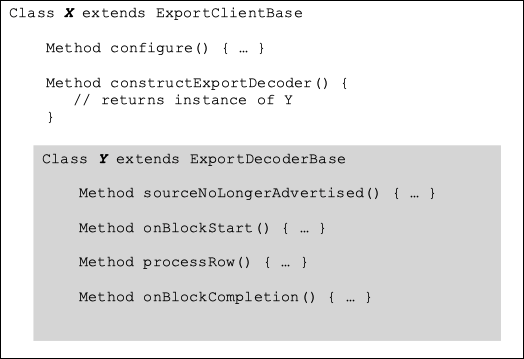 At run time, VoltDB passes data to the export client in blocks that are roughly 2MB in size but do not align with transactions. A block is guaranteed to contain complete rows — that is, no single SQL INSERT to an export stream is split across blocks. The handoff from the internal VoltDB producer to the custom export client follows a simple pattern: producer -> client.onBlockStart
foreach row in block:
producer -> client.processRow
producer -> client.onBlockCompletionEach time the pattern executes, it runs within a single thread. Therefore, it is not necessary to synchronize accesses to the data structures used in client.onBlockStart, client.processRow, and client.onBlockCompletion unless they are used in other threads as well. For each row of data, the processRow() method is called. The object passed in as an argument contains a full description of the row, including the column names, types, and values, which your client code can iterate over. For example: public boolean processRow(ExportRow row)
throws RestartBlockException {
for (int i =0; i < row.values.length; i++) {
String column_name = row.names.get(i);
Object column_value = row.values[i];
// do work . . .
}Note that each row starts with six columns of metadata, including the transaction ID and timestamp. If you do not need this information, you can skip the first six columns. Also, within each block of export data, the schema is constant. However, it is possible for the schema to change between blocks (if a schema change is applied to the database while export is active). The custom client can evaluate the ExportRow object passed into the onBlockStart() or processRow() method to recognize any changes to the schema and configure the downstream system as necessary to accept the new data. As a rule, the custom client must balance the requirements to execute and return control quickly, so as not to block other export threads (since connectors share a limited thread pool), against the need to ensure that the individual rows are accepted and acknowledged by the downstream system before onBlockCompletion() returns. If the client fails at onBlockStart, processRow or onBlockCompletion, the export client must throw a RestartBlockException to prevent VoltDB from acknowledging (ACKing) and dropping the export data from its durability control. This point deserves repeating: if the custom ExportClient runs onBlockStart, processRow and onBlockCompletion without throwing the correct exception, VoltDB assumes the data is remotely durable and that the VoltDB database can discard that export block. The ExportClient must not return from onBlockCompletion until it ensures the downstream target acknowledges receipt of the data. 8.1.2. How to Use Custom Properties to Configure the ClientProperties, set in the deployment file as part of the export configuration, let you pass information to the export connector. For example, if the user needs to pass the export connector a file location or IP address for the export target. What properties are necessary or supported is up to you as the author of the export client to decide. The properties specified in the deployment file are passed to the export client as a Properties object argument to the configure() method every time the connector starts. That is, whenever the database starts with the connector enabled or whenever the schema or deployment is modified (for example, by a voltadmin update command). The configure() method can either iterate over the Properties object or it can look for specific entries as needed. For example: public void configure(Properties config) throws Exception {
// Check for specific property value
if config.containsKey("filename") {
filename = config.getProperty("filename");
}
}8.1.3. How to Compile and Install the ClientOnce your export client code is complete, you need to compile, package, and install the connector on the appropriate VoltDB servers. You compile the export client like other Java methods. Be sure to include the VoltDB server jar file in the classpath. For example, if VoltDB is installed in a directory called voltdb in your home directory, the command could be: $ javac -cp "$HOME/voltdb/voltdb/*:./" -d obj \ org.voltdb.exportclient/MyExportClient.java After compiling the source code, you must package the resulting class into a JAR file, like so: $ jar cvf myexportclient.jar -C obj . Finally you must install the JAR file in the lib/extension folder where VoltDB is installed on all servers in the cluster that will be running the export client. For, example, if you are running a single node cluster on the current node, where VoltDB has been installed as $HOME/voltdb, you can copy the JAR file with the following command: $ cp myexportclient.jar $HOME/voltdb/lib/extension/ 8.1.4. How to Configure the Export ClientOnce your custom export client is installed you can configure and start it. Custom export clients are configured
like any other export connector, by adding a deployment:
export:
configurations:
- enabled: true
target: myspecial
type: custom
exportconnectorclass: org.voltdb.exportclient.MyExportClient
properties:
- name: filename
value: exportfile.txtAny properties listed in the |
| You are visitor 01402775 — GeezerVison does not store the pages you look up. Best viewed with Netscape Navigator 4.7 or Internet Explorer 6 at 800×600. No cookies required. |