GV

GeezerVison

The World Wide Web, restored to 800 pixels of glory.

Home|About|Gaming cabinet|Archives|How it works|Starter sites

On this site

  • Documentation
  • Privacy Statement
  • License Agreement
  • Contact Us

This view

  • Original page
  • New address

GeezerVison is showing docs.voltdb.com — 10.2. Defining the Compound Procedure

  • Volt Active Data
  • Developer Hub
  • Books
    • VoltDB Tutorial
    • Using VoltDB
    • VoltDB Guide to Performance and Customization
    • VoltDB Administrator's Guide
    • Volt Kubernetes Administrator's Guide
    • VoltDB Quick Reference
  • VoltDB V16
    • VoltDB V16
    • VoltDB V15.3 LTS
    • VoltDB V14.3 LTS
    • VoltDB V13.3 LTS
    • VoltDB V12.3 LTS
    • VoltDB V11.4
    • VoltDB V10.2
    • VoltDB V9.3
10.2. Defining the Compound Procedure

Guide to Performance and Customization

  • Preface▶
    • 1. Organization of this Manual
    • 2. Other Resources
  • 1. Introduction▶
    • 1.1. What Affects Performance?
    • 1.2. How to Use This Book
  • 2. Hello, World! Revisited▶
    • 2.1. Optimizing your Application for VoltDB
    • 2.2. Applying Hello World to a Practical Problem
    • 2.3. Partitioned vs. Replicated Tables
      • 2.3.1. Defining the Partitioning Column
      • 2.3.2. Creating the Stored Procedures
    • 2.4. Using Asynchronous Stored Procedure Calls
      • 2.4.1. Understanding Asynchronous Programming
      • 2.4.2. The Callback Procedure
      • 2.4.3. Making an Asynchronous Procedure Call
    • 2.5. Connecting to all Servers
    • 2.6. Putting it All Together
    • 2.7. Next Steps
  • 3. Understanding VoltDB Execution Plans▶
    • 3.1. How VoltDB Selects Execution Plans for Individual SQL Statements
    • 3.2. Understanding VoltDB Execution Plans
    • 3.3. Reading the Execution Plan and Optimizing Your SQL Statements
      • 3.3.1. Evaluating the Use of Indexes
      • 3.3.2. Evaluating the Table Order for Joins
  • 4. Using Indexes Effectively▶
    • 4.1. Basic Principles for Effective Indexing
    • 4.2. Defining Indexes
    • 4.3. The Goals for Effective Indexing
    • 4.4. How Indexes Work
    • 4.5. Summary
  • 5. Client2, A Modern Java Client Programming Interface (API)▶
    • 5.1. Configuring the Client
    • 5.2. Connecting to the Database
    • 5.3. Calling Procedures
      • 5.3.1. Handling Backpressure
      • 5.3.2. Handling Request Timeouts
      • 5.3.3. Defining Options on a Per-Call Basis
  • 6. Creating Flexible Schemas With JSON▶
    • 6.1. Using JSON Data Structures as VoltDB Content
    • 6.2. Querying JSON Data
    • 6.3. Updating JSON Data
    • 6.4. Indexing JSON Fields
    • 6.5. Summary: Using JSON in VoltDB
  • 7. Creating Geospatial Applications▶
    • 7.1. The Geospatial Datatypes
      • 7.1.1. The GEOGRAPHY_POINT Datatype
      • 7.1.2. The GEOGRAPHY Datatype
      • 7.1.3. Sizing GEOGRAPHY Columns
      • 7.1.4. How Geospatial Values are Interpreted
    • 7.2. Entering Geospatial Data
    • 7.3. Working With Geospatial Data
      • 7.3.1. Working With Locations
      • 7.3.2. Working With Regions
  • 8. Creating Custom Importers, Exporters, and Formatters▶
    • 8.1. Writing a Custom Exporter
      • 8.1.1. The Structure and Workflow of the Export Client
      • 8.1.2. How to Use Custom Properties to Configure the Client
      • 8.1.3. How to Compile and Install the Client
      • 8.1.4. How to Configure the Export Client
    • 8.2. Writing a Custom Importer
      • 8.2.1. Designing and Coding a Custom Importer
      • 8.2.2. Packaging and Installing a Custom Importer
      • 8.2.3. Configuring and Running a Custom Importer
    • 8.3. Writing a Custom Formatter
      • 8.3.1. The Structure of the Custom Formatter
      • 8.3.2. Compiling and Packaging Custom Formatter Bundles
      • 8.3.3. Installing and Invoking Custom Formatters
      • 8.3.4. Using Custom Formatters With the kafkaloader Utility
  • 9. Creating Custom Tasks▶
    • 9.1. Overview of How Custom Tasks Work
    • 9.2. Modifying the Procedure Call and Arguments
      • 9.2.1. Designing a Java Class That Implements ActionGenerator
      • 9.2.2. Compiling and Loading the Class into VoltDB
      • 9.2.3. Declaring the Task
    • 9.3. Modifying the Interval Between Invocations
      • 9.3.1. Designing a Java Class That Implements IntervalGenerator
      • 9.3.2. Compiling and Loading the Class into VoltDB
      • 9.3.3. Declaring the Task
    • 9.4. Modifying Both the Procedure and Interval
      • 9.4.1. Designing a Java Class That Implements ActionScheduler
      • 9.4.2. Compiling and Loading the Class into VoltDB
      • 9.4.3. Declaring the Task
  • 10. Using Compound Procedures▶
    • 10.1. How Compound Procedures Work
    • 10.2. Defining the Compound Procedure
    • 10.3. Compiling and Loading the Compound Procedure
    • 10.4. Declaring the Compound Procedure
    • 10.5. Invoking the Compound Procedure
    • 10.6. Handling Errors
    • 10.7. Managing Compound Procedures and System Resources
  • 11. Understanding Memory Usage▶
    • 11.1. How the Database Uses Memory
    • 11.2. Actions that Impact Memory Usage
    • 11.3. How the Database Manages Memory
    • 11.4. How Memory is Allocated and Deallocated
    • 11.5. Controlling How Memory is Allocated and Used
      • 11.5.1. Managing the Java Heap
      • 11.5.2. Controlling the Compaction Process for Table Data
    • 11.6. Understanding Memory Usage for Specific Applications
  • 12. Managing Time▶
    • 12.1. The Importance of Time
    • 12.2. Using NTP to Manage Time
      • 12.2.1. Basic Configuration
      • 12.2.2. Troubleshooting Issues with Time
      • 12.2.3. Correcting Common Problems with Time
      • 12.2.4. Example NTP Configuration
    • 12.3. Configuring NTP in a Hosted, Virtual, or Cloud Environment
      • 12.3.1. Considerations for Hosted Environments
      • 12.3.2. Considerations for Virtual and Cloud Environments

10.2. Defining the Compound Procedure

Compound procedures are defined as Java classes that extend the class VoltCompoundProcedure. Within the run method of the class, you define stages, which will be executed sequentially — each stage having access to the results of any transactional procedures invoked in the previous stage:

public static class MyCompoundProc extends VoltCompoundProcedure {
 
    public long run() {
        newStageList(this::myFirstStage)
                  .then(this::MySecondStage)
                  .then(this::MyLastStage)
                  .build();

Within each stage you can queue one or more transactional stored procedures, using the queueProcedureCall() method. Once the stage executes, the queued procedures are submitted to the appropriate partitions for execution. All procedures are initiated asynchronously and in parallel. Once all of the queued procedures complete, the next stage is executed, receiving the results from the stored procedures, in the order that the queueProcedureCall() methods were invoked, as an argument.

Any parameters to the compound procedure are received as arguments to the run method. Then each stage receives an array of ClientResponse objects, matching the number and order of the procedures queued in the previous stage. So if the first stage queues two procedures, the second stage will receive a two element array with the first element being the client response from the first procedure and second element being the client response of the second procedure.

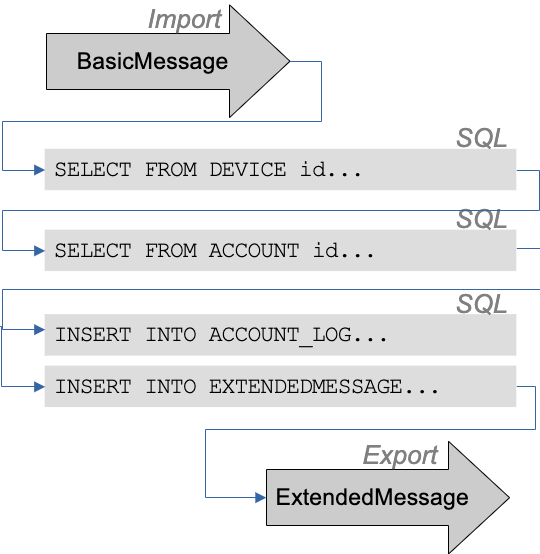
Let's look at an example. Say an application processes messages from IoT devices. The system needs to look up the device by its ID to verify it exists and identify the account associated with it, then look up the account information, and finally record the activity to the account log and pass on the enhanced message information to a new stream (via export to Kafka, for example). Figure 10.1, “Business Logic for Processing Device Messages” shows the business logic the application must support.

Figure 10.1. Business Logic for Processing Device Messages

Business Logic for Processing Device Messages

This process can easily be written as a compound procedure with three stages, plus a fourth to complete the procedure:

  1. deviceLookup — Use the ID in the input to look up the device record

  2. accountLookup — Based on the response from stage 1, look up the account associated with the device. If there is no response (that is, no record for the device), stop the procedure with the abortProcedure method.

  3. extendMessage — Use the account information to create an extended message record, which is then inserted into the account log table, which is defined to export to the appropriate Kafka stream.

  4. finish — Complete the procedure, reporting either success or failure.

The following example shows Java code that implements the compound procedure described above. Note the use of class variables to save state across the stages (in this case, the original input fields plus the device and account information necessary in the last stage).

package devices;

import org.voltdb.VoltCompoundProcedure;
import org.voltdb.VoltTable;
import org.voltdb.VoltType;
import org.voltdb.client.ClientResponse;

public class ProcessMessage extends VoltCompoundProcedure {

    private long deviceID, accountID;
    private String deviceName, accountName, message;
    
    public long run(long id, String messagetext) {                   1
    
        this.deviceID = id;
        this.message = messagetext;

        newStageList(this::deviceLookup)                             2
            .then(this::accountLookup)
            .then(this::extendMessage)
            .then(this::finish)
            .build();

        return 0;
    }

    // stage 1 
    private void deviceLookup(ClientResponse[] none) {
        queueProcedureCall("DEVICE.select", deviceID);
    }

    // stage 2
    private void accountLookup(ClientResponse[] resp) {
        VoltTable deviceRec = resp[0].getResults()[0];
        
        if (deviceRec == null) { // Verify device exists
            abortProcedure("No such device. " + deviceID);           3
            return;
        }
        deviceRec.advanceRow();
        deviceName = deviceRec.getString("name");
        accountID = deviceRec.getLong("account");

        queueProcedureCall("ACCOUNT.select", accountID);
    }

    // stage 3 
    private void extendMessage(ClientResponse[] resp) {
        VoltTable accountRec = resp[0].getResults()[0];
        accountRec.advanceRow();
        accountName = accountRec.getString("name");

        // Queue the extrened record to insert into                   4
        // the account log, which exports to the Kafka stream
        queueProcedureCall("ACCOUNT_LOG.insert", 
                           accountID,deviceID,message);
    }

    // stage 4 
    private void finish(ClientResponse[] resp) {
        Long results = 1L;
        completeProcedure(results);                                   5                             
    }


}

Some important points to note about this example:

1

The compound procedure receives any input parameters as arguments to the run method.

2

You define the order for the stages in the run method. The stages are processed sequentially, with each stage receiving the results of any procedures queued in the preceding stage.

3

You can interrupt the compound procedure at any point by calling abortProcedure to cancel the procedure and return a text message to the calling application (if there is one).

4

You can queue more than one procedure call. However, they are not initiated until the current stage completes. Once the stage completes, all procedures are initiated at the same time (not sequentially). It is also important to note that the procedures are called asynchronously, to avoid blocking threads while waiting for a response. So there is no guarantee as to the order in which the transactions queued in a single stage are executed. The only way to ensure two procedures are processed sequentially is to queue them in separate stages.

5

Finally, you must explicitly complete the compound procedure, either by calling completeProcedure to report success or calling abortProcedure to report failure. If neither is called before the compound procedure ends, VoltDB returns the status UNEXPECTED_FAILURE.

You are visitor 01402775 — GeezerVison does not store the pages you look up.
Best viewed with Netscape Navigator 4.7 or Internet Explorer 6 at 800×600. No cookies required.