GeezerVisonThe World Wide Web, restored to 800 pixels of glory. |
| Home|About|Gaming cabinet|Archives|How it works|Starter sites |
GeezerVison is showing happycoding.io — Calling JavaScript Calling JavaScript
Previous:
Next:
Calling JavaScriptIf you’re following these tutorials in order, then at this point you should be familiar with creating a webpage using HTML and CSS. HTML is a markup language, which lets you specify the content of a webpage. CSS is a style sheet language, which lets you style that content. But HTML and CSS don’t contain any logic! You can create a button in HTML, and you can style it in CSS, but you can’t tell the browser to display a message when that button is clicked. This is where JavaScript comes into play. JavaScript is a programming language that runs in the browser and lets you create interactive webpages. Running JavaScriptLet’s start with an example
Code Editor
?
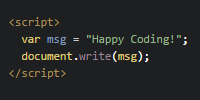
See the Pen by Happy Coding (@KevinWorkman) on CodePen. This HTML creates a webpage that contains a single To add JavaScript to this webpage, add a
Code Editor
?
See the Pen by Happy Coding (@KevinWorkman) on CodePen. When the browser loads the webpage, it reads the Calling FunctionsIn JavaScript (and most other languages), one of the tools you’ll use most often is the ability to call a function. What’s a function?Writing code is a little bit like writing a recipe. Similar to how a recipe is a set of steps that another person follows, a program is a set of steps that the computer follows. A single step of a recipe might be something like “preheat the oven to 350 degrees” or “add 2 cups of flour”, and you might write each step on its own line. The other person then follows those steps in order, one after the other, to bake a cake. This is similar to how a computer program works. A program is a set of instructions that tells the computer to follow a series of steps. Each step is written on its own line, and the computer follows the instructions one at a time. A function is one of those steps. Calling a function is giving the computer a single instruction that tells it to do one thing. How do I call a function?To call a function (which is another way to say “tell the computer to follow the step on this line of the directions”), you need to do four things:
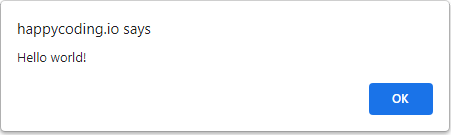
What’s a parameter?In our recipe instructions, imagine if one of the steps just said “preheat the oven” - that wouldn’t be enough information! What temperature should you use? That step requires more information: specifically, a temperature. It’s the same idea when you’re writing code. Computers are very dumb, so they only know how to do exactly what you tell them. When you ask a computer to jump, it’s going to ask you: how high? You pass that extra information into a function through its parameters. The recipe from above might look like this in code: Notice that the Note: Parameters are also often called arguments. I generally use the terms parameter and argument interchangeably. Helpful FunctionsWe’ll get into some more advanced functions in the next few tutorials, but for now let’s focus on some functions that you’ll use a lot while coding and debugging. document.write()The You’ve already seen this one in the example above. You’ll learn more about the Notice the alert()The
Code Editor
?
See the Pen by Happy Coding (@KevinWorkman) on CodePen. Try changing the code to show a dialog that says Alert dialogs can be pretty annoying if you overuse it (nobody likes popups), but it can be useful for debugging your code. console.log()The To see the JavaScript console, open your browser’s developer tools and find the console tab.
Code Editor
?
See the Pen by Happy Coding (@KevinWorkman) on CodePen. You can learn more about your browser’s developer tools in the developer tools tutorial. External JavaScriptYou could write all of your JavaScript inside the Similar to how you can load external This is a little silly because this code is only one line long, but this will come in handy as your code gets more complicated. Now your The Homework
Previous:
Next:
|
| You are visitor 01402503 — GeezerVison does not store the pages you look up. Best viewed with Netscape Navigator 4.7 or Internet Explorer 6 at 800×600. No cookies required. |