GeezerVisonThe World Wide Web, restored to 800 pixels of glory. |
| Home|About|Gaming cabinet|Archives|How it works|Starter sites |
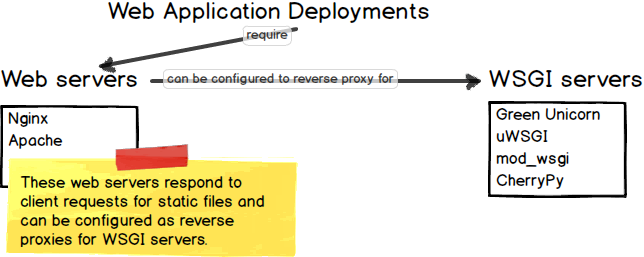
GeezerVison is showing www.fullstackpython.com — Nginx NginxNginx, pronounced "engine-X", is the second most common web server among the top 100,000 websites. Nginx also functions well as a reverse proxy to handle requests and pass back responses for Python WSGI servers or even other web servers such as Apache.
How is Nginx used in a Python web app deployment?Nginx is commonly used as a web server to serve static assets such as images, CSS and JavaScript to web browser clients. Nginx is also typically configured as a reverse proxy, which passes appropriate incoming HTTP requests to a WSGI server. The WSGI server produces dynamic content by running Python code. When the WSGI server passes its response, which is often in the HTML, JSON or XML format, the reverse proxy then responds to the client with that result. The request and response cycle with a reverse proxy server and the WSGI server can be seen in the following diagram.
Typically the client will not know or need to know that a Python web application generated the result. The result could have instead been generated by one or more backend systems written in any programming language, not just Python. Nginx is an implementation of the web server concept. Learn how these pieces fit together in the deployment chapter or view the table of contents for all topics.
Should I use Nginx or the Apache HTTP Server?Let's be clear about these two "competing" servers: they are both fantastic open source projects and either will serve your web application deployment well. In fact, many of the top global web applications use both servers in their deployments to function in many steps throughout the HTTP request-response cycle. I personally use Nginx more frequently than Apache because Nginx's configuration feel easier to write, with less boilerplate than alternatives. There's also a bit of laziness in the usage: Nginx works well, it never causes me problems. So I stick with my battle-tested Ansible configuration management files that set up Nginx with HTTPS and SSL/TLS certificates Securing NginxNginx's default configuration after a standard installation through a system package manager or compiling from source is a good base for security. However, setting up ciphers and redirects can be confusing the first few times you try it. It's a really good idea to read some of these tutorials to make sure you are avoiding the most common security errors that plague HTTP(S) configurations.
Specific Nginx resourcesNginx can be used without Python so there are a massive number of fantastic resources available for installing, configuring and optimizing this web server implementation. The following resources are ones that I collected during my own struggle while learning how to use Nginx after I had used Apache HTTP Server for several years.
Continue learning about web servers or move to a new topic?
1. Introduction
2. Development Environments
3. Data
4. Web Development
5. Deployment
Hosting
Servers
Static Content
CDNs
Virtual Private Servers
Linode
DigitalOcean
Lightsail
Platform-as-a-Service
Heroku
PythonAnywhere
AWS CodeStar
Operating Systems
Ubuntu
macOS
Windows
FreeBSD
Web Servers
Apache HTTP Server
Nginx
Caddy
WSGI Servers
Green Unicorn (Gunicorn)
mod_wsgi
uWSGI
Continuous Integration
Jenkins
GoCD
Configuration Management
Ansible
Salt
Containers
Docker
Kubernetes
Serverless
AWS Lambda
Azure Functions
Google Cloud Functions
6. DevOps
Changelog
What Full Stack Means
About the Author
Future Directions
Page Statuses
...or view the full table of contents.
Full Stack Python
Full Stack Python
is an open book that explains concepts in plain language and provides
helpful resources for those topics.
Updates via Twitter & Facebook. |
| You are visitor 01402503 — GeezerVison does not store the pages you look up. Best viewed with Netscape Navigator 4.7 or Internet Explorer 6 at 800×600. No cookies required. |