GeezerVisonThe World Wide Web, restored to 800 pixels of glory. |
| Home|About|Gaming cabinet|Archives|How it works|Starter sites |
GeezerVison is showing www.fullstackpython.com — Web Servers Web ServersWeb servers respond to Hypertext Transfer Protocol (HTTP) requests from clients and send back a response containing a status code and often content such as HTML, XML or JSON as well. Why are web servers necessary?Web servers are the ying to the web client's yang. The server and client speak the standardized language of the World Wide Web. This standard language is why an old Mozilla Netscape browser can still talk to a modern Apache or Nginx web server, even if it cannot properly render the page design like a modern web browser can. The basic language of the Web with the request and response cycle from client to server then server back to client remains the same as it was when the Web was invented by Tim Berners-Lee at CERN in 1989. Modern browsers and web servers have simply extended the language of the Web to incorporate new standards. Web server implementationsThe conceptual web server idea can be implemented in various ways. The following web server implementations each have varying features, extensions and configurations.
Client requestsA client that sends a request to a web server is usually a browser such as Internet Explorer, Firefox, or Chrome, but it can also be a
Web servers process requests from the above clients. The result of the web server's processing is a response code and commonly a content response. Some status codes, such as 204 (No content) and 403 (Forbidden), do not have content responses. In a simple case, the client will request a static asset such as a picture or JavaScript file. The file sits on the file system in a location the web server is authorized to access and the web server sends the file to the client with a 200 status code. If the client already requested the file and the file has not changed, the web server will pass back a 304 "Not modified" response indicating the client already has the latest version of that file.
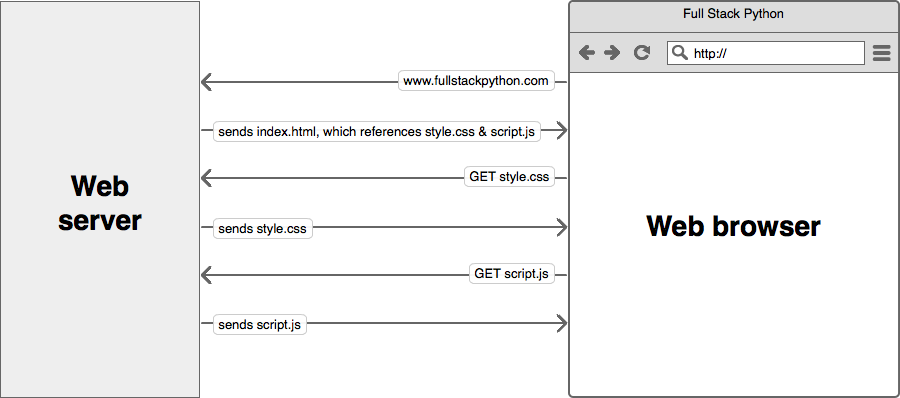
A web server sends files to a web browser based on the web browser's request. In the first request, the browser accessed the "www.fullstackpython.com" address and the server responded with the index.html HTML-formatted file. That HTML file contained references to other files, such as style.css and script.js that the browser then requested from the server. Sending static assets (such as CSS and JavaScript files) can eat up a large amount of bandwidth which is why using a Content Delivery Network (CDN) to serve static assets is important when possible. Building web servers
Web server references
Web servers learning checklist
What do you want to learn after the web server is configured?
1. Introduction
2. Development Environments
3. Data
4. Web Development
5. Deployment
Hosting
Servers
Static Content
CDNs
Virtual Private Servers
Linode
DigitalOcean
Lightsail
Platform-as-a-Service
Heroku
PythonAnywhere
AWS CodeStar
Operating Systems
Ubuntu
macOS
Windows
FreeBSD
Web Servers
Apache HTTP Server
Nginx
Caddy
WSGI Servers
Green Unicorn (Gunicorn)
mod_wsgi
uWSGI
Continuous Integration
Jenkins
GoCD
Configuration Management
Ansible
Salt
Containers
Docker
Kubernetes
Serverless
AWS Lambda
Azure Functions
Google Cloud Functions
6. DevOps
Changelog
What Full Stack Means
About the Author
Future Directions
Page Statuses
...or view the full table of contents.
Full Stack Python
Full Stack Python
is an open book that explains concepts in plain language and provides
helpful resources for those topics.
Updates via Twitter & Facebook. |
| You are visitor 01402503 — GeezerVison does not store the pages you look up. Best viewed with Netscape Navigator 4.7 or Internet Explorer 6 at 800×600. No cookies required. |