GeezerVisonThe World Wide Web, restored to 800 pixels of glory. | ||||||||||||||
| Home|About|Gaming cabinet|Archives|How it works|Starter sites | ||||||||||||||
GeezerVison is showing www.tutorialspoint.com — Command Design Pattern in C++ 
Selected Reading
Command Design Pattern in C++The Command Design Pattern is a way to turn a request—like asking a light to turn on—into its own object. This means you can treat actions as things you can pass around, save for later, or even undo if you want. In simple terms, it lets you wrap up an action and all the details it needs, so you can run it whenever you like. This makes your code more flexible and easier to manage, especially when you want to add features like undo or keep a history of what happened. For example, in a text editor, actions like Copy, Paste, and Undo can each be their own command object. This makes it easy to run them, line them up, or take them back if you change your mind. In the following image, you can see a remote control sending commands to a light source. The remote control (Invoker) doesn’t know how the Light (Receiver) works; it just tells it to turn on or off using Command objects. 
Components of Command Design PatternFollowing are the main components of the Command Design Pattern −
C++ Implementation of Command Design PatternIn this we will implement a simple command pattern example where we have a light that can be turned on and off using command objects. Steps to Implement Command Design Pattern in C++Following are the steps to implement Command Design Pattern in C++ 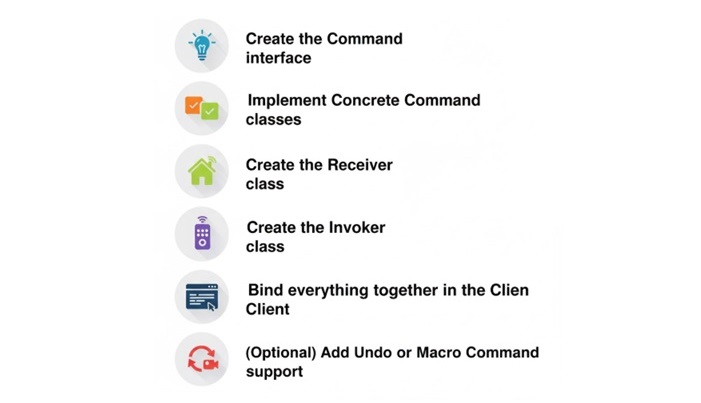
C++ Code Example of Command Design PatternFollowing is a simple C++ code example demonstrating the Command Design Pattern − #include <iostream>
using namespace std;
// Command Interface
class Command {
public:
virtual void execute() = 0;
};
// Receiver Class
class Light {
public:
void on() {
cout << "Light is ON" << endl;
}
void off() {
cout << "Light is OFF" << endl;
}
};
// Concrete Command to turn on the light
class LightOnCommand : public Command {
private:
Light* light;
public:
LightOnCommand(Light* l) : light(l) {}
void execute() override {
light->on();
}
};
// Concrete Command to turn off the light
class LightOffCommand : public Command {
private:
Light* light;
public:
LightOffCommand(Light* l) : light(l) {}
void execute() override {
light->off();
}
};
// Invoker Class
class RemoteControl {
private:
Command* command;
public:
void setCommand(Command* cmd) {
command = cmd;
}
void pressButton() {
command->execute();
}
};
// Client Code
int main() {
Light* light = new Light();
Command* lightOn = new LightOnCommand(light);
Command* lightOff = new LightOffCommand(light);
RemoteControl* remote = new RemoteControl();
// Turn the light ON
remote->setCommand(lightOn);
remote->pressButton();
// Turn the light OFF
remote->setCommand(lightOff);
remote->pressButton();
// Clean up
delete light;
delete lightOn;
delete lightOff;
delete remote;
return 0;
}
Following is the output of the above code − Light is ON Light is OFF In this example, we have defined a Command interface with an execute method. The Light class acts as the Receiver that knows how to turn the light on and off. The LightOnCommand and LightOffCommand classes are ConcreteCommand classes that implement the Command interface. The RemoteControl class is the Invoker that calls the command to execute the request. Finally, in the main function, we create instances of the commands and use the RemoteControl to execute them. Pros and Cons of Command Design Pattern
Real-World Use Cases of Command Design Pattern

ConclusionIn this chapter, we learned what is commnand design pattern, its components, and how to implement it in C++. We also discussed the pros and cons of using this pattern along with real-world use cases. The Command Design Pattern is a powerful tool for decoupling the sender and receiver of requests, it enables features like undo/redo, and improves code organization. 
Advertisements
| ||||||||||||||
| You are visitor 01402503 — GeezerVison does not store the pages you look up. Best viewed with Netscape Navigator 4.7 or Internet Explorer 6 at 800×600. No cookies required. |