GeezerVisonThe World Wide Web, restored to 800 pixels of glory. | ||||||||||||
| Home|About|Gaming cabinet|Archives|How it works|Starter sites | ||||||||||||
GeezerVison is showing www.tutorialspoint.com — Structural Design Pattern in C++ 
Selected Reading
Structural Design Pattern in C++The Structural Design Patterns is a way of combining or arranging different classes and objects to form larger and complex structures to solve a particular problem in a better way. These patterns help in simplifying the design by identifying simple ways to realize relationships between entities. Take a example of a Building. A building is made up of different parts like walls, roof, doors, and windows. Each part has its own characteristics and functions, but when combined, they form a complete structure that serves a specific purpose. Similarly, in software design, structural design patterns help in combining different classes and objects to create larger structures that are easier to understand and maintain. Structural design patterns are all about how classes and objects are composed to form larger structures. These patterns provide a way to create relationships between objects and classes in a way that is easy to understand and maintain. Types of Structural Design PatternsThere are 7 main types of structural design patterns −
In the subsequent set of chapters, we will cover all these design patterns in detail. Illustration of Structural Design PatternsFollowing is the illustration of Structural Design Patterns in C++ 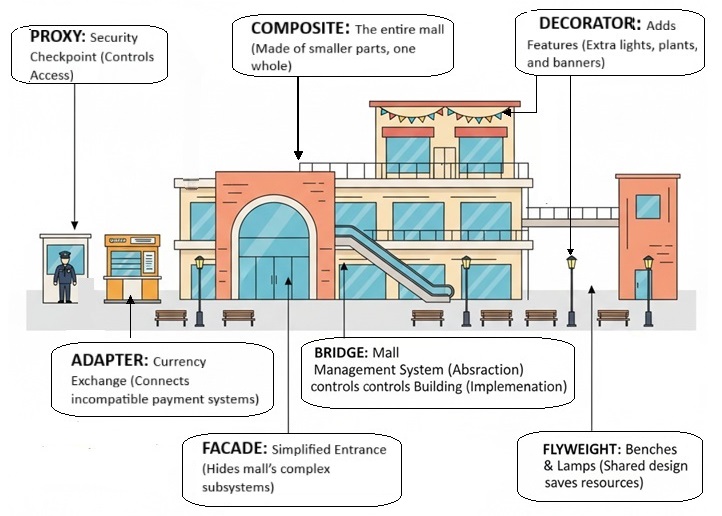
We have taken example of a Mall. A entire mall is example of Composite Design Pattern, it's entrance that shows how Facade Design Pattern works, the security guard at the entrance is example of Proxy Design Pattern, the management system of mall is example of Bridge Design Pattern, the Currency Exchange Point is example of Adapter Design Pattern, the Lamps, Banners, Lights are examples of Decorator Design Pattern, and the Benches and Lamps are examples of Flyweight Design Pattern as they are shared by multiple area like food court, parking area etc. Example of Structural Design Patterns in C++In this example, we have created a media player application that uses multiple structural design patterns to provide a flexible and maintainable solution. The Adapter Pattern allows us to convert different media file formats into a common interface that the media player can understand. The Composite Pattern allows us to create a playlist of media files that can be played together. The Decorator Pattern allows us to add new functionality to the media player dynamically. The Facade Pattern provides a simplified interface to the complex media player subsystem. The Proxy Pattern controls access to the media player and ensures that only authorized users can play certain media files. The Bridge Pattern separates the abstraction of the media player from its implementation, allowing us to easily switch between different media player implementations. Finally, the Flyweight Pattern reduces memory usage by sharing common parts of media files. 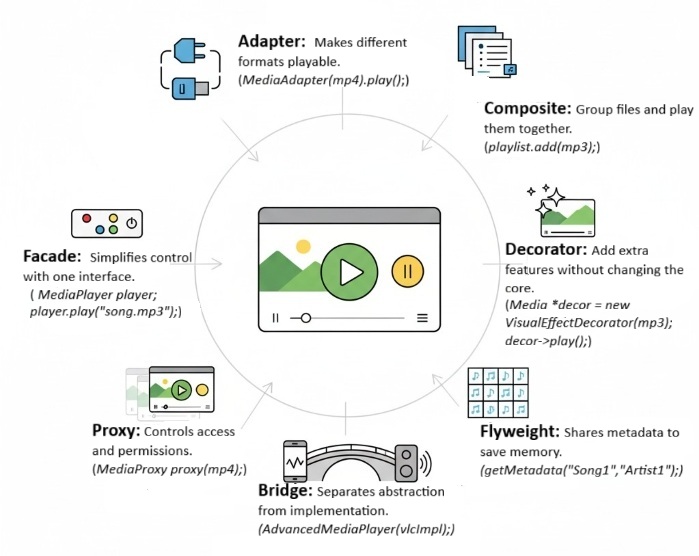
Following is the code that demonstrates the use of multiple structural design patterns together in C++ to create a media player application − #include <iostream>
#include <string>
#include <vector>
#include <memory>
using namespace std;
// MediaFile interface
class MediaFile {
public:
virtual string getType() = 0;
virtual void play() = 0;
virtual ~MediaFile() = default;
};
// Concrete MediaFile classes
class MP3File : public MediaFile {
public:
string getType() {
return "MP3";
}
void play() {
cout << "Playing MP3 file" << endl;
}
};
class MP4File : public MediaFile {
public:
string getType() {
return "MP4";
}
void play() {
cout << "Playing MP4 file" << endl;
}
};
// Adapter Pattern
class MediaAdapter : public MediaFile {
private:
shared_ptr<MediaFile> mediaFile;
public:
MediaAdapter(shared_ptr<MediaFile> file) {
mediaFile = file;
}
string getType() {
return mediaFile->getType();
}
void play() {
mediaFile->play();
}
};
// Composite Pattern
class Playlist : public MediaFile {
private:
vector<shared_ptr<MediaFile>> mediaFiles;
public:
void add(shared_ptr<MediaFile> file) {
mediaFiles.push_back(file);
}
string getType() {
return "Playlist";
}
void play() {
cout << "Playing playlist:" << endl;
for (auto& file : mediaFiles) {
file->play();
}
}
};
// Decorator Pattern
class MediaDecorator : public MediaFile {
protected:
shared_ptr<MediaFile> mediaFile;
public:
MediaDecorator(shared_ptr<MediaFile> file) {
mediaFile = file;
}
string getType() {
return mediaFile->getType();
}
void play() {
mediaFile->play();
}
};
class VisualEffectDecorator : public MediaDecorator {
public:
VisualEffectDecorator(shared_ptr<MediaFile> file) : MediaDecorator(file) {}
void play() {
mediaFile->play();
cout << "Adding visual effects" << endl;
}
};
class AudioEnhancementDecorator : public MediaDecorator {
public:
AudioEnhancementDecorator(shared_ptr<MediaFile> file) : MediaDecorator(file) {}
void play() {
mediaFile->play();
cout << "Enhancing audio quality" << endl;
}
};
// Facade Pattern
class MediaPlayer {
private:
shared_ptr<MediaFile> mediaFile;
public:
MediaPlayer(shared_ptr<MediaFile> file) {
mediaFile = file;
}
void play() {
mediaFile->play();
}
};
// Proxy Pattern
class MediaProxy : public MediaFile {
private:
shared_ptr<MediaFile> mediaFile;
bool authorized;
public:
MediaProxy(shared_ptr<MediaFile> file, bool auth) {
mediaFile = file;
authorized = auth;
}
string getType() {
return mediaFile->getType();
}
void play() {
if (authorized) {
mediaFile->play();
} else {
cout << "Access denied" << endl;
}
}
};
// Bridge Pattern
class MediaImplementation {
public:
virtual void play() = 0;
virtual ~MediaImplementation() = default;
};
class VLCImplementation : public MediaImplementation {
public:
void play() {
cout << "Playing using VLC implementation" << endl;
}
};
class WindowsMediaImplementation : public MediaImplementation {
public:
void play() {
cout << "Playing using Windows Media implementation" << endl;
}
};
class MediaAbstraction {
protected:
shared_ptr<MediaImplementation> implementation;
public:
MediaAbstraction(shared_ptr<MediaImplementation> impl) {
implementation = impl;
}
virtual void play() = 0;
virtual ~MediaAbstraction() = default;
};
class AdvancedMediaPlayer : public MediaAbstraction {
public:
AdvancedMediaPlayer(shared_ptr<MediaImplementation> impl) : MediaAbstraction(impl) {}
void play() {
implementation->play();
}
};
// Flyweight Pattern
class MediaMetadata {
private:
string title;
string artist;
string album;
public:
MediaMetadata(string t, string ar, string al) : title(t), artist(ar), album(al) {}
string getTitle() { return title; }
string getArtist() { return artist; }
string getAlbum() { return album; }
void display() {
cout << "Title: " << title << ", Artist: " << artist << ", Album: " << album << endl;
}
};
class MediaMetadataFactory {
private:
vector<shared_ptr<MediaMetadata>> metadataPool;
public:
shared_ptr<MediaMetadata> getMetadata(string title, string artist, string album) {
for (auto& meta : metadataPool) {
if (meta->getTitle() == title &&
meta->getArtist() == artist &&
meta->getAlbum() == album) {
return meta;
}
}
shared_ptr<MediaMetadata> newMeta = make_shared<MediaMetadata>(title, artist, album);
metadataPool.push_back(newMeta);
return newMeta;
}
};
int main() {
// Create media files
auto mp3 = make_shared<MP3File>();
auto mp4 = make_shared<MP4File>();
auto adaptedMp3 = make_shared<MediaAdapter>(mp3);
auto adaptedMp4 = make_shared<MediaAdapter>(mp4);
// Create playlist
auto playlist = make_shared<Playlist>();
playlist->add(adaptedMp3);
playlist->add(adaptedMp4);
playlist->add(make_shared<VisualEffectDecorator>(adaptedMp4));
playlist->add(make_shared<AudioEnhancementDecorator>(adaptedMp3));
// Create media player facade
auto player = make_shared<MediaPlayer>(playlist);
player->play();
// Create media proxy
auto proxy1 = make_shared<MediaProxy>(adaptedMp4, false);
proxy1->play();
auto proxy2 = make_shared<MediaProxy>(adaptedMp4, true);
proxy2->play();
// Create advanced media player with bridge pattern
auto vlcImpl = make_shared<VLCImplementation>();
shared_ptr<MediaAbstraction> advancedPlayer = make_shared<AdvancedMediaPlayer>(vlcImpl);
advancedPlayer->play();
auto wmImpl = make_shared<WindowsMediaImplementation>();
advancedPlayer = make_shared<AdvancedMediaPlayer>(wmImpl);
advancedPlayer->play();
// Create media metadata using flyweight pattern
auto metadataFactory = make_shared<MediaMetadataFactory>();
auto meta1 = metadataFactory->getMetadata("Song1", "Artist1", "Album1");
auto meta2 = metadataFactory->getMetadata("Song1", "Artist1", "Album1");
auto meta3 = metadataFactory->getMetadata("Song2", "Artist2", "Album2");
meta1->display();
meta2->display();
meta3->display();
return 0;
}
Following is the output of the above code − Playing playlist: Playing MP3 file Playing MP4 file Playing MP4 file Adding visual effects Playing MP3 file Enhancing audio quality Access denied Playing MP4 file Playing using VLC implementation Playing using Windows Media implementation Title: Song1, Artist: Artist1, Album: Album1 Title: Song1, Artist: Artist1, Album: Album1 Title: Song2, Artist: Artist2, Album: Album2 When to Use Structural Design Patterns?Structural design patterns are useful in the following scenarios −
Pros and Cons of Structural Design PatternsFollowing are the some important pros and cons of Structural Design Patterns −
ConclusionIn this chapter, we have discussed the Structural Design Patterns in C++. We have seen the different types of structural design patterns and how they can be used to create flexible and maintainable code. We have also seen an example of how multiple structural design patterns can be used together to create a complex system. Structural design patterns are an important tool for any software developer, and understanding them can help you create better software. 
Advertisements
| ||||||||||||
| You are visitor 01402503 — GeezerVison does not store the pages you look up. Best viewed with Netscape Navigator 4.7 or Internet Explorer 6 at 800×600. No cookies required. |