GeezerVisonThe World Wide Web, restored to 800 pixels of glory. | ||||||||||||||||||||||||||||||||||||||||||
| Home|About|Gaming cabinet|Archives|How it works|Starter sites | ||||||||||||||||||||||||||||||||||||||||||
GeezerVison is showing www.tutorialspoint.com — C++ Strings 
Selected Reading
C++ StringsC++ provides following two types of string representations −
The C-Style Character StringThe C-style character string originated within the C language and continues to be supported within C++. This string is actually a one-dimensional array of characters which is terminated by a null character '\0'. Thus a null-terminated string contains the characters that comprise the string followed by a null. The following declaration and initialization create a string consisting of the word "Hello". To hold the null character at the end of the array, the size of the character array containing the string is one more than the number of characters in the word "Hello." char greeting[6] = {'H', 'e', 'l', 'l', 'o', '\0'};
If you follow the rule of array initialization, then you can write the above statement as follows − char greeting[] = "Hello"; Following is the memory presentation of above defined string in C/C++ − 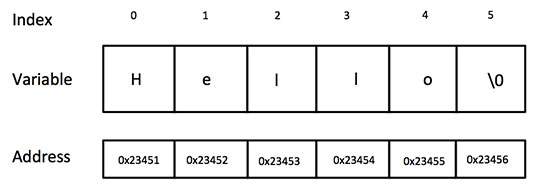
Actually, you do not place the null character at the end of a string constant. The C++ compiler automatically places the '\0' at the end of the string when it initializes the array. Let us try to print above-mentioned string − Example#include <iostream>
using namespace std;
int main () {
char greeting[6] = {'H', 'e', 'l', 'l', 'o', '\0'};
cout << "Greeting message: ";
cout << greeting << endl;
return 0;
}
When the above code is compiled and executed, it produces the following result − Greeting message: Hello C Style String FunctionsC++ supports a wide range of functions that manipulate null-terminated strings. These functions are defined in <string.h> header file.
ExampleFollowing example makes use of few of the above-mentioned functions − #include <iostream>
#include <cstring>
using namespace std;
int main () {
char str1[10] = "Hello";
char str2[10] = "World";
char str3[10];
int len ;
// copy str1 into str3
strcpy( str3, str1);
cout << "strcpy( str3, str1) : " << str3 << endl;
// concatenates str1 and str2
strcat( str1, str2);
cout << "strcat( str1, str2): " << str1 << endl;
// total lenghth of str1 after concatenation
len = strlen(str1);
cout << "strlen(str1) : " << len << endl;
return 0;
}
When the above code is compiled and executed, it produces result something as follows − strcpy( str3, str1) : Hello strcat( str1, str2): HelloWorld strlen(str1) : 10 The String Class in C++The standard C++ library provides a string class type that supports all the operations mentioned above, additionally much more functionality. Example of String ClassLet us check the following example − #include <iostream>
#include <string>
using namespace std;
int main () {
string str1 = "Hello";
string str2 = "World";
string str3;
int len ;
// copy str1 into str3
str3 = str1;
cout << "str3 : " << str3 << endl;
// concatenates str1 and str2
str3 = str1 + str2;
cout << "str1 + str2 : " << str3 << endl;
// total length of str3 after concatenation
len = str3.size();
cout << "str3.size() : " << len << endl;
return 0;
}
When the above code is compiled and executed, it produces result something as follows − str3 : Hello str1 + str2 : HelloWorld str3.size() : 10 Creating a StringWe can create string variables in two ways, using either of the following methods − Creating String Using Character ArraysWe can declare strings using the C-type arrays in the format of characters. This is done using the following syntax − Syntaxchar variable_name[len_value] ; Here, len_value is the length of the character array. Example of Creating String using Character ArrayIn the following examples, we are declaring a character array, and assigning values to it. #include <iostream>
using namespace std;
int main() {
char s[5]={'h','e','l','l','o'};
cout<<s<<endl;
return 0;
}
Outputhello Creating String using <string>We can declare a String variable using the 'string' keyword. This is included in the <string> header file. The syntax of declaring a string is explained as follows − Syntaxstring variable_name = [value]; Here, [value] is an optional and can be used to assign value during the declaration. ExampleIn the following examples, we are declaring a string variable, assigning a value to it. #include <iostream>
using namespace std;
int main() {
string s="a merry tale";
cout<<s;
return 0;
}
Outputa merry tale Traversing a String (Iterate Over a String)We can iterate over a string in two ways − Using looping statementsWe can traverse a string using for loops, while loops and do while loops using a pointer to the first and the last index in the string. Using iteratorsUsing range based loops, we can iterate over the string using iterators. This is achieved using ":" operator while running a range based loop. Example of Iterating a StringThe following example code shows string traversal using both of these methods − #include <iostream>
using namespace std;
int main() {
string s="Hey, I am at TP.";
for(int i=0;i<s.length();i++){
cout<<s[i]<<" ";
}
cout<<endl;
for(char c:s){
cout<<c<<" ";
}
return 0;
}
OutputH e y , I a m a t T P . H e y , I a m a t T P . Accessing Characters of StringWe can access the characters of a string using both iterators and pointer to the indices of the string. ExampleThe following example code shows how we can access the characters in a string − #include <iostream>
using namespace std;
int main() {
string s="Hey, I am at TP.";
cout<<s<<endl;
for(int i=0;i<s.length();i++){
s[i]='A';
}
cout<<s<<endl;
for(char &c:s){
c='B';
}
cout<<s<<endl;
return 0;
}
OutputHey, I am at TP. AAAAAAAAAAAAAAAA BBBBBBBBBBBBBBBB String FunctionsString is an object of the <string> class, and hence, it has a variety of functions that users can utilize for a variety of operations. Some of these functions are as follows −
Length of a StringThe length of a string is the number of characters present in the string. Hence, the string "apple" has a length of 5 characters and the string "hello son" has a length of 9 characters (including empty spaces). This can be accessed using the length() method in <string> header file. SyntaxThe syntax is explained as follows − int len = string_1.length(); Example#include <iostream>
#include <string>
using namespace std;
int main() {
string x="hey boy";
cout<<x.length()<<endl;
return 0;
}
Output7 String ConcatenationString concatenation is a way to add two strings together. This can be done using two ways − Addition OperatorThe addition operator is used to add two elements. In case of strings, the addition operator concatenates the two strings. This is clearly explained in the following example − Example#include <iostream>
#include <string>
using namespace std;
int main() {
string x = "10";
string y = "20";
cout<<x+y<<endl;
return 0;
}
Output1020 This is different from integer addition. When we take two integers and add them using addition operator, we get the sum of the two numbers instead. This is clearly explained in the following example − Example#include <iostream>
#include <string>
using namespace std;
int main() {
int x = 10;
int y = 20;
cout<<x+y<<endl;
return 0;
}
Output30 Using string append() methodC++ is an object oriented programming language, and hence a string is actually an object, which contain functions that can perform certain operations on strings. We can use string append() method to append one string to another. The syntax of this operation is as follows − Syntaxstring_1.append(string_2); The usage of this method is depicted clearly in the following example − Example#include <iostream>
#include <string>
using namespace std;
int main() {
string x="hey boy";
string y=" now";
x.append(y);
cout<<x<<endl;
return 0;
}
Outputhey boy now String Input in C++Strings can be taken as an input to the program, and the most common way to do this is by using cin method. There are three methods to take a string as an input, and these methods are given as follows −
Using cin MethodThis is the simplest way to take a string as an input. The syntax is given as follows − Syntaxcin>>string_name; Example#include <iostream>
using namespace std;
int main() {
string s;
cout << "Enter custom string : "<<endl;
//enter the string here
cin>>s;
cout<<"The string is : "<<s;
}
Using getline() MethodThe getline() method can be used to read a string from an input stream. This is defined in the <string> header file. The syntax of the above method is given as follows − Syntaxgetline(cin, string_name); Example#include <iostream>
using namespace std;
int main() {
string s;
cout << "Enter String as input : " << endl;
getline(cin, s);
//enter the string here
cout << "Printed string is : " << s << endl;
return 0;
}
Using stringstreamThe stringstream class is used to take multiple strings as input, all at once. The syntax of the above method is given as follows − SyntaxStringstream object_name(string_name); Example#include <iostream>
#include <sstream>
#include <string>
using namespace std;
int main() {
string s = "Hey, I am at TP";
stringstream object(s);
string newstr;
// >> operator will read from the stringstream object
while (object >> newstr) {
cout << newstr << " ";
}
return 0;
}
OutputHey, I am at TP 
Advertisements
| ||||||||||||||||||||||||||||||||||||||||||
| You are visitor 01402503 — GeezerVison does not store the pages you look up. Best viewed with Netscape Navigator 4.7 or Internet Explorer 6 at 800×600. No cookies required. |