Java Program to Calculate the Area and Perimeter of a Square
This article is created to cover a program in Java that calculates the area and perimeter of a square based on the length of its sides as entered by the
user at run-time.
Note: The area of a square is calculated using the formula s*s or s2. Where s is the length of the side.
Note: The perimeter of a square is calculated using the formula 4*s.
Find the area of a square in Java
The question is: write a program in Java to find and print the area of a square. The following program has its answer:
import java.util.Scanner;

public class CodesCracker
{
   public static void main(String[] args)
   {
      float side, area;
      Scanner s = new Scanner(System.in);

      System.out.print("Enter the Side Length of Square: ");
      side = s.nextFloat();

      area = 4*side;
      System.out.println("\nArea = " +area);
   }
}
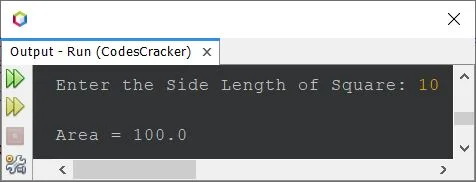
The snapshot given below shows the sample run of the above Java program with user input 10 as the side length of a square whose area we want to see using
the program:
Find the perimeter of a square in Java
The question is: write a program in Java to find and print the perimeter of a square. The program given below has its answer:
import java.util.Scanner;

public class CodesCracker
{
   public static void main(String[] args)
   {
      float s, perimeter;
      Scanner scan = new Scanner(System.in);

      System.out.print("Enter the Side Length of Square: ");
      s = scan.nextFloat();

      perimeter = 4*s;
      System.out.println("\nPerimeter = " +perimeter);
   }
}
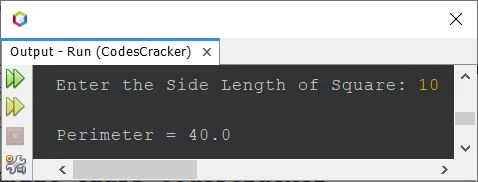
The sample run of the above program with the same user input as the previous program, i.e., 10, is:
Calculate Area and Perimeter of Square in Java: Single Program
After combining both programs given above, this program is created that calculates and prints the area and perimeter values of a square, whose side length
is entered by the user at run-time.
import java.util.Scanner;

public class CodesCracker
{
   public static void main(String[] args)
   {
      Scanner scan = new Scanner(System.in);

      System.out.print("Enter the Side Length of Square: ");
      float s = scan.nextFloat();

      float a = s*s;
      float p = 4*s;
      System.out.println("\nArea = " +a);
      System.out.println("\nPerimeter = " +p);
   }
}
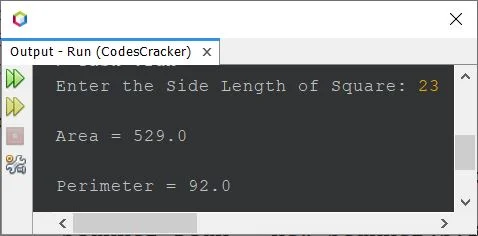
The sample run of the above program with user input 23 as the side length of the square is shown in the following snapshot:
Note: For the area and perimeter of the rectangle program in Java,
refer to its separate article.
Same Program in Other Languages
Java Online Test
« Previous Program
Next Program »