GeezerVisonThe World Wide Web, restored to 800 pixels of glory. |
| Home|About|Gaming cabinet|Archives|How it works|Starter sites |
GeezerVison is showing codescracker.com — Java Program to Check Odd or Even Number
Java Program to Check Odd or Even NumberThis article covers a program in Java that checks whether a number entered by user at run-time of the program, is an odd or an even number. Note - A number that can be divided into two equal groups or parts, can be called as an even number. Whereas a number that can not be divided into two equal groups, can be called as an odd number. Check Odd or Even using if-else in JavaThe question is, write a Java program to check odd or even number. The number must be received by user at run-time. The program given below is its answer: import java.util.Scanner; public class CodesCracker { public static void main(String[] args) { int num; Scanner scan = new Scanner(System.in); System.out.print("Enter a Number: "); num = scan.nextInt(); if(num%2==0) { System.out.println("\nIt is an Even Number."); } else { System.out.println("\nIt is an Odd Number."); } } } The snapshot given below shows the sample run of above Java program on checking whether a given number is an odd or an even number, with user input 34 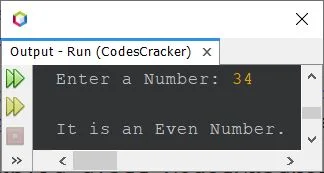
The above program can also be written as: import java.util.Scanner; public class CodesCracker { public static void main(String[] args) { Scanner scan = new Scanner(System.in); System.out.print("Enter a Number: "); int num = scan.nextInt(); if(num%2==0) System.out.println("\n" +num+ " is an Even Number."); else System.out.println("\n" +num+ " is an Odd Number."); } } Here is its sample run with user input 7: 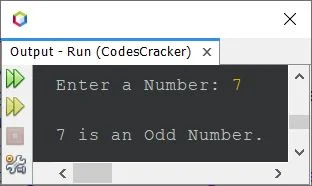
Check Odd or Even using Ternary Operator in JavaThis program uses ternary operator (?:) to do the same job as done by previous program. import java.util.Scanner; public class CodesCracker { public static void main(String[] args) { Scanner scan = new Scanner(System.in); System.out.print("Enter a Number: "); int num = scan.nextInt(); int res = (num%2==0) ? 0 : 1; if(res==0) System.out.println("\n" +num+ " is an Even Number."); else System.out.println("\n" +num+ " is an Odd Number."); } } The above program can also be created in this way: import java.util.Scanner; public class CodesCracker { public static void main(String[] args) { Scanner scan = new Scanner(System.in); System.out.print("Enter a Number: "); int num = scan.nextInt(); String res = (num%2==0) ? "even" : "odd"; if(res.equals("even")) System.out.println("\n" +num+ " is an Even Number."); else System.out.println("\n" +num+ " is an Odd Number."); } } Check Odd or Even without using Modulus Operator in JavaThis is the last program of this article, that checks for even or odd number. This program does not uses modulus (%) operator in any way. import java.util.Scanner; public class CodesCracker { public static void main(String[] args) { Scanner scan = new Scanner(System.in); System.out.print("Enter a Number: "); int num = scan.nextInt(); float resReal = (float)num/2; int resRound = num/2; if((resReal*2)==(resRound*2)) System.out.println("\n" +num+ " is an Even Number."); else System.out.println("\n" +num+ " is an Odd Number."); } } Same Program in Other Languages« Previous Program Next Program » Practice Quizzes
Test your programming and computer science knowledge with interactive MCQs and topic-based quizzes. Popular Topics
Explore the most popular programming and computer science tutorials on CodesCracker. |
| You are visitor 01402503 — GeezerVison does not store the pages you look up. Best viewed with Netscape Navigator 4.7 or Internet Explorer 6 at 800×600. No cookies required. |