GeezerVisonThe World Wide Web, restored to 800 pixels of glory. |
| Home|About|Gaming cabinet|Archives|How it works|Starter sites |
GeezerVison is showing codescracker.com — Java Program to Insert an Element in an Array
Java Program to Insert an Element in an ArrayThis article covers multiple programs in Java that inserts an element in an array, entered by user at run-time of the program. Here are the list of programs covered by this article:
Insert an Element at the End of an Array in JavaThe question is, write a Java program to insert an element in an array at the end. The program given below is its answer: import java.util.Scanner; public class CodesCracker { public static void main(String[] args) { int i, element; int[] arr = new int[11]; Scanner scan = new Scanner(System.in); System.out.print("Enter 10 Elements: "); for(i=0; i<10; i++) arr[i] = scan.nextInt(); System.out.print("Enter an Element to Insert: "); element = scan.nextInt(); arr[i] = element; System.out.println("\nNow the new array is: "); for(i=0; i<11; i++) System.out.print(arr[i]+ " "); } } The snapshot given below shows the sample run of above program, with user input 10, 20, 30, 40, 50, 60, 70, 80, 90, 100 as ten elements and 500 as new element to insert at the end of array: 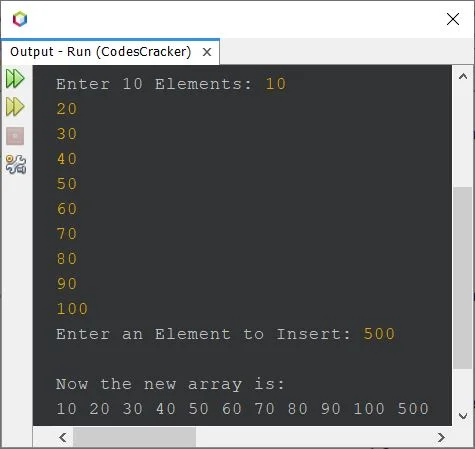
Modified Version of Previous ProgramSince previous program works with 10 elements only. Therefore after modifying that program, the program given below allows user to define the size of array too, along with its elements: import java.util.Scanner; public class CodesCracker { public static void main(String[] args) { int i, element, n; Scanner scan = new Scanner(System.in); System.out.print("Enter the Size of Array: "); n = scan.nextInt(); int[] arr = new int[n+1]; System.out.print("Enter " +n+ " Elements: "); for(i=0; i<n; i++) arr[i] = scan.nextInt(); System.out.print("Enter an Element to Insert: "); element = scan.nextInt(); arr[i] = element; System.out.println("\nNow the new array is: "); for(i=0; i<(n+1); i++) System.out.print(arr[i]+ " "); } } The sample run with user input 5 as size, 11, 12, 13, 14, 15 as five elements, and 16 as new element to insert, is shown in the snapshot given below: 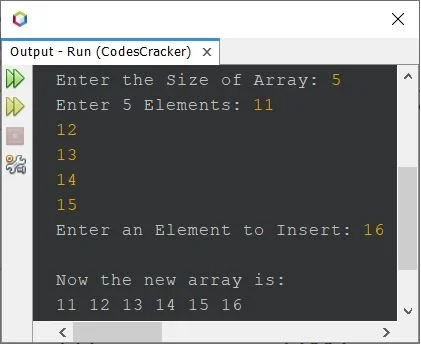
Insert an Element in an Array at a Given Position in JavaThis is the last program of this article, created to insert an element in an array at any specified (given) position: import java.util.Scanner; public class CodesCracker { public static void main(String[] args) { int i, tot; Scanner scan = new Scanner(System.in); System.out.print("Enter the Size of Array: "); int n = scan.nextInt(); int[] arr = new int[n+1]; System.out.print("Enter " +n+ " Elements: "); for(i=0; i<n; i++) arr[i] = scan.nextInt(); System.out.print("Enter an Element to Insert: "); int element = scan.nextInt(); System.out.print("At what position ? "); int pos = scan.nextInt(); if(pos<n) { for(i=n; i>=pos; i--) arr[i] = arr[i-1]; arr[i] = element; System.out.println("\nNow the new array is: "); for(i=0; i<(n+1); i++) System.out.print(arr[i]+ " "); } else System.out.println("\nInvalid Input!"); } } The sample run with user input 5 as size, 6, 7, 9, 10, 11 as five elements, 8 as new element to insert, and 3 as position to insert the element, is given below: 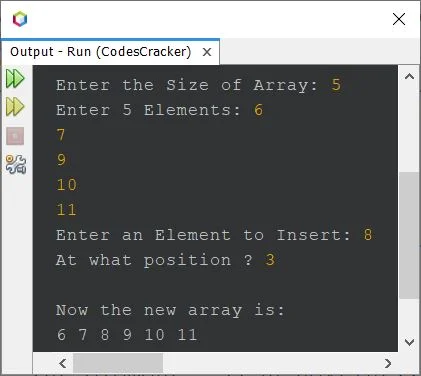
Same Program in Other Languages« Previous Program Next Program » Practice Quizzes
Test your programming and computer science knowledge with interactive MCQs and topic-based quizzes. Popular Topics
Explore the most popular programming and computer science tutorials on CodesCracker. |
| You are visitor 01402503 — GeezerVison does not store the pages you look up. Best viewed with Netscape Navigator 4.7 or Internet Explorer 6 at 800×600. No cookies required. |