GeezerVisonThe World Wide Web, restored to 800 pixels of glory. |
| Home|About|Gaming cabinet|Archives|How it works|Starter sites |
GeezerVison is showing codescracker.com — Java Program to Reverse a Number
Java Program to Reverse a NumberThis article covers a program in Java that find and prints the reverse of a number. For example, if user enters a number say 123, then the output will be 321. Reverse a Number in Java using while LoopThe question is, write a Java program to reverse a number. The number to reverse, must be received by user at run-time of the program. The answer to this question, is following program: import java.util.Scanner; public class CodesCracker { public static void main(String[] args) { int num, rem, rev=0; Scanner s = new Scanner(System.in); System.out.print("Enter a Number: "); num = s.nextInt(); while(num!=0) { rem = num%10; rev = (rev*10) + rem; num = num/10; } System.out.println("\nReverse = " +rev); } } The snapshot given below shows the sample run of above Java program, with user input 1034 as number to reverse: 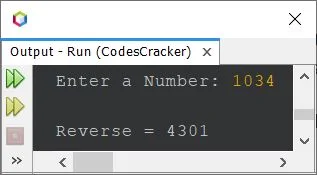
Reverse a Number in Java using for LoopSince the above program uses while loop, to reverse a given number. Therefore I've modified that program and created a new one, using for loop: import java.util.Scanner; public class CodesCracker { public static void main(String[] args) { int num, rem, rev; Scanner s = new Scanner(System.in); System.out.print("Enter a Number: "); num = s.nextInt(); for(rev=0; num!=0; num=num/10) { rem = num%10; rev = (rev*10) + rem; } System.out.println("\nReverse = " +rev); } } This program produces exactly same output as of previous program. The following two statements, from above program: rem = num%10; rev = (rev*10) + rem; can be replaced with a single statement, given below: rev = (rev*10) + (num%10); Reverse a Number in Java using ArrayThis program uses array to do the same job as of previous program. import java.util.Scanner; public class CodesCracker { public static void main(String[] args) { int num, len, i; Scanner s = new Scanner(System.in); System.out.print("Enter a Number: "); num = s.nextInt(); len = String.valueOf(num).length(); int[] arr = new int[len]; for(i=0; i<len; i++) { arr[i] = num%10; num = num/10; } System.out.print("\nReverse = "); for(i=0; i<len; i++) System.out.print(arr[i]); } } Since above program has a limitation. The limitation is, when user enters a number say 1230 or 03201. That is, 0 as the last or the first digit of a number. In that case, that 0 will get removed. As 013 is equal to 13. Therefore, I've created another version of the program, to remove this limitation. That program is given below, in the complete version. Reverse a Number in Java - Complete VersionI'm saying this program as a complete version of the reversing a number program in Java, because this program also produces the exact reverse of a number ending or starting with 0. For example, reverse of 00134 will be 43100. similarly reverse of 120 will be 021. import java.util.Scanner; public class CodesCracker { public static void main(String[] args) { int len, i; String num; Scanner s = new Scanner(System.in); System.out.print("Enter a Number: "); num = s.next(); len = num.length(); char[] arr = new char[len]; for(i=0; i<len; i++) arr[i] = num.charAt(i); System.out.print("\nReverse = "); for(i=(len-1); i>=0; i--) System.out.print(arr[i]); } } Here is its sample run with user input 2300 as number to reverse: 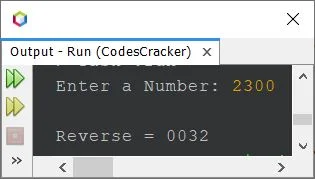
Here is another sample run with user input 0023 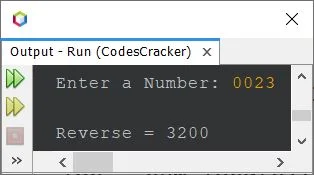
Same Program in Other Languages« Previous Program Next Program » Practice Quizzes
Test your programming and computer science knowledge with interactive MCQs and topic-based quizzes. Popular Topics
Explore the most popular programming and computer science tutorials on CodesCracker. |
| You are visitor 01402503 — GeezerVison does not store the pages you look up. Best viewed with Netscape Navigator 4.7 or Internet Explorer 6 at 800×600. No cookies required. |