GeezerVisonThe World Wide Web, restored to 800 pixels of glory. |
| Home|About|Gaming cabinet|Archives|How it works|Starter sites |
GeezerVison is showing codescracker.com — Python chr() Function
Python chr() FunctionThe char() function in Python returns the character corresponding to the specified Unicode. For example: x = 65 print(chr(x)) x = 100 print(chr(x)) x = 51 print(chr(x)) x = 40 print(chr(x)) The output produced by this program is: A d 3 ( Python chr() Function SyntaxThe syntax of chr() function in Python is: chr(x)
where x is an integer value refers to the Unicode. The value of x ranges from 0 to 1,114,111. If specified value (value of x) is out of range, then an exception is thrown by chr(). The name of that exception is ValueError. Python chr() Function ExampleHere is an example of chr() function in Python. This program receives the Unicode value from the user at run-time of the program, and prints the equivalent character corresponding to given Unicode: print("Enter the Unicode Value: ", end="") u = int(input()) ch = chr(u) print("\nEquivalent Character =", ch) The snapshot given below shows the sample run of above program, with user input 176 as value to find and print its corresponding character using chr() function: 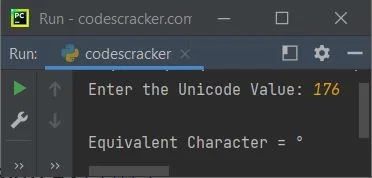
The Unicode 176 corresponding to a degree (o). Here is another example that handles the ValueError exception, when raised by chr() function: print("Enter the Unicode Value: ", end="") u = int(input()) try: ch = chr(u) print("\nEquivalent Character =", ch) except ValueError: print("\nInvalid Unicode!") Here is its sample run with user input 1114112: 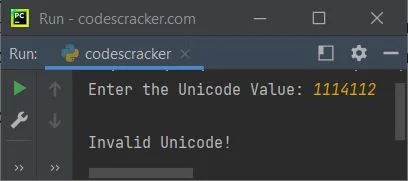
Here is the modified version of above program. This program continues its execution of getting the Unicode value from
user and printing the equivalent character, until user types exit and hits while True: print("\nEnter the Unicode Value: ", end="") u = input() if u == "exit": break else: try: u = int(u) try: ch = chr(u) print("Equivalent Character =", ch) except ValueError: print("Invalid Unicode!") except ValueError: print("Only integer value is allowed!") The sample run of this program with some user inputs, is shown in the snapshot given below: 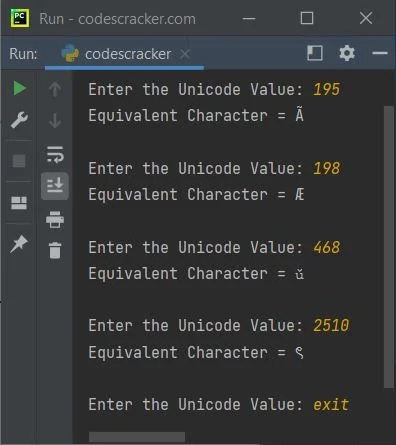
« Previous Function Next Function » Practice Quizzes
Test your programming and computer science knowledge with interactive MCQs and topic-based quizzes. Popular Topics
Explore the most popular programming and computer science tutorials on CodesCracker. |
| You are visitor 01402503 — GeezerVison does not store the pages you look up. Best viewed with Netscape Navigator 4.7 or Internet Explorer 6 at 800×600. No cookies required. |