GV

GeezerVison

The World Wide Web, restored to 800 pixels of glory.

Home|About|Gaming cabinet|Archives|How it works|Starter sites

On this site

  • CODESCRACKER
  • Python
  • Java
  • C++
  • JavaScript
  • SQL
  • Quiz
  • C
  • C#
  • HTML
  • CSS
  • PHP
  • Networking
  • Operating System

This view

  • Original page
  • New address

GeezerVison is showing codescracker.com — Python enumerate() Function

  • Python Built-in Functions
  • Python All Built-in Functions
  • Python print() Function
  • Python input() Function
  • Python int() Function
  • Python float() Function
  • Python len() Function
  • Python range() Function
  • Python str() Function
  • Python ord() Function
  • Python chr() Function
  • Python ascii() Function
  • Python pow() Function
  • Python type() Function
  • Python List Functions
  • Python list() Function
  • Python insert() Function
  • Python append() Function
  • Python extend() Function
  • Python pop() Function
  • Python remove() Function
  • Python reverse() Function
  • Python sort() Function
  • Python sorted() Function
  • Python Dictionary Functions
  • Python dict() Function
  • Python update() Function
  • Python get() Function
  • Python keys() Function
  • Python setdefault() Function
  • Python fromkeys() Function
  • Python items() Function
  • Python popitem() Function
  • Python Tuple Function
  • Python tuple() Function
  • Python Set Functions
  • Python set() Function
  • Python frozenset() Function
  • Python String Functions
  • Python split() Function
  • Python join() Function
  • Python format() Function
  • Python replace() Function
  • Python Iterator Functions
  • Python iter() Function
  • Python min() Function
  • Python max() Function
  • Python sum() Function
  • Python count() Function
  • Python index() Function
  • Python copy() Function
  • Python clear() Function
  • Python next() Function
  • Python filter() Function
  • Python enumerate() Function
  • Python zip() Function
  • Python reversed() Function
  • Python Number Functions
  • Python abs() Function
  • Python bin() Function
  • Python oct() Function
  • Python hex() Function
  • Python round() Function
  • Python divmod() Function
  • Python complex() Function
  • Python File Handling Functions
  • Python open() Function
  • Python read() Function
  • Python readable() Function
  • Python readline() Function
  • Python readlines() Function
  • Python write() Function
  • Python writable() Function
  • Python writelines() Function
  • Python close() Function
  • Python seek() Function
  • Python tell() Function
  • Python flush() Function
  • Python fileno() Function
  • Python truncate() Function
  • Python Class Functions
  • Python object() Function
  • Python property() Function
  • Python getattr() Function
  • Python setattr() Function
  • Python hasattr() Function
  • Python delattr() Function
  • Python classmethod() Function
  • Python staticmethod() Function
  • Python issubclass() Function
  • Python super() Function
  • Python Misc Functions
  • Python all() Function
  • Python any() Function
  • Python isatty() Function
  • Python bool() Function
  • Python callable() Function
  • Python globals() Function
  • Python locals() Function
  • Python dir() Function
  • Python id() Function
  • Python isinstance() Function
  • Python map() Function
  • Python repr() Function
  • Python slice() Function
  • Python vars() Function
  • Python Advance Functions
  • Python help() Function
  • Python hash() Function
  • Python breakpoint() Function
  • Python bytes() Function
  • Python bytearray() Function
  • Python memoryview() Function
  • Python compile() Function
  • Python eval() Function
  • Python exec() Function
  • Python Tutorial
  • Python Tutorial
  • Python Examples
  • Python Examples

Python enumerate() Function

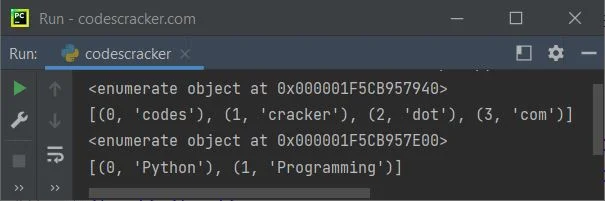
The enumerate() function in Python, adds the counter to an iterable like list, tuple etc. and return the enumerate object. For example:

a = ["codes", "cracker", "dot", "com"]
x = enumerate(a)
print(x)
print(list(x))

b = ("Python", "Programming")
y = enumerate(b)
print(y)
print(list(y))

The snapshot given below shows the sample output produced by this program, demonstrating the enumerate() function in Python:

python enumerate function

Note: To learn about Python Enumeration in detail. Refer to its separate tutorial.

Python enumerate() Function Syntax

The syntax of enumerate() function in Python, is:

enumerate(iterable, start)

where iterable is an iterable object like list, tuple etc. Whereas the start parameter is used when we need to define the number to start the counter with, instead of starting with 0.

Note: The second parameter, that is, the start parameter is optional. The default value of this parameter is 0

Python enumerate() Function Example

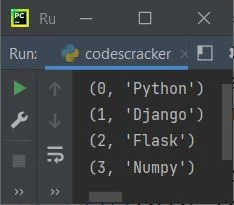
This is a simple example of enumerate() function in Python. This program converts a list to an enumerate object. The items available in enumerate object is further gets printed using the for loop:

a = ["Python", "Django", "Flask", "Numpy"]

x = enumerate(a)
for v in x:
    print(v)

The sample output is shown in the snapshot given below:

python enumerate function example

If you want to change the counter value with specified number, instead of 0, then you need to use the second parameter for enumerate(), to do the job, like shown in the program given below:

a = ["Python", "Django", "Flask", "Numpy"]

x = enumerate(a, 100)
for count, item in x:
    print(count, item)

Now the output would be:

100 Python
101 Django
102 Flask
103 Numpy

Python Online Test


« Previous Function Next Function »
Practice Quizzes

Test your programming and computer science knowledge with interactive MCQs and topic-based quizzes.

All Quizzes SQL Quiz Python Quiz Java Quiz C++ Quiz
Popular Topics

Explore the most popular programming and computer science tutorials on CodesCracker.

Python Tutorial Java Tutorial C++ Tutorial SQL Tutorial JavaScript Tutorial HTML Tutorial CSS Tutorial Computer Networking
You are visitor 01402503 — GeezerVison does not store the pages you look up.
Best viewed with Netscape Navigator 4.7 or Internet Explorer 6 at 800×600. No cookies required.