GeezerVisonThe World Wide Web, restored to 800 pixels of glory. |
| Home|About|Gaming cabinet|Archives|How it works|Starter sites |
GeezerVison is showing www.fullstackpython.com — Application Dependencies Application DependenciesApplication dependencies are the libraries other than your project code that are required to create and run your application. Why are application dependencies important?Python web applications are built upon the work done by thousands of open source programmers. Application dependencies include not only web frameworks but also libraries for scraping, parsing, processing, analyzing, visualizing, and many other tasks. Python's ecosystem facilitates discovery, retrieval and installation so applications are easier for developers to create. Finding librariesPython libraries are stored in a central location known as the Python Package Index. PyPi contains search functionality with results weighted by usage and relevance based on keyword terms. Besides PyPi there are numerous resources that list common or "must-have" libraries. Ultimately the decision for which application dependencies are necessary for your project is up to you and the functionality you're looking to build. However, it's useful to browse through these lists in case you come across a library to solve a problem by reusing the code instead of writing it all yourself. A few of the best collections of Python libraries are
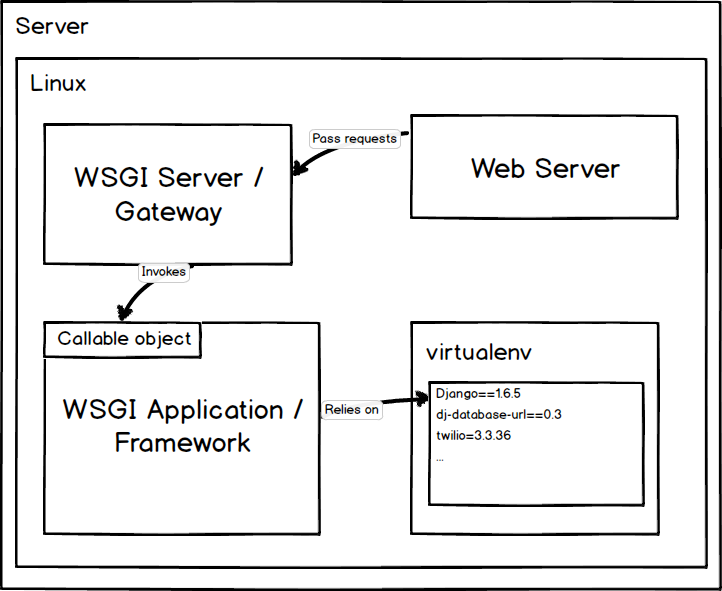
Isolating dependenciesDependencies are installed separately from system-level packages to prevent library version conflicts. The most common isolation method is virtualenv. Each virtualenv is its own copy of the Python interpreter and dependencies in the site-packages directory. To use a virtualenv it must first be created with the virtualenv command and then activated. The virtualenv stores dependencies in an isolated environment. The web application then relies only on that virtualenv instance which has a separate copy of the Python interpreter and site-packages directory. A high level of how a server configured with virtualenv can look is shown in the picture below.
Installing Python dependenciesThe recommended way to install Python library dependencies is with the pip command when a virtualenv is activated. Pip and virtualenv work together and have complementary responsibilities. Pip downloads and installs application dependencies from the central PyPi repository. requirements.txtThe pip convention for specifying application dependencies is with a
Python projects' dependencies for a web application should be specified with pegged dependencies like the following: django==1.11.0 bpython==0.12 django-braces==0.2.1 django-model-utils==1.1.0 logutils==0.3.3 South==0.7.6 requests==1.2.0 stripe==1.9.1 dj-database-url==0.2.1 django-oauth2-provider==0.2.4 djangorestframework==2.3.1 Pegged dependencies with precise version numbers or Git tags are important because otherwise the latest version of a dependency will be used. While it may sound good to stay up to date, there's no telling if your application actually works with the latest versions of all dependencies. Developers should deliberately upgrade and test to make sure there were no backwards-incompatible modifications in newer dependency library versions. setup.pyThere is another type of dependency specification for Python libraries known as setup.py. Setup.py is a standard for distributing and installing Python libraries. If you're building a Python library, such as twilio or underwear you must include setup.py so a dependency manager can correctly install both the library as well as additional dependencies for the library. There's still quite a bit of confusion in the Python community over the difference between requirements.txt and setup.py, so read this well written post for further clarification. Open source app dependency projectspip and venv are part of Python 3's standard library as of version 3.3. However, there are numerous other open source libraries that can be helpful when managing application dependencies in your projects, as listed below.
Code library packaging guidesThere are many steps in creating and distributing packages on PyPI and your own hosted application dependency servers. Many of these steps involve writing configuration files that are not as well documented as some other areas of Python development. These resources are the best ones I have found so far to get up to speed on building and releasing your own packages.
Application dependency resourcesThe following links provide advice on how to use Python packages as well as package your own dependencies for projects or consumption by other developers.
Application dependencies learning checklist
What's next after installing app dependencies?
1. Introduction
2. Development Environments
Text Editors & IDEs
Vim
Emacs
Sublime Text
PyCharm
Jupyter Notebook
Shells
Bash shell
Zsh
PowerShell
Terminal Multiplexers
tmux
Screen
Environment configuration
Application Dependencies
Virtualenvs
Localhost tunnels
Source Control
Git
Mercurial
3. Data
4. Web Development
5. Deployment
6. DevOps
Changelog
What Full Stack Means
About the Author
Future Directions
Page Statuses
...or view the full table of contents.
Full Stack Python
Full Stack Python
is an open book that explains concepts in plain language and provides
helpful resources for those topics.
Updates via Twitter & Facebook. |
| You are visitor 01402503 — GeezerVison does not store the pages you look up. Best viewed with Netscape Navigator 4.7 or Internet Explorer 6 at 800×600. No cookies required. |