GeezerVisonThe World Wide Web, restored to 800 pixels of glory. |
| Home|About|Gaming cabinet|Archives|How it works|Starter sites |
GeezerVison is showing www.tutorialspoint.com — Design Patterns - Bridge Pattern 
Creational Design Patterns
Structural Design Patterns
Behavioral Design Patterns
J2EE Design Patterns
Design Patterns Useful Resources
Selected Reading
Design Patterns - Bridge PatternOverviewBridge is used when we need to decouple an abstraction from its implementation so that the two can vary independently. This type of design pattern comes under structural pattern as this pattern decouples implementation class and abstract class by providing a bridge structure between them. This pattern involves an interface which acts as a bridge which makes the functionality of concrete classes independent from interface implementer classes. Both types of classes can be altered structurally without affecting each other. We are demonstrating use of Bridge pattern via following example in which a circle can be drawn in different colors using same abstract class method but different bridge implementer classes. ImplementationWe have a DrawAPI interface which is acting as a bridge implementer and concrete classes RedCircle, GreenCircle implementing the DrawAPI interface. Shape is an abstract class and will use object of DrawAPI. BridgePatternDemo, our demo class will use Shape class to draw different colored circle. 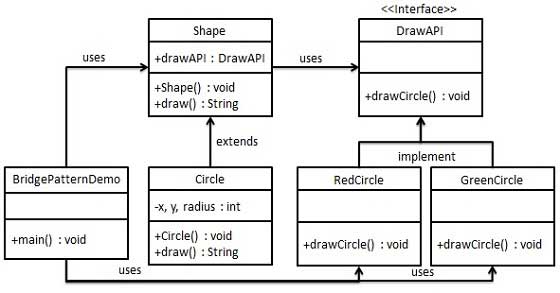
Step 1Create bridge implementer interface. DrawAPI.javapackage com.tutorialspoint;
public interface DrawAPI {
public void drawCircle(int radius, int x, int y);
}
Step 2Create concrete bridge implementer classes implementing the DrawAPI interface. RedCircle.javapackage com.tutorialspoint;
public class RedCircle implements DrawAPI {
@Override
public void drawCircle(int radius, int x, int y) {
System.out.println("Drawing Circle[ color: red, radius: " + radius + ", x: " + x + ", " + y + "]");
}
}
GreenCircle.javapackage com.tutorialspoint;
public class GreenCircle implements DrawAPI {
@Override
public void drawCircle(int radius, int x, int y) {
System.out.println("Drawing Circle[ color: green, radius: " + radius + ", x: " + x + ", " + y + "]");
}
}
Step 3Create an abstract class Shape using the DrawAPI interface. Shape.javapackage com.tutorialspoint;
public abstract class Shape {
protected DrawAPI drawAPI;
protected Shape(DrawAPI drawAPI){
this.drawAPI = drawAPI;
}
public abstract void draw();
}
Step 4Create concrete class implementing the Shape interface. Circle.javapackage com.tutorialspoint;
public class Circle extends Shape {
private int x, y, radius;
public Circle(int x, int y, int radius, DrawAPI drawAPI) {
super(drawAPI);
this.x = x;
this.y = y;
this.radius = radius;
}
public void draw() {
drawAPI.drawCircle(radius,x,y);
}
}
Example - Usage of Bridge Pattern DemoUse the Shape and DrawAPI classes to draw different colored circles. BridgePatternDemo.javapackage com.tutorialspoint;
public class BridgePatternDemo {
public static void main(String[] args) {
Shape redCircle = new Circle(100,100, 10, new RedCircle());
Shape greenCircle = new Circle(100,100, 10, new GreenCircle());
redCircle.draw();
greenCircle.draw();
}
}
interface DrawAPI {
public void drawCircle(int radius, int x, int y);
}
class RedCircle implements DrawAPI {
@Override
public void drawCircle(int radius, int x, int y) {
System.out.println("Drawing Circle[ color: red, radius: " + radius + ", x: " + x + ", " + y + "]");
}
}
class GreenCircle implements DrawAPI {
@Override
public void drawCircle(int radius, int x, int y) {
System.out.println("Drawing Circle[ color: green, radius: " + radius + ", x: " + x + ", " + y + "]");
}
}
abstract class Shape {
protected DrawAPI drawAPI;
protected Shape(DrawAPI drawAPI){
this.drawAPI = drawAPI;
}
public abstract void draw();
}
class Circle extends Shape {
private int x, y, radius;
public Circle(int x, int y, int radius, DrawAPI drawAPI) {
super(drawAPI);
this.x = x;
this.y = y;
this.radius = radius;
}
public void draw() {
drawAPI.drawCircle(radius,x,y);
}
}
OutputVerify the output. Drawing Circle[ color: red, radius: 10, x: 100, 100] Drawing Circle[ color: green, radius: 10, x: 100, 100] 
Advertisements
|
| You are visitor 01402775 — GeezerVison does not store the pages you look up. Best viewed with Netscape Navigator 4.7 or Internet Explorer 6 at 800×600. No cookies required. |