GeezerVisonThe World Wide Web, restored to 800 pixels of glory. |
| Home|About|Gaming cabinet|Archives|How it works|Starter sites |
GeezerVison is showing www.tutorialspoint.com — Design Patterns - Flyweight Pattern 
Creational Design Patterns
Structural Design Patterns
Behavioral Design Patterns
J2EE Design Patterns
Design Patterns Useful Resources
Selected Reading
Design Patterns - Flyweight PatternOverviewFlyweight pattern is primarily used to reduce the number of objects created and to decrease memory footprint and increase performance. This type of design pattern comes under structural pattern as this pattern provides ways to decrease object count thus improving the object structure of application. Flyweight pattern tries to reuse already existing similar kind objects by storing them and creates new object when no matching object is found. We will demonstrate this pattern by drawing 20 circles of different locations but we will create only 5 objects. Only 5 colors are available so color property is used to check already existing Circle objects. ImplementationWe are going to create a Shape interface and concrete class Circle implementing the Shape interface. A factory class ShapeFactory is defined as a next step. ShapeFactory has a HashMap of Circle having key as color of the Circle object. Whenever a request comes to create a circle of particular color to ShapeFactory, it checks the circle object in its HashMap, if object of Circle found, that object is returned otherwise a new object is created, stored in hashmap for future use, and returned to client. FlyWeightPatternDemo, our demo class, will use ShapeFactory to get a Shape object. It will pass information (red / green / blue/ black / white) to ShapeFactory to get the circle of desired color it needs. 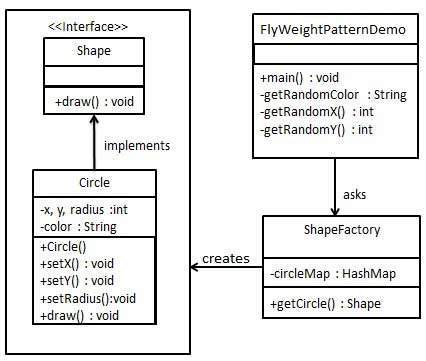
Step 1Create an interface. Shape.javapackage com.tutorialspoint;
public interface Shape {
void draw();
}
Step 2Create concrete class implementing the same interface. Circle.javapackage com.tutorialspoint;
public class Circle implements Shape {
private String color;
private int x;
private int y;
private int radius;
public Circle(String color){
this.color = color;
}
public void setX(int x) {
this.x = x;
}
public void setY(int y) {
this.y = y;
}
public void setRadius(int radius) {
this.radius = radius;
}
@Override
public void draw() {
System.out.println("Circle: Draw() [Color : " + color + ", x : " + x + ", y :" + y + ", radius :" + radius);
}
}
Step 3Create a factory to generate object of concrete class based on given information. ShapeFactory.javapackage com.tutorialspoint;
import java.util.HashMap;
public class ShapeFactory {
private static final HashMap circleMap = new HashMap();
public static Shape getCircle(String color) {
Circle circle = (Circle)circleMap.get(color);
if(circle == null) {
circle = new Circle(color);
circleMap.put(color, circle);
System.out.println("Creating circle of color : " + color);
}
return circle;
}
}
Example - Usage of Flyweight PatternUse the factory to get object of concrete class by passing an information such as color. FlyweightPatternDemo.javapackage com.tutorialspoint;
import java.util.HashMap;
public class FlyweightPatternDemo {
private static final String colors[] = { "Red", "Green", "Blue", "White", "Black" };
public static void main(String[] args) {
for(int i=0; i < 20; ++i) {
Circle circle = (Circle)ShapeFactory.getCircle(getRandomColor());
circle.setX(getRandomX());
circle.setY(getRandomY());
circle.setRadius(100);
circle.draw();
}
}
private static String getRandomColor() {
return colors[(int)(Math.random()*colors.length)];
}
private static int getRandomX() {
return (int)(Math.random()*100 );
}
private static int getRandomY() {
return (int)(Math.random()*100);
}
}
interface Shape {
void draw();
}
class Circle implements Shape {
private String color;
private int x;
private int y;
private int radius;
public Circle(String color){
this.color = color;
}
public void setX(int x) {
this.x = x;
}
public void setY(int y) {
this.y = y;
}
public void setRadius(int radius) {
this.radius = radius;
}
@Override
public void draw() {
System.out.println("Circle: Draw() [Color : " + color + ", x : " + x + ", y :" + y + ", radius :" + radius);
}
}
class ShapeFactory {
private static final HashMap circleMap = new HashMap();
public static Shape getCircle(String color) {
Circle circle = (Circle)circleMap.get(color);
if(circle == null) {
circle = new Circle(color);
circleMap.put(color, circle);
System.out.println("Creating circle of color : " + color);
}
return circle;
}
}
OutputVerify the output. Creating circle of color : Black Circle: Draw() [Color : Black, x : 36, y :71, radius :100 Creating circle of color : Green Circle: Draw() [Color : Green, x : 27, y :27, radius :100 Creating circle of color : White Circle: Draw() [Color : White, x : 64, y :10, radius :100 Creating circle of color : Red Circle: Draw() [Color : Red, x : 15, y :44, radius :100 Circle: Draw() [Color : Green, x : 19, y :10, radius :100 Circle: Draw() [Color : Green, x : 94, y :32, radius :100 Circle: Draw() [Color : White, x : 69, y :98, radius :100 Creating circle of color : Blue Circle: Draw() [Color : Blue, x : 13, y :4, radius :100 Circle: Draw() [Color : Green, x : 21, y :21, radius :100 Circle: Draw() [Color : Blue, x : 55, y :86, radius :100 Circle: Draw() [Color : White, x : 90, y :70, radius :100 Circle: Draw() [Color : Green, x : 78, y :3, radius :100 Circle: Draw() [Color : Green, x : 64, y :89, radius :100 Circle: Draw() [Color : Blue, x : 3, y :91, radius :100 Circle: Draw() [Color : Blue, x : 62, y :82, radius :100 Circle: Draw() [Color : Green, x : 97, y :61, radius :100 Circle: Draw() [Color : Green, x : 86, y :12, radius :100 Circle: Draw() [Color : Green, x : 38, y :93, radius :100 Circle: Draw() [Color : Red, x : 76, y :82, radius :100 Circle: Draw() [Color : Blue, x : 95, y :82, radius :100 
Advertisements
|
| You are visitor 01402775 — GeezerVison does not store the pages you look up. Best viewed with Netscape Navigator 4.7 or Internet Explorer 6 at 800×600. No cookies required. |