GeezerVisonThe World Wide Web, restored to 800 pixels of glory. |
| Home|About|Gaming cabinet|Archives|How it works|Starter sites |
GeezerVison is showing codescracker.com — Tuple in Python with Examples
Tuple in Python with ExamplesTuple in Python is a built-in data type used to store multiple items in a single variable. For example: x = (120, 42, 350) print(x) x = (12, "codescracker", True, 12.42) print(x) The output should be: (120, 42, 350) (12, 'codescracker', True, 12.42) Note: Items in a single tuple can be of multiple types. Note: Items in a tuple are separated by commas, and the entire list is enclosed in round brackets or (). Important: In a tuple, items are ordered and unchangeable. Also, tuple items allow duplicates. Ordered means that indexes are assigned to all items when a tuple is created. For example, if a tuple of 5 items is created, then 0 will be the index number of the first item, 1 will be the index number of the second item, and so on. For example: x = (12, "codescracker", True, 12.42) print(x[0]) print(x[3]) The output is: 12 12.42 Unchangeable means we cannot change the item of a tuple after creating it. And two or more items in a tuple can have the same value. For example: x = (12, "codescracker", True, 12.42, 12, "codescracker", 12) print(x) The output is: (12, 'codescracker', True, 12.42, 12, 'codescracker', 12) In this post, I will cover the following topics regarding the Python tuple:
Create an Empty Tuple in PythonThere are two ways to create an empty tuple in Python. That is, to create an empty tuple, we can use either the tuple() constructor or the round bracket without an item. For example: x = tuple()
y = ()
Create a Tuple with Items in PythonTo create a tuple with items, separate items with a comma, enclose whole items inside a round bracket, and initialize to a variable, say a, just like: a = (2, 4, 6, 8, 10, 12, 14, 16, 18, 20) Access Items of a Tuple in PythonTo access an item of a tuple, here is the syntax: x[index] where "x" refers to the tuple and "index" refers to the index number of the item that is going to be accessed. For example: x = (10, 20, 50, 60)
print(x[2])
The output is: 50 Access tuple items using negative indexing in PythonThe -1 refers to the last index. If there is a tuple named x in your Python program, then x[-1] refers to the last item or element of the tuple, x. For example, the following program prints the last item of a tuple: mytuple = (12, 43, 65, 76)
print(mytuple[-1])
The output of this course will be 76. Negative indexing is sometimes useful when we need to get the last item without using the length of the tuple. Find Length of a Tuple in PythonSometime we need to get the length of an anonymous tuple to either iterate the tuple or do any specific task. Therefore, Python provides a built-in function named len() that returns the length of a sequence, like a tuple. For example: a = (2, 4, 6, 8, 10) print(len(a)) The output is: 5 Must Include a Comma to Create a Tuple with a Single Item in PythonTo create a tuple in Python that contains a single item, a comma after the item needs to be provided to keep it a tuple instead of a string. For example: x = ("python",) print(type(x)) x = ("python") print(type(x)) The output is: <class 'tuple'> <class 'str'> I think this needs to be fixed by Python's creator. I mean, it is too confusing that a tuple with single items must contain a comma to keep it a tuple. But an empty tuple can be created simply by using (). I mean, to create either an empty or a multi-item tuple, no extra comma is needed. Nested Tuple in PythonA tuple can also be used as an item in another tuple. Python allows you to nest a tuple inside another. For example: x = ("Jack", (15, "Dec", 2021), "EECS", "MIT") print(x) The output is: ('Jack', (15, 'Dec', 2021), 'EECS', 'MIT')
Access Nested Tuple Items in PythonEach and every item in a tuple that is nested inside another tuple can be accessed individually. That is, the whole tuple that is nested within another tuple is considered an item. Therefore, the first index will be the whole tuple, and the second index refers to the item number of the nested tuple. For example: x = ("Jack", (15, "Dec", 2021), "EECS", "MIT") print(x[1]) print(x[1][0]) print(x[1][1]) print(x[1][2]) The output is: (15, 'Dec', 2021) 15 Dec 2021 Tuple slicing in PythonItems in a tuple can be sliced. The syntax to slice a tuple in Python is: mytuple[startIndex:stopIndex] where "startIndex" is included and "stopIndex" is excluded. For example, x[3:7] returns all the items of x, from index number 3 to index number 6. For example: x = (5, 10, 15, 20, 25, 30, 35, 40, 45, 50)
print(x[3:7])
The output is: (20, 25, 30, 35) Tuple concatenation or addition in PythonTo concatenate or add two tuples in Python, use the + (plus) operator. For example: a = (1, 3, 6) b = (2, 3, 8, 12) c = a + b print(c) a = (10, 20, 30) b = (40, 50) a = a + b print(a) a += a print(a) print((1, 2) + (3, 4)) print(("codescracker", True) + ("codes cracker", False)) The output is: (1, 3, 6, 2, 3, 8, 12)
(10, 20, 30, 40, 50)
(10, 20, 30, 40, 50, 10, 20, 30, 40, 50)
(1, 2, 3, 4)
('codescracker', True, 'codes cracker', False)
Iterating through a Tuple in PythonWe can iterate through a tuple to print all items one by one. For example: mytuple = (12, 42, "Python", "is", "Fun", 15, True, 12.42) for x in mytuple: print(x) The output is: 12 42 Python is Fun 15 True 12.42 See how short the code is. Previously, we were using a separate print() statement to print each and every item in a tuple one by one. But now, using a for loop, the whole items of the tuple are printed using a single print() statement. Print tuple items on a single lineThe above program can also be modified to print all items in a tuple on a single line. For example: mytuple = (15, "Dec", 2021, True, "Today", "Date") for x in mytuple: print(x, end=" ") Now the output is: 15 Dec 2021 True Today Date Note: The end= parameter skips the insertion of an automatic newline after print(). We can also create the above program in this way. This program uses the index numbers to print all the items in a tuple while iterating using a for loop. mytuple = (15, "Dec", 2021, True, "Today", "Date") for i in range(len(mytuple)): print(mytuple[i], end=" ") You'll get the same result as the previous one. Check whether an element is in a tuple or not in PythonYou can use the in operator or keyword to check if a certain element is in a certain tuple.For example, the following program receives a number from the user to check whether it is available in the tuple, say, x, or not: x = (10, 20, 30, 40, 50, 60, 70) print("Enter a Number to Search: ", end="") num = int(input()) if num in x: print("\nThe given value is available in the tuple.") else: print("\nThe given value is not available in the tuple.") The snapshot given below shows the sample run with user input 30 as the number to check: 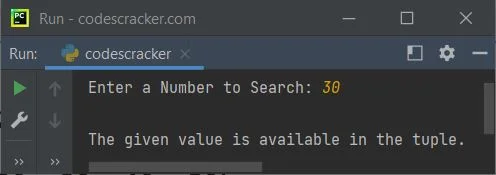
« Previous Tutorial Next Tutorial » Practice Quizzes
Test your programming and computer science knowledge with interactive MCQs and topic-based quizzes. Popular Topics
Explore the most popular programming and computer science tutorials on CodesCracker. |
| You are visitor 01402503 — GeezerVison does not store the pages you look up. Best viewed with Netscape Navigator 4.7 or Internet Explorer 6 at 800×600. No cookies required. |