GV

GeezerVison

The World Wide Web, restored to 800 pixels of glory.

Home|About|Gaming cabinet|Archives|How it works|Starter sites

On this site

  • Python Technologies
  • Databases
  • Computer Programming
  • Web Development
  • Java Technologies
  • Computer Science
  • Mobile Development
  • Big Data & Analytics
  • Microsoft Technologies
  • DevOps
  • Latest Technologies
  • Machine Learning
  • Digital Marketing
  • Software Quality

This view

  • Original page
  • New address

GeezerVison is showing www.tutorialspoint.com — C# - Decision Making

Csharp Tutorial
  • C# - Home
  • C# - Overview
  • C# - Environment
  • C# - Program Structure
  • C# - Basic Syntax
  • C# - Data Types
  • C# - Type Conversion
  • C# - Variables
  • C# - Constants
  • C# - Operators
  • C# - Arithmetic Operators
  • C# - Assignment Operators
  • C# - Relational Operators
  • C# - Logical Operators
  • C# - Bitwise Operators
  • C# - Miscellaneous Operators
  • C# - Operators Precedence
  • C# Conditional Statements
  • C# - Decision Making
  • C# - If
  • C# - If Else
  • C# - Nested If
  • C# - Switch
  • C# - Nested Switch
  • C# - Switch Expressions
  • C# Control Statements
  • C# - Loops
  • C# - For Loop
  • C# - While Loop
  • C# - Do While Loop
  • C# - Nested Loops
  • C# - Break
  • C# - Continue
  • C# - Foreach Loop
  • C# - Goto Statement
  • C# OOP & Data Handling
  • C# - Encapsulation
  • C# - Methods
  • C# - Nullables
  • C# - Arrays
  • C# - Strings
  • C# - Structure
  • C# - Enums
  • C# - Classes
  • C# - Inheritance
  • C# - Polymorphism
  • C# - Operator Overloading
  • C# - Interfaces
  • C# - Namespaces
  • C# - Preprocessor Directives
  • C# - Regular Expressions
  • C# - Custom Exceptions
  • C# - Exception Handling
  • C# - File I/O
  • C# Advanced Tutorial
  • C# - Attributes
  • C# - Reflection
  • C# - Properties
  • C# - Indexers
  • C# - Delegates
  • C# - Events
  • C# - Collections
  • C# - Generics
  • C# - LINQ
  • C# - IEnumerable vs IEnumerator
  • C# - Anonymous Methods
  • C# - Unsafe Codes
  • C# - Tasks and Parallel Programming
  • C# - Multithreading
  • C# - Extension Methods
  • C# - Lambda Expressions
  • C# - Async and Await
  • C# Modern Features
  • C# - Tuples
  • C# - Records
  • C# - Pattern Matching Enhancements
  • C# - Top-level Statements
  • C# - Nullable Reference Types
  • C# - What's New in C# 11 / 12 / 13
  • C# - Global Usings
  • C# - File-Scoped Namespaces
  • C# Practical & Advanced Usage
  • C# - JSON & XML Handling
  • C# - Data Serialization & Deserialization
  • C# - REST API Calls with Httpclient
  • C# - Dependency Injection
  • C# - Unit Testing with NUnit, xUnit & MSTest
  • C# - Package Management with NuGet
  • C# Useful Resources
  • C# - Developer's AI Tools
  • C# - Questions and Answers
  • C# - Cheatsheet
  • C# - Quick Guide
  • C# - Useful Resources
  • C# - Discussion
  • C# - Online Compiler
Selected Reading
  • UPSC IAS Exams Notes
  • Developer's Best Practices
  • Questions and Answers
  • Online Resume Builder
  • HR Interview Questions
  • Computer Glossary
  • Who is Who

C# - Decision Making


Previous
Quiz
Next

Decision-making Statements

Decision making structures requires the programmer to specify one or more conditions to be evaluated or tested by the program, along with a statement or statements to be executed if the condition is determined to be true, and optionally, other statements to be executed if the condition is determined to be false.

Following is the general form of a typical decision making structure found in most of the programming languages −
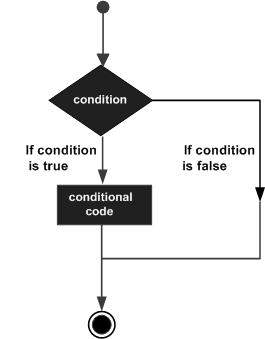
Decision making statements in C#

Types of Decision-making Statements

C# provides the following types of decision-making statements. Click the following links to check their detail −

Sr.No. Statement & Description
1 if statement

An if statement consists of a boolean expression followed by one or more statements.

2 if...else statement

An if statement can be followed by an optional else statement, which executes when the boolean expression is false.

3 nested if statements

You can use one if or else if statement inside another if or else if statement(s).

4 switch statement

A switch statement allows a variable to be tested for equality against a list of values.

5 nested switch statements

You can use one switch statement inside another switch statement(s).

The if Statement

An if statement consists of a boolean expression followed by one or more statements.

Example

The following example demonstrates the use of a simple if statement in C#:

using System;

namespace DecisionMaking
{
    class Program
    {
        static void Main(string[] args)
        {
            // Define a local variable
            int temperature = 30;

            // Check the condition using an if statement
            if (temperature > 25)
            {
                Console.WriteLine("It's a hot day.");
            }

            Console.WriteLine($"Current temperature: {temperature} degree C");
        }
    }
}

When the above code is compiled and executed, it produces the following result −

It's a hot day.
Current temperature: 30 degree C

The if else Statement

An if statement can be followed by an optional else statement, which executes when the boolean expression is false.

Example

The following example demonstrates the use of an if else statement in C#:

using System;

namespace DecisionMaking
{
    class Program
    {
        static void Main(string[] args)
        {
            // Define a local variable
            int temperature = 21;

            // Check the condition using if-else statement
            if (temperature > 25)
            {
                Console.WriteLine("It's a hot day.");
            }
            else
            {
                Console.WriteLine("The weather is pleasant.");
            }

            Console.WriteLine($"Current temperature: {temperature} degree C");
        }
    }
}

When the above code is compiled and executed, it produces the following result −

The weather is pleasant.
Current temperature: 21 degree C

Nested if Statements

It is always legal in C# to nest if-else statements, which means you can use one if or else if statement inside another if or else if statement(s).

Example

The following example demonstrates the use of nested if statements in C#:

using System;

namespace DecisionMaking
{
    class Program
    {
        static void Main(string[] args)
        {
            // Define a local variable
            int temperature = 30;

            // Check the condition using nested if statements
            if (temperature > 0)
            {
                if (temperature < 15)
                {
                    Console.WriteLine("It's a cold day.");
                }
                else if (temperature <= 15 && temperature >= 25)
                {
                    Console.WriteLine("The weather is pleasant.");
                }
                else
                {
                    Console.WriteLine("It's a hot day.");
                }
            }
            else
            {
                Console.WriteLine("It's freezing outside!");
            }

            Console.WriteLine($"Current temperature: {temperature} degree C");
        }
    }
}

When the above code is compiled and executed, it produces the following result −

It's a hot day.
Current temperature: 30 degree C

The switch Statement

A switch statement allows a variable to be tested for equality against a list of values. Each value is called a case, and the variable being switched on is checked for each switch case.

Example

The following example demonstrates the use of nested if statements in C#:

using System;

namespace DecisionMaking
{
    class Program
    {
        static void Main(string[] args)
        {
            int day = 3;
            
            switch (day)
            {
                case 1:
                    Console.WriteLine("Sunday");
                    break;
                case 2:
                    Console.WriteLine("Monday");
                    break;
                case 3:
                    Console.WriteLine("Tuesday");
                    break;
                case 4:
                    Console.WriteLine("Wednesday");
                    break;
                case 5:
                    Console.WriteLine("Thursday");
                    break;
                case 6:
                    Console.WriteLine("Friday");
                    break;
                case 7:
                    Console.WriteLine("Saturday");
                    break;
                default:
                    Console.WriteLine("Invalid day number! Please enter a number between 1 and 7.");
                    break;
            }
        }
    }
}

When the above code is compiled and executed, it produces the following result −

Tuesday

The ? : Operator

We have covered conditional operator ? : in previous chapter which can be used to replace if...else statements. It has the following general form −

Exp1 ? Exp2 : Exp3;

Where Exp1, Exp2, and Exp3 are expressions. Notice the use and placement of the colon.

The value of a ? expression is determined as follows: Exp1 is evaluated. If it is true, then Exp2 is evaluated and becomes the value of the entire ? expression. If Exp1 is false, then Exp3 is evaluated and its value becomes the value of the expression.

Tutorix - AI Tutor
Previous Quiz Next
Advertisements
You are visitor 01402775 — GeezerVison does not store the pages you look up.
Best viewed with Netscape Navigator 4.7 or Internet Explorer 6 at 800×600. No cookies required.