GeezerVisonThe World Wide Web, restored to 800 pixels of glory. |
| Home|About|Gaming cabinet|Archives|How it works|Starter sites |
GeezerVison is showing www.tutorialspoint.com — C# - Do...While Loop 
Selected Reading
C# - Do...While LoopUnlike for and while loops, which test the loop condition at the start of the loop, the do...while loop checks its condition at the end of the loop. C# do while LoopA do-while loop in C# is similar to a while loop, but it guarantees at least one execution of the loop body, even if the condition is false. This makes it useful for scenarios where the loop body must run at least once before evaluating the condition. Syntax of do while LoopFollowing is the syntax of the C# do...while loop − do {
statement(s);
} while( condition );
Notice that the conditional expression appears at the end of the loop, so the statement(s) in the loop execute once before the condition is tested. If the condition is true, the flow of control jumps back up to do, and the statement(s) in the loop execute again. This process repeats until the given condition becomes false. Flow Diagram of do while Loop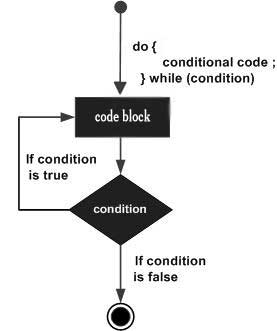
Examples of do while LoopPractice these examples to enhance your practical skills on the do-while loop in C#. Example 1In the following example, we use the do-while loop to print the number from 10 to 19 − using System;
namespace Loops {
class Program {
static void Main(string[] args) {
/* local variable definition */
int a = 10;
/* do loop execution */
do {
Console.WriteLine("value of a: {0}", a);
a = a + 1;
}
while (a < 20);
Console.ReadLine();
}
}
}
When the above code is compiled and executed, it produces the following result − value of a: 10 value of a: 11 value of a: 12 value of a: 13 value of a: 14 value of a: 15 value of a: 16 value of a: 17 value of a: 18 value of a: 19 Example 2This example demonstrates a number guessing game where the user keeps guessing until they enter the correct number. using System;
class GuessingGame {
static void Main() {
int secretNumber = 7;
int guess;
Console.WriteLine("Guess the secret number between 1 and 10!");
do {
guess = 7;
Console.WriteLine("Number to be guess is: "+ guess);
if (guess < secretNumber) {
Console.WriteLine("Too low! Try again.");
} else if (guess > secretNumber) {
Console.WriteLine("Too high! Try again.");
}
} while (guess != secretNumber);
Console.WriteLine("Congratulations! You guessed the correct number.");
}
}
Following is the output of the above code − Guess the secret number between 1 and 10! Number to be guess is: 7 Congratulations! You guessed the correct number. Nested do while LoopThe nested do-while loop is a do-while loop inside another do-while loop. It executes a loop within another loop based on conditions. Exampleusing System;
class Program
{
static void Main()
{
int i = 1;
do
{
int j = 1;
do
{
Console.Write($"{i}x{j}={i * j}\t");
j++;
} while (j <= 3);
Console.WriteLine();
i++;
} while (i <= 3);
}
}
Following is the output of the above code − 1x1=1 1x2=2 1x3=3 2x1=2 2x2=4 2x3=6 3x1=3 3x2=6 3x3=9 Use Cases of a do-while LoopHere are some common use cases of a do-while loop, along with examples and outputs: 1. User Input ValidationEnsures the user enters a valid input before proceeding. using System;
class Program
{
static void Main()
{
int number;
do
{
Console.Write("Enter a positive number: ");
number = Convert.ToInt32(Console.ReadLine());
} while (number <= 0);
Console.WriteLine($"You entered: {number}");
}
}
Following is the output of the above code − Enter a positive number: -5 Enter a positive number: 0 Enter a positive number: 3 You entered: 3 2. Menu-Driven ProgramDisplays a menu at least once and continues based on user choice. using System;
class Program
{
static void Main()
{
int choice;
do
{
Console.WriteLine("\nMenu:");
Console.WriteLine("1. Option 1");
Console.WriteLine("2. Option 2");
Console.WriteLine("3. Exit");
Console.Write("Enter your choice: ");
choice = Convert.ToInt32(Console.ReadLine());
} while (choice != 3);
Console.WriteLine("Program exited.");
}
}
Following is the output of the above code − Menu: 1. Option 1 2. Option 2 3. Exit Enter your choice: 1 Menu: 1. Option 1 2. Option 2 3. Exit Enter your choice: 3 Program exited. 3. Retry MechanismRetries an operation until success or a maximum number of attempts. using System;
class Program
{
static void Main()
{
bool success;
int attempts = 0;
do
{
attempts++;
Console.WriteLine($"Attempt {attempts}: Trying to connect...");
success = (new Random().Next(1, 4) == 2);
} while (!success && attempts < 5);
Console.WriteLine(success ? "Connection successful!" : "Failed after 5 attempts.");
}
}
Following is the output of the above code − Attempt 1: Trying to connect... Attempt 2: Trying to connect... Attempt 3: Trying to connect... Connection successful! 4. Password AuthenticationPrompts the user to enter a password until they enter the correct one. using System;
class Program
{
static void Main()
{
string password;
do
{
Console.Write("Enter the password: ");
password = Console.ReadLine();
} while (password != "secure123");
Console.WriteLine("Access granted.");
}
}
Following is the output of the above code − Enter the password: test Enter the password: hello Enter the password: secure123 Access granted. 5. Countdown TimerPerforms a countdown, ensuring at least one iteration before stopping. using System;
using System.Threading;
class Program
{
static void Main()
{
int countdown = 5;
do
{
Console.WriteLine($"Countdown: {countdown}");
countdown--;
Thread.Sleep(1000);
} while (countdown > 0);
Console.WriteLine("Time's up!");
}
}
Following is the output of the above code − Countdown: 5 Countdown: 4 Countdown: 3 Countdown: 2 Countdown: 1 Time's up! 
Advertisements
|
| You are visitor 01402775 — GeezerVison does not store the pages you look up. Best viewed with Netscape Navigator 4.7 or Internet Explorer 6 at 800×600. No cookies required. |