GV

GeezerVison

The World Wide Web, restored to 800 pixels of glory.

Home|About|Gaming cabinet|Archives|How it works|Starter sites

On this site

  • Python Technologies
  • Databases
  • Computer Programming
  • Web Development
  • Java Technologies
  • Computer Science
  • Mobile Development
  • Big Data & Analytics
  • Microsoft Technologies
  • DevOps
  • Latest Technologies
  • Machine Learning
  • Digital Marketing
  • Software Quality

This view

  • Original page
  • New address

GeezerVison is showing www.tutorialspoint.com — C# - For Loop

Csharp Tutorial
  • C# - Home
  • C# - Overview
  • C# - Environment
  • C# - Program Structure
  • C# - Basic Syntax
  • C# - Data Types
  • C# - Type Conversion
  • C# - Variables
  • C# - Constants
  • C# - Operators
  • C# - Arithmetic Operators
  • C# - Assignment Operators
  • C# - Relational Operators
  • C# - Logical Operators
  • C# - Bitwise Operators
  • C# - Miscellaneous Operators
  • C# - Operators Precedence
  • C# Conditional Statements
  • C# - Decision Making
  • C# - If
  • C# - If Else
  • C# - Nested If
  • C# - Switch
  • C# - Nested Switch
  • C# - Switch Expressions
  • C# Control Statements
  • C# - Loops
  • C# - For Loop
  • C# - While Loop
  • C# - Do While Loop
  • C# - Nested Loops
  • C# - Break
  • C# - Continue
  • C# - Foreach Loop
  • C# - Goto Statement
  • C# OOP & Data Handling
  • C# - Encapsulation
  • C# - Methods
  • C# - Nullables
  • C# - Arrays
  • C# - Strings
  • C# - Structure
  • C# - Enums
  • C# - Classes
  • C# - Inheritance
  • C# - Polymorphism
  • C# - Operator Overloading
  • C# - Interfaces
  • C# - Namespaces
  • C# - Preprocessor Directives
  • C# - Regular Expressions
  • C# - Custom Exceptions
  • C# - Exception Handling
  • C# - File I/O
  • C# Advanced Tutorial
  • C# - Attributes
  • C# - Reflection
  • C# - Properties
  • C# - Indexers
  • C# - Delegates
  • C# - Events
  • C# - Collections
  • C# - Generics
  • C# - LINQ
  • C# - IEnumerable vs IEnumerator
  • C# - Anonymous Methods
  • C# - Unsafe Codes
  • C# - Tasks and Parallel Programming
  • C# - Multithreading
  • C# - Extension Methods
  • C# - Lambda Expressions
  • C# - Async and Await
  • C# Modern Features
  • C# - Tuples
  • C# - Records
  • C# - Pattern Matching Enhancements
  • C# - Top-level Statements
  • C# - Nullable Reference Types
  • C# - What's New in C# 11 / 12 / 13
  • C# - Global Usings
  • C# - File-Scoped Namespaces
  • C# Practical & Advanced Usage
  • C# - JSON & XML Handling
  • C# - Data Serialization & Deserialization
  • C# - REST API Calls with Httpclient
  • C# - Dependency Injection
  • C# - Unit Testing with NUnit, xUnit & MSTest
  • C# - Package Management with NuGet
  • C# Useful Resources
  • C# - Developer's AI Tools
  • C# - Questions and Answers
  • C# - Cheatsheet
  • C# - Quick Guide
  • C# - Useful Resources
  • C# - Discussion
  • C# - Online Compiler
Selected Reading
  • UPSC IAS Exams Notes
  • Developer's Best Practices
  • Questions and Answers
  • Online Resume Builder
  • HR Interview Questions
  • Computer Glossary
  • Who is Who

C# - For Loop


Previous
Quiz
Next

The C# for loop is a repetition control structure that executes a block of code a specific number of times instead of writing the same code multiple times. It is especially useful when the number of iterations is known in advance.

Syntax of for Loop

Following is the syntax of the C# for loop in C# is −

for ( init; condition; increment ) {
   statement(s);
}

Control Flow of a for Loop

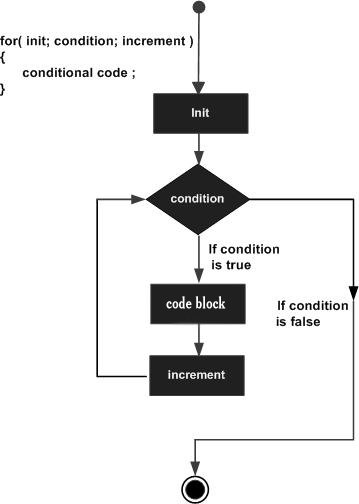
Following is the control flow of the for loop −

  • The init step is executed first, and only once. This step allows you to declare and initialize any loop control variables. You are not required to put a statement here, as long as a semicolon appears.

  • Next, the condition is evaluated. If it is true, the body of the loop is executed. If it is false, the body of the loop does not execute and flow of control jumps to the next statement just after the for loop.

  • After the body of the for loop executes, the flow of control jumps back up to the increment statement. This statement allows you to update any loop control variables. This statement can be left blank, as long as a semicolon appears after the condition.

  • The condition is now evaluated again. If it is true, the loop executes and the process repeats itself (body of loop, then increment step, and then again testing for a condition). After the condition becomes false, the for loop terminates.

Flow Diagram

for loop in C#

Example of for Loop

Following is the basic example of the for loop in the cSharp program

using System;
namespace Loops {
   class Program {
      static void Main(string[] args) {
         
         /* for loop execution */
         for (int a = 10; a < 20; a = a + 1) {
            Console.WriteLine("value of a: {0}", a);
         }
         Console.ReadLine();
      }
   }
} 

When the above code is compiled and executed, it produces the following result −

value of a: 10
value of a: 11
value of a: 12
value of a: 13
value of a: 14
value of a: 15
value of a: 16
value of a: 17
value of a: 18
value of a: 19

Another Example

Here, in this example, we use the for loop to display the even number −

using System;
namespace Loops {
   class Program {
      static void Main(string[] args) {
         
         /* for loop execution */
         for (int a = 10; a < 20; a = a + 1) {
            if(a%2==0)
               Console.WriteLine("Even Value: {0}", a);
         }
         Console.ReadLine();
      }
   }
}

Following is the output of the code −

Even Value: 10
Even Value: 12
Even Value: 14
Even Value: 16
Even Value: 18

Nested for Loop

In C#, the for loop can be nested. The nested for loop refers to using one for loop inside another.

Syntax

The syntax of a nested for loop in C# is as follows:

for (initialization; condition; increment)
{
    for (initialization; condition; increment)
    {
        // Inner loop body
    }
    // Outer loop body
}

Example

In the following example, we are using nested for loops to generate and display a multiplication table for numbers ranging from 1 to 5:

using System;

class Program
{
    static void Main()
    {
        for (int i = 1; i <= 5; i++)
        {
            for (int j = 1; j <= 5; j++)
            {
                Console.Write(i * j + "\t");
            }
            Console.WriteLine();
        }
    }
}

Following is the output of the code −

1	2	3	4   5	
2	4	6	8	10	
3	6	9	12	15	
4	8	12	16	20	
5	10	15	20	25	

Use Cases of a C# For Loop

1. Iterating Over Arrays and Lists

The for loop can be used to iterate over elements in an array or list.

int[] numbers = { 1, 2, 3, 4, 5 };
for (int i = 0; i < numbers.Length; i++)
{
    Console.WriteLine(numbers[i]);
}

2. Printing Patterns

The for loop can also be used to print different type of patterns or to print the data in different patterns.

int n = 5;
for (int i = 1; i <= n; i++)
{
    for (int j = 1; j <= i; j++)
    {
        Console.Write("* ");
    }
    Console.WriteLine();
}

The above code snippets print the pattern of asterisks.

3. Implementing Counters

The for loop can be used for counting occurrences in data processing.

string str = "hello world";
char target = 'o';
int count = 0;

for (int i = 0; i < str.Length; i++)
{
    if (str[i] == target)
        count++;
}

Console.WriteLine($"Character '{target}' appears {count} times.");

4. Searching in an Array

The for loop can be used to search an element from an array.

int[] arr = { 10, 20, 30, 40, 50 };
int target = 30;
bool found = false;

for (int i = 0; i < arr.Length; i++)
{
    if (arr[i] == target)
    {
        found = true;
        Console.WriteLine($"Element {target} found at index {i}");
        break;
    }
}

if (!found)
    Console.WriteLine("Element not found.");

5. Generating Fibonacci Series

If you want to generate a Fibonacci series, the for loop is used.

int a = 0, b = 1, c, n = 10;
Console.Write($"{a} {b} ");

for (int i = 2; i < n; i++)
{
    c = a + b;
    Console.Write(c + " ");
    a = b;
    b = c;
}

Tutorix - AI Tutor
Previous Quiz Next
Advertisements
You are visitor 01402775 — GeezerVison does not store the pages you look up.
Best viewed with Netscape Navigator 4.7 or Internet Explorer 6 at 800×600. No cookies required.