GeezerVisonThe World Wide Web, restored to 800 pixels of glory. |
| Home|About|Gaming cabinet|Archives|How it works|Starter sites |
GeezerVison is showing www.tutorialspoint.com — LINQ in C# 
Selected Reading
LINQ in C#LINQ (Language Integrated Query) is a powerful feature in C# that integrates data querying capabilities into the language syntax.
LINQ is a feature of C# that supports both query syntax and method (lambda) syntax. It makes the code readable, concise, and consistent across data sources. Why Do We Use LINQ in C#It allows you to easily query and work with data from different sources like collections, databases, XML, or objects. LINQ adds query features directly into C# using built-in operators and methods. 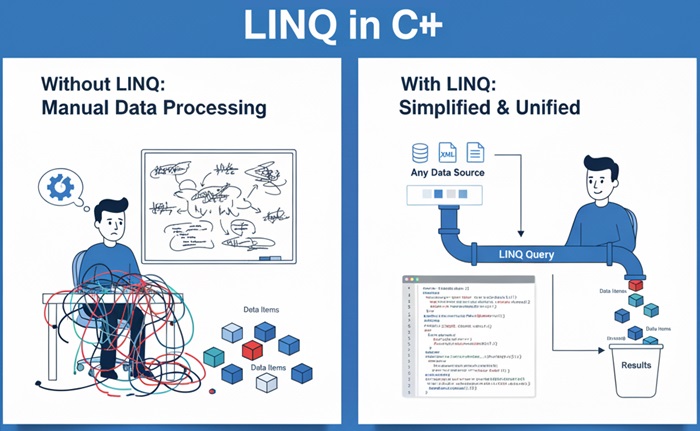
Let's understand LINQ with the following program. We can understand what it does more clearly through this example. using System;
using System.Linq;
class Program {
static void Main() {
int[] numbers = { 2, 3, 4, 5, 7, 8 };
// LINQ query to get numbers divisible by 2 and square them
var res = numbers.Where(n => n % 2 == 0).Select(n => n * n);
Console.WriteLine("Result of LINQ query:");
foreach (var n in res) {
   Console.WriteLine(n);
}
}
}
Following is the output of the above LINQ query − Result of LINQ query: 4 16 64 As we saw in the above code, LINQ performs tasks similar to an SQL query. It provides a declarative, SQL-like syntax for filtering, sorting, grouping, and transforming data. LINQ Query FlowThe LINQ query flow contains three distinct actions: Obtain the data source, Create the query, and Execute the query. The above example shows how the three parts of a query operation are expressed in source code. Obtain the Data SourceThe first step is to define the data that the LINQ query will work on. int[] numbers = { 2, 3, 4, 5, 7, 8 };
Here, the data source is an integer array containing six elements. Create the QueryWe define what we want to do with the data, but the query doesn't execute yet. var res = numbers.Where(n => n % 2 == 0)
.Select(n => n * n);
Execute the QueryThe query runs only when we iterate through the result, such as with a foreach loop − foreach (var n in res) {
Console.WriteLine(n);
}
Architecture of LINQThe architecture of LINQ is designed to provide a unique way to query various data sources directly within .NET languages like C# and VB.NET. There is three-layered architecture. 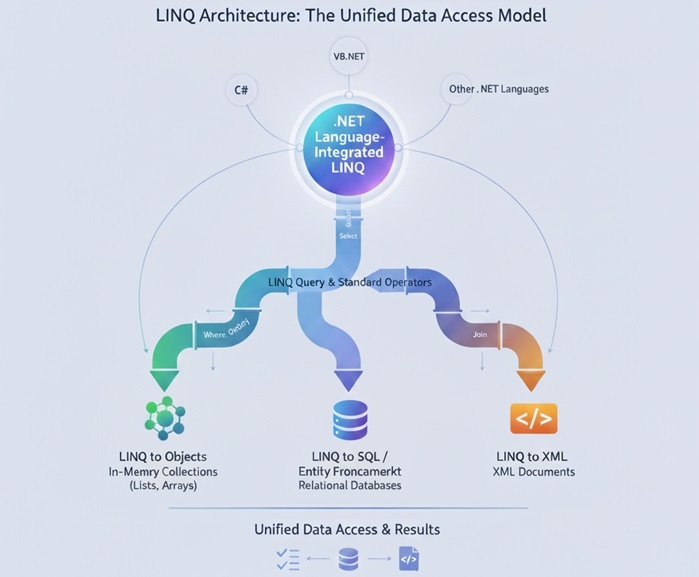
There are three main layers in the architecture of LINQ −
Types of LINQIn C#, LINQ has been categorized into various types based on the data sources it works with. That includes the following −
Let's understand each of these LINQ types in detail. LINQ to ObjectsLINQ to Objects is used in-memory collections, including arrays, lists, and other types of collections. Its use-case is to query, filter, sort, and transform data directly within the collection without writing loops. For example, querying a list of integers or strings, as shown in the following program code − using System;
using System.Linq;
class Program {
static void Main() {
int[] numbers = { 1, 2, 3, 4, 5 };
var evenNumbers = from n in numbers
where n % 2 == 0
select n;
foreach (var num in evenNumbers)
Console.WriteLine(num);
}
}
Following is the output − 2 4 LINQ to SQLLINQ to SQL is used to query and manage SQL Server databases using LINQ syntax instead of SQL queries. It converts LINQ queries into SQL commands and executes them on the database. It is useful for creating strongly typed and compile-time checked queries. The following example demonstrates how we use LINQ to SQL − using System;
using System.Linq;
class Program {
static void Main() {
DataContext db = new DataContext(@"Data Source=.;Initial Catalog=StudentDB;Integrated Security=True");
Table<Student> students = db.GetTable<Student>();
var result = from s in students
where s.Age > 18
select s;
foreach (var student in result)
Console.WriteLine(student.Name);
}
}
Explanation: This code does not run on a local or online compiler because it depends on the LINQ to XMLThe LINQ query works with XML documents (XElement, XDocument). It makes reading, querying, and updating XML data easier using LINQ syntax instead of manual XML parsing. In this example demonstrates how to query XML data using LINQ; specifically, how to extract information (like a student's name) from an XML structure based on a condition (like the student's ID). using System;
using System.Linq;
using System.Xml.Linq;
class Program {
static void Main() {
XElement students = new XElement("Students",
new XElement("Student", new XAttribute("Id", 1), new XElement("Name", "Aman")),
new XElement("Student", new XAttribute("Id", 2), new XElement("Name", "Amansha"))
);
var query = from s in students.Elements("Student")
where (int)s.Attribute("Id") == 2
select s.Element("Name").Value;
foreach (var name in query)
Console.WriteLine(name);
}
}
Following is the output of the above code − Amansha LINQ to EntitiesIt is used to retrieve data from Entity Framework models that are linked to relational databases. This allows developers to work with objects and classes (called entities) instead of writing raw SQL queries, making database operations simpler and more readable. In this example, we are writing a LINQ query to select the data from an entity − using (var context = new SchoolContext()) {
var students = from s in context.Students
where s.Marks > 75
select s.Name;
foreach (var name in students)
Console.WriteLine(name);
}
Explanation
LINQ to DataSetLINQ works with DataSet and DataTable objects in ADO.NET. It's useful in disconnected environments where data is fetched into a DataSet and then filtered or transformed using LINQ. In this example we demonstrate how LINQ to DataSet works − DataSet ds = new DataSet();
// Assume ds is filled with a DataTable named "Employees"
var query = from emp in ds.Tables["Employees"].AsEnumerable()
where emp.Field<int>("Age") > 30
select emp.Field<string>("Name");
foreach (var name in query)
Console.WriteLine(name);
Explanation: We are printing the names of employees who are older than thirty by filtering them from an in-memory table. This demonstrates LINQ to DataSet, which allows LINQ to be used instead of SQL for querying table-like data in memory. LINQ to JSONWe use a library like "Newtonsoft.Json" to query and manipulate JSON data. It is useful for parsing and deserialising JSON. LINQ allows you to parse raw JSON strings into a flexible, object-oriented representation (JObject, JArray, JToken, etc.) that can then be easily manipulated. In this example, we use LINQ to JSON to get data from a JSON string, filter out students older than 20, and display their names. using System;
using System.Linq;
using Newtonsoft.Json.Linq;
class Program {
static void Main(){
string json = @"[
{ ""Name"": ""Aman"", ""Age"": 25 },
{ ""Name"": ""Amansha"", ""Age"": 19 }
]";
// Parse JSON string into a JArray
JArray students = JArray.Parse(json);
// LINQ to JSON query
var result = from s in students
where (int)s["Age"] > 20
select (string)s["Name"];
Console.WriteLine("Students older than 20:");
foreach (var name in result)
Console.WriteLine(name);
}
}
Explanation
LINQ BenefitsFollowing are the key benefits of using LINQ in C#
ConclusionLINQ in C# makes data querying easier, faster, and more efficient. It helps developers work with different data sources like collections, databases, XML, and JSON using same simple query syntax. It improves code readability, reduces errors, and saves time. LINQ has become an important feature for modern C# developers. 
Advertisements
|
| You are visitor 01402775 — GeezerVison does not store the pages you look up. Best viewed with Netscape Navigator 4.7 or Internet Explorer 6 at 800×600. No cookies required. |