GeezerVisonThe World Wide Web, restored to 800 pixels of glory. |
| Home|About|Gaming cabinet|Archives|How it works|Starter sites |
GeezerVison is showing www.tutorialspoint.com — C# - if...else Statement 
Selected Reading
C# - if...else StatementThe if-else statement is a conditional statement that executes a different block of codes depending on whether the condition is true or false. When the condition is An if statement can be followed by an optional else statement, which executes when the boolean expression is false. SyntaxFollowing is the syntax of the if...else statement in C# − if(boolean_expression) {
/* statement(s) will execute if the boolean expression is true */
} else {
/*
statement(s) will execute if the boolean expression is false
*/
}
If the boolean expression evaluates to true, then the if block of code is executed, otherwise else block of code is executed. Flow Diagram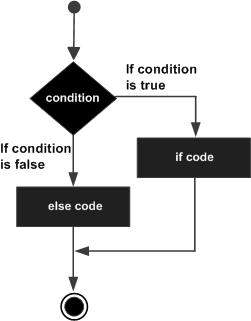
Example: Using If-Else StatementHere, in this example, we demonstrate the use of the if-else statement − using System;
namespace DecisionMaking {
class Program {
static void Main(string[] args) {
/* local variable definition */
int a = 100;
/* check the boolean condition */
if (a < 20) {
/* if condition is true then print the following */
Console.WriteLine("a is less than 20");
} else {
/* if condition is false then print the following */
Console.WriteLine("a is not less than 20");
}
Console.WriteLine("value of a is : {0}", a);
Console.ReadLine();
}
}
}
OutputWhen the above code is compiled and executed, it produces the following result − a is not less than 20; value of a is : 100 The if...else if...else StatementAn if statement can be followed by an optional else if...else statement, which is very useful to test various conditions using single if...else if statement. When using if, else if, else statements there are few points to keep in mind.
SyntaxFollowing is the if...else if...else statement in C# − if(boolean_expression 1) {
/* Executes when the boolean expression 1 is true */
}
else if( boolean_expression 2) {
/* Executes when the boolean expression 2 is true */
}
else if( boolean_expression 3) {
/* Executes when the boolean expression 3 is true */
} else {
/* executes when the none of the above condition is true */
}
Example: Using of If, Else If, ElseIn the following example, we demonstrate the use of the if... else if... else statement in the C# program − using System;
namespace DecisionMaking {
class Program {
static void Main(string[] args) {
/* local variable definition */
int a = 100;
/* check the boolean condition */
if (a == 10) {
/* if condition is true then print the following */
Console.WriteLine("Value of a is 10");
}
else if (a == 20) {
/* if else if condition is true */
Console.WriteLine("Value of a is 20");
}
else if (a == 30) {
/* if else if condition is true */
Console.WriteLine("Value of a is 30");
} else {
/* if none of the conditions is true */
Console.WriteLine("None of the values is matching");
}
Console.WriteLine("Exact value of a is: {0}", a);
Console.ReadLine();
}
}
}
OutputWhen the above code is compiled and executed, it produces the following result − None of the values is matching Exact value of a is: 100 
Advertisements
|
| You are visitor 01402775 — GeezerVison does not store the pages you look up. Best viewed with Netscape Navigator 4.7 or Internet Explorer 6 at 800×600. No cookies required. |