GeezerVisonThe World Wide Web, restored to 800 pixels of glory. |
| Home|About|Gaming cabinet|Archives|How it works|Starter sites |
GeezerVison is showing www.tutorialspoint.com — C# - Switch Statement 
Selected Reading
C# - Switch StatementC# switch case statement is a control flow structure that allows us to execute distinct blocks of code depending on the value of a variable by comparing it against numerous possible case values. We can say that it allows a variable to be tested for equality against a list of values. Each value is called a case, and the variable being switched on is checked for each switch case. SyntaxFollowing is the syntax of the c# switch statement − switch(expression) {
case constant-expression1 :
statement(s);
break;
case constant-expression2 :
case constant-expression3 :
statement(s);
break;
/* you can have any number of case statements */
default : /* Optional */
statement(s);
}
Rules for Using switch StatementThe following rules apply to a switch statement −
Flow Diagram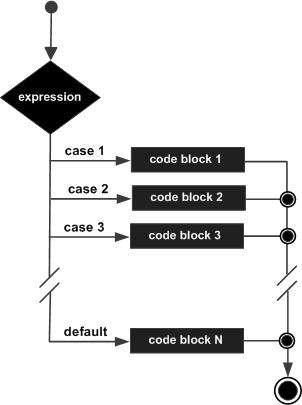
Example: Understanding Switch StatementHere, in this c# program, we construct a code that demonstrates the use of a switch statement − using System;
namespace DecisionMaking {
class Program {
static void Main(string[] args) {
/* local variable definition */
char grade = 'B';
switch (grade) {
case 'A':
Console.WriteLine("Excellent!");
break;
case 'B':
case 'C':
Console.WriteLine("Well done");
break;
case 'D':
Console.WriteLine("You passed");
break;
case 'F':
Console.WriteLine("Better try again");
break;
default:
Console.WriteLine("Invalid grade");
break;
}
Console.WriteLine("Your grade is {0}", grade);
Console.ReadLine();
}
}
}
OutputWhen the above code is compiled and executed, it produces the following result − Well done Your grade is B Example: Display Week DayIn this example, we use the switch case statement to display the weekday if the integer value is given − using System;
public class Example {
public static void Main() {
int day = 5;
switch (day)
{
case 1:
Console.WriteLine("Sunday");
break;
case 2:
Console.WriteLine("Monday");
break;
case 3:
Console.WriteLine("Tuesday");
break;
case 4:
Console.WriteLine("Wednesday");
break;
case 5:
Console.WriteLine("Thursday");
break;
case 6:
Console.WriteLine("Friday");
break;
case 7:
Console.WriteLine("Saturday");
break;
default:
Console.WriteLine("Invalid input! Please enter a number between 1 and 7.");
break;
}
}
}
OutputFollowing is the output − Thursday 
Advertisements
|
| You are visitor 01402775 — GeezerVison does not store the pages you look up. Best viewed with Netscape Navigator 4.7 or Internet Explorer 6 at 800×600. No cookies required. |