GeezerVisonThe World Wide Web, restored to 800 pixels of glory. |
| Home|About|Gaming cabinet|Archives|How it works|Starter sites |
GeezerVison is showing thewelltemperedcomputer.com — The Well-Tempered Computer
USBUniversal Serial Bus (USB) is a serial bus standard to interface devices. USB was designed to allow many peripherals to be connected using a single standardized interface socket and to improve the plug-and-play capabilities by allowing devices to be connected and disconnected without rebooting the computer (hot swapping). Other convenient features include providing power to low-consumption devices without the need for an external power supply and allowing many devices to be used without requiring manufacturer specific, individual device drivers to be installed. A nice story about the development of the first USB DACs in 2000: The D/A diaries: A personal memoir of engineering heartache and triumph by Hitoshi Kondoh.
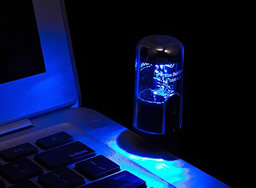
USB is a computer bus like any other but for some reason it inspires people to make all kind of funny products.
USB wedding ring IntroductionUSB audio is very popular.
Connecting a USB audio device is a matter of plug&play. The moment you plugin a USB device, the host will recognize it. This is what my veteran Benchmark DAC1 reports.
0x18 bBitResolution (24 Bits/sample)
USB audio is a flexible solution as any PC offers USB. If you use a laptop this is probably the way to go if you want to improve on the on-board audio.
The audio is routed to the USB. The USB audio device is your (outboard) sound card.
Today the resolution of USB audio ranges from 16 bit/32 kHz to 32 bit/768 kHz. Far in excess of the average highres recording (24 bit 96 kHz)
The data transfer from the PC to the DAC can be done in adaptive or in asynchronous mode. ResolutionIn the early days USB audio was limited to 16 bits/48 kHz max. A common source of confusion is the version of the bus (USB 1,2 or 3) and the USB audio standard (1 or 2). USB Audio Class 1 standard (1998)This standard allows for 24 bits/96 kHz max.
2 channel * 24 bit * 96000 Hz sample rate= 4608000 bits/s or 576 Byte/ms
All popularr operating systems support USB Audio Class 1 natively. USB Audio Class 2 standard (2009) USB Audio Class 2 additionally supports 32 bit and all common sample rates > 96 kHz Using High Speed USB for playback there are no limits in resolution. It is downwards compatible with class 1.
From mid-2010 on USB audio class 2 drivers are available in OSX 10.6.4 and Linux. Companies like Thesycon or Centrance have developed a USB Class 2 Audio driver for Windows. This was necessary because Microsoft simply didn’t support UAC2. In April 2017, an update of Win10 finally included UAC2 drivers. It is the same driver as developed by Thesycon. If you use older versions of Win, you still need a third party driver. USB Speed
USB receiversThe data send over the USB must be transformed to a format a DAC (the chip doing the DA conversion) does understand. This can be SPDIF or I2S.
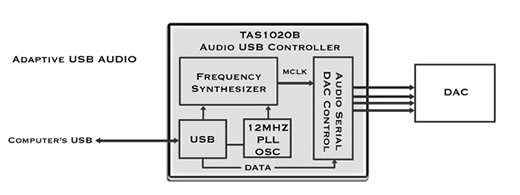
Adaptive mode 16 bit units often use the Cmedia or TI (PCM270x) based chip sets. These are not programmable and usually only support 16 bit and 32, 44.1, 48 kHz sample rate. This type of receiver is characteristic of the first generation of USB DAC’s, say 2000-2010.
This chip enables 24 bit/ 96 kHz over USB. Chips like the TAS1020 are limited to full speed. 24 bit/96 kHz is the upper limit when using native mode USB Audio Class 1 drivers.
From 2010 on, asynchronous USB took over.
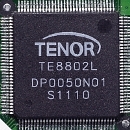
A USB audio class 2 or a custom driver is needed to run 176/ 192 kHz and higher. An example is the Tenor TE8802L by Galaxy Far East Corp.
Today you can buy complete USB-receiver modules like XMOS. Basically a USB to I2S or SPDIF converter. A couple of these interfaces can be found here. Transfer modesData is exchanged over USB using one of the four possible modes:
Transfer modes explained in detail. Isochronous transferWhen the computer sends the audio stream to an USB port, if first reads the data from the hard disk and caches blocks of the data in memory. It is then spooled from memory to the output port in a continuous stream (Isochronous mode). Frames are sent out every millisecond.
Isochronous transfer can be done with three possible types of synchronization modes in the USB audio device. Synchronous, adaptive and asynchronous synchronizationThere must be some kind of synchronization between the PC and the DAC to avoid buffer under/overrun. SynchronousThe clock driving the DAC is directly derived from the 1 kHz frame rate. AdaptiveIn this mode the timing is generated by a separate clock.
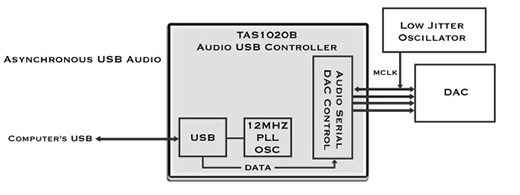
AsynchronousIn this mode an external clock is used to clock the data out of the buffer and a feedback stream is setup to tell the host how much data to send. A control circuit monitors the status of the buffer and tells the host to increase the amount of data if the buffer is getting too empty or to decrease if it’s getting too full.
The warm reception in the audiophile world of asynchronous USB as developed and promoted by Wavelength inspired other brands to offer asynchronous USB DACs .
Asynchronous mode is not better by design but by implementation because you can implement a top quality (low jitter) clock in the DAC. There is actually a good example of this case of its the implementation of the clock thats important, not the asyncness itself that is important. The recent inexpensive Musiland devices use an asynchronous protocol but then use a frequency synthesizer to generate the local clock rather than use a fixed frequency oscillator. The result is jitter that is actually worse than some of the better adaptive implementations! John Swenson The best way to get the most out of a dac chip is to put 2 audio oscillators right next to the dac chip. Buffer the oscillators and send them back to the USB controller to use to create the I2S (or other audio data stream L/R justified, DSP whatever) and this will give you the best response and the lowest jitter.
What many companies are doing is using the Frequency Synthesizer to create the audio oscillators. Basically these are frequency multipliers that can create any frequency and in the case of the TAS1020 down to 4Hz resolution. The problem with a Frequency Synthesizer is that the jitter can be as much as 100x that of a fixed oscillator. When enabling the oscillator in the TAS1020 also adds noise to the audio data stream because of the noise it fixes to the power supplies.
So choose wisely what you buy and ask the correct questions. It's not about the code... though all of ours is different, it may have an effect on the sound. But more so it has to do with the hardware and how that functions. Thanks
Not everybody agree that asynchronous is better. Centrance, manufacturer of adaptive mode solutions, is one of them. Some manufacturers may lead you to believe that Asynchronous USB transfers are superior to Adaptive USB transfers. This no more true than saying that you "must" hold the fork in your left hand. If you know what you are doing, you will feed yourself with either hand. Michael Goodman, Chief Product Architect Async USB provides a simpler way to implement a low jitter DAC relative to adaptive mode USB. For the cost of a small number of lines of firmware code, you reduce the amount and complexity hardware needed and potentially reduce the cost of the hardware needed for a high quality result. Most thinking engineers appreciate simplicity and the potential for low cost designs that deliver the goods. You can find plenty of bovine excrement in the marketing of all kinds of high-end gear. Marketing products using buzz words without supporting detail or test results works when the audience is technically ignorant. The perfect solutionAsynchronous USB looks to be the perfect solution.
Almost all recent offerings of quality DACs have asynchronous USB input.
One issue with USB is that it sends regular bursts of info like the start of frame packet - "The SOF packet consisting of an 11-bit frame number is sent by the host every 1ms ± 500ns on a full speed bus or every 125 µs ± 0.0625 µs on a high speed bus". If the timing of this shifts or is variable, this could elicit a different & variable reaction from the USB receiver & translate into a different & varying jitter or noise spectrum. Making the PC end as solid & stable as possible without undue processing could be one factor in ameliorating this variation. It might not be the low level of jitter that we notice but the variation in jitter - that's one reason why I say that the measurements we currently run seem not to be capable of picking up these issues or we are not directing them to the correct target for measuring. Vendor specificToday almost all USB audio is UAC2 (USB Audio Class 2). It is not trivial to develop a driver.
Measurement
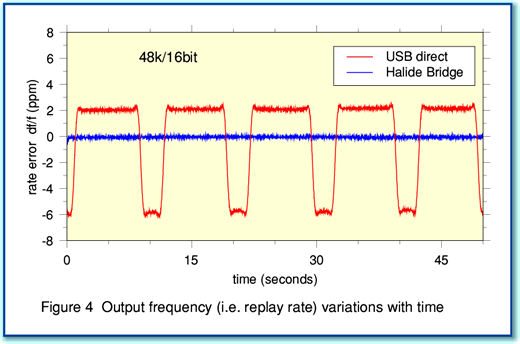
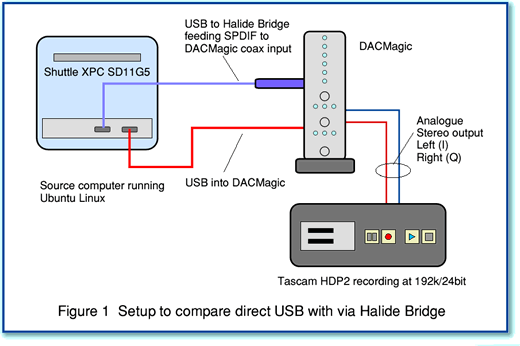
The differences between adaptive (USB direct) and asynchronous (Halide) are clear. According to the author not only measurable but also audible. [5]
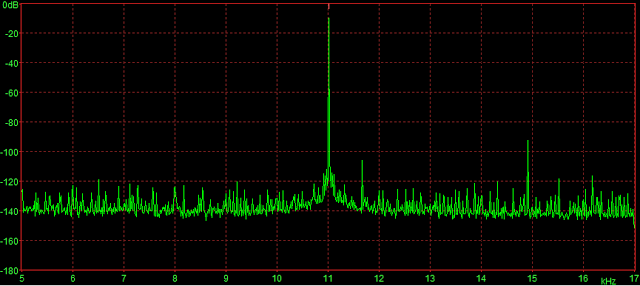
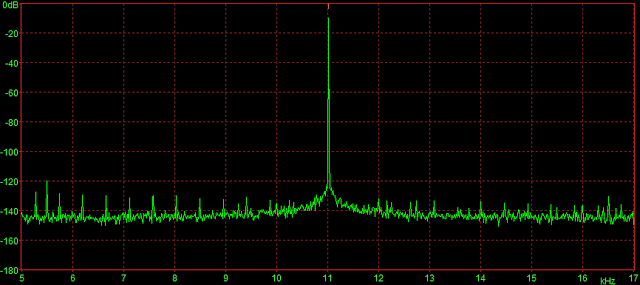
Archimago [11] measured the jitter performance of a adaptive mode USB and a async mode.
adaptive mode USB
Asynchronous mode USB (CM6631A Indeed, the jitter performance improves with asynchronous USB USB cablesCable length between full speed devices is limited to 5 meters. For a low speed device the limit is 3 meters. As the signal degrades proportional to the length of the cable, a short cable is often recommended. Other says this can put a source of RFI (the PC) to close to the USB-DAC. Audiophile USB cablesAs file based audio is gaining momentum and many believe asynchronous USB the way to go there is a growing market for audiophile grade USB cables. The question of course is why a cable can have any impact on sound quality. The Limitations of digital audio processors and cables create timing
errors known as jitter, which remove portions of the audio signal and
replace them with noise and distortion. Cables tend to round off the
square waveforms of the signal, making them less clear to the processor,
thus increasing jitter. This rounding effect varies greatly among cables
and a truly superior digital audio cable can make great improvements
in sound quality.
Another manufacturer talking some marketing bull shit? The USB 2.0 specification lists a maximum cable length of 5 meters (~15 feet). This is marginal with the best of cables, and many "audiophile grade" cables will run into problems even with far shorter lengths. There have been many credible reports of improved sound quality with some cables, but these have almost all been in systems using Class 1 Audio, with a maximum data rate of 12 MHz. When the data rate is boosted by a factor of 40x to 480 MHz, there are very few "audiophile" cable companies that have the tools and experience to ensure good results. This is an easy test. Configuring
A clear and well written step by step guide to setup and USB DAC using XP, Vista or OSX can be found at the Ayre website. Setup for Win7. Setup for Vista. CheckYou can check if your asynchronous USB DAC is really asynchronous. A simple way to find out is to use the Thesycon USB Descriptor Dumper Drop out.Some users complain about dropouts when playing USB audio. This might be due to different devices sharing the same USB-Hub. If your audio and your graphics card are on the same hub, the bandwidth required by the graphics might cause the audio to stutter. Anti-virus programs polling the internet with high priority might interrupt the audio too. Trouble shootingTrouble shooting USB audio is covered here.
USB-CUSB-C defines a connector. It might offer USB 2 or USB 3. As it is USB you expect it to support USB audio (digital audio conform UAC1 or UAC2). This allows you to connect a USB DAC to the USB port. A perfect solution to connect wired headphones to your mobile that dropped the analog jack.
However, this doesn't work all of the time. Android mobiles might also offers Audio Adapter Accessory Mode. In this mode the device sends analog audio over the USB!
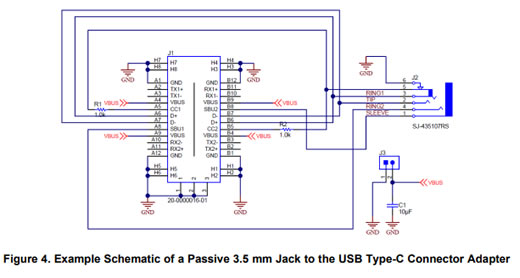
Most of the time it is totally unclear if this mode is supported by your device or not. This explain why a passive USB-C to 3.5 mm headphone adapter work on some Android phones and not on others. The same apply to active (DAC) adapters.
USB Type-C Audio Adapter Accessory Mode Reference Design - TI Designs 2016
References
© Vincent Kars May 2011
December 21, 2024
|
| You are visitor 01402503 — GeezerVison does not store the pages you look up. Best viewed with Netscape Navigator 4.7 or Internet Explorer 6 at 800×600. No cookies required. |

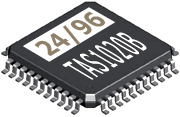 24 bit adaptive mode DACs needs a programmable design
 Jim