GeezerVisonThe World Wide Web, restored to 800 pixels of glory. |
| Home|About|Gaming cabinet|Archives|How it works|Starter sites |
GeezerVison is showing thewelltemperedcomputer.com — The Well-Tempered Computer
FLACOver the years, FLAC (Free Lossless Audio Codec) has become one of the most popular open source audio codecs.
FLAC supports linear PCM audio:
FLAC's metadata system supports custom tags, cover art, seek tables and cue sheets.
The integrity of the audio data is insured by storing an MD5 signature of the original raw audio data in the file header, which can be compared against later during decoding or testing.
FLAC is very well supported. Apple don't support FLAC. Hence you can't use it with iTunes. From Win10 (2015) on FLAC is supported by Microsoft. How it worksFLAC uses linear prediction.
The bad news is that there is nothing linear about audio. The linear prediction is of course highly inaccurate. Compare the prediction to the actual samples and there will be a difference between prediction and sample, the so-called residue.
The trick: store both the coefficients + residues in a file. On playback the decoder can completely reconstruct the original signal by adding the residue to the linear prediction recreating the original sample.
A logical consequence is that FLAC is by definition VBR (variable bit rate).
Convert a file full of random noise. There is nothing linear about it, so the prediction is 0 and the residuals are the same as the original sample. The file size is the same as the original.
In practice, you will encounter very different values. Music with a lot of distortion, such as punk, is compressed little because there is a lot of distortion (noise). Acoustic music, for example a sonata for violin and piano, might be 600 kb/s. A 24-bit recording will also compress poorly, because bits 20-24 are usually filled with noise.
Basically, FLAC's bitrate indicates how successful it has been in compressing the source losslessly. CompressionYou can choose from 0-8, where 0 is the lowest and 8 is the highest compression.
This "compression" parameter is a constant source of misunderstanding.
FLAC's "compression level" is the amount of resources FLAC is allowed to spend on finding the best possible linear prediction. The better this prediction, the smaller the residual, the smaller the file. This affects the amount of CPU used during encoding.
Because FLAC uses FIR Linear Prediction for the highest compression level, there is still a small performance penalty during playback compared to level 0.
A higher compression level affects the encoding time and to a much lesser extent the decoding time. On current CPU's you will probably have a hard time measuring the difference between level 0 and level 8, even during encoding. I/O is the limiting factor, not the CPU.
In practice, 5 is often recommended as a nice compromise between encoding time and file size.
When Josh Coalson started developing FLAC (2000), this parameter made sense. We are talking about PCs to anematic to run XP... Nowadays, the CPU is no longer a limiting factor.
Again, regardless of the compression ratio chosen, the result is always lossless. Bit rate If you play a 16/44.1 track (CD audio) ripped to WAV you see a bit rate of 1411 Kbit/s.
From the FLAC website:
Obvious the compression and therefore the bit rate you see varies with the complexity of the signal. In essence it is VBR (Variable Bit Rate) but lossless all of the time. Uncompressed FLACFrom 14.1 on, dBpoweramp supports uncompressed FLAC FLAC encoder wording changed, also includes a FLAC Uncompressed encoding option (which stores audio uncompressed, for those who want WAVE PCM but with better ID Tagging).
Source : dBpoweramp This sounds like we finally have WAV with excellent tagging options. It is probably not plain PCM as some think.
I don't know FLAC algorithms very well, but I think that decoder still needs to convert FLAC bitstream into plain integer values. It requires such operations as byte swap, bit shift, bitwise or, etc. FLAC file cannot store PCM information 'as is'. Source: https://github.com/xiph/flac/issues/73#event-1667854824 You can create uncompressed FLAC with parameters Zero lengthIf you need a FLAC with zero length e.g. as a placeholder you can do so using:
flac --no-padding --force-raw-format --endian=little --sign=signed --channels=2 --bps=16 --sample-rate=44100 -o zero.flac - </dev/null
On Windows, just change /dev/null to NUL integrityThe integrity of a file can be easily tested by running FLAC –t FileToTest.FLAC
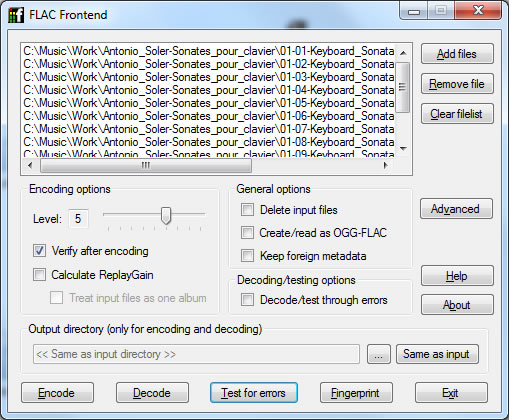
FLAC will exit with an exit code of 1 (and print a message, even in silent mode) if there were any errors during decoding, including when the MD5 checksum does not match the decoded output. Otherwise the exit code will be 0. InterfaceYou don't like typing command lines? Try this one: FLAC frontend
References
© Vincent Kars
April 23, 2025
|
| You are visitor 01402503 — GeezerVison does not store the pages you look up. Best viewed with Netscape Navigator 4.7 or Internet Explorer 6 at 800×600. No cookies required. |