GeezerVisonThe World Wide Web, restored to 800 pixels of glory. | ||||||||||||||||||||||||
| Home|About|Gaming cabinet|Archives|How it works|Starter sites | ||||||||||||||||||||||||
GeezerVison is showing thewelltemperedcomputer.com — The Well-Tempered Computer
Wi-FiWi-Fi has become extremely popular to connect to the network.
A Wi-Fi network (802.11 G) has a gross throughput of 53 Mbit/s (network speed is expressed in bits per second, not bytes).
Playing audio with CD quality is playing 16-bit PCM audio at 44.1 kHz. This is 1411 kbs. A 24/192 kHz requiring 9216 kbs
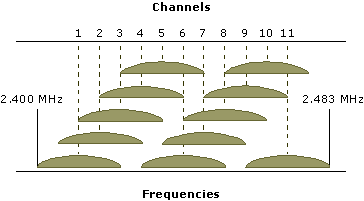
Although Wi-Fi has a lot more overhead compared with a wired connection, even an older standard like G has sufficient throughput to play highres over the Wi-Fi. DropoutsIf reception is poor or you neighbors are using the same channels, you might run into troubles (dropouts).
Wi-Fi channels and their overlap, 1,6,11 is the non-overlapping combination
In these case a wired connection can be the answer. Ethernet has less overhead and is faster (100/1000 Mbit/s). You don't share it with your neighbors either. However don't be surprised if Wi-Fi AC beats you're wired connection.
If it is not feasible to run a wire, a home plug (Ethernet over the power lines) is an option.
Upgrading to 802.11 N or AC might help too as they have a higher throughput.
The alphabetWhat we call Wi-Fi is a IEEE standard. If you buy a device you see specs like 802.11b/g/n. 802.11 is the name of the standard and the characters indicate a version. Over the years speed improved substantial. Technologies like Dual band (2.4 and 5 GHz), MIMO ( multiple-input multiple-output antennas) and modulation schemes like OFDM allow at the present for 1300 Mbps.
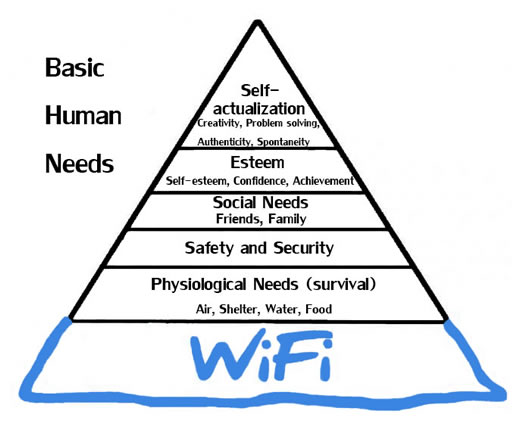
Maslow's hierarchy References
IEEE 802.11 - Wikipedia © Vincent Kars November 2014
| ||||||||||||||||||||||||
| You are visitor 01402503 — GeezerVison does not store the pages you look up. Best viewed with Netscape Navigator 4.7 or Internet Explorer 6 at 800×600. No cookies required. |