GV

GeezerVison

The World Wide Web, restored to 800 pixels of glory.

Home|About|Gaming cabinet|Archives|How it works|Starter sites

On this site

  • Introduction
  • Hardware
  • Software
  • Sound Quality
  • Reference
  • Enjoy
  • AccurateRip
  • Acoustid
  • AES/EBU
  • AirPlay
  • Amplifier
  • aptX
  • Audio file formats
  • AAC

This view

  • Original page
  • New address

GeezerVison is showing thewelltemperedcomputer.com — The Well-Tempered Computer

The Well-Tempered Computer

An introduction to computer audio

  • Introduction
  • Hardware
  • Software
  • Sound Quality
  • Reference
  • Enjoy
  • AccurateRip
  • Acoustid
  • AES/EBU
  • AirPlay
  • Amplifier
  • aptX
  • Audio file formats
    • AAC
    • AIFF
    • ALAC
    • APE
    • DSD
    • DXD
    • FLAC
    • MP3
    • MQA
    • M4A
    • WAV
    • WMAL
  • ASRC
  • AVB
  • Bit perfect jitter
  • Bits: 16 or 24
  • Bit perfect playback
  • Bitrate
  • Bluetooth
  • Burn-in
  • BWF
  • Cables
    • Analog
    • Speaker
    • Bi-wiring
    • Digital
  • CDtext
  • Chromecast
  • Clipping
  • Clock
  • Codec
  • Compression
  • CRC
  • Crossover
  • Cue sheet
  • DAC
  • Damping
  • DASH
  • Digital
  • Digital Room Correction
  • Dither
  • DLNA
  • Drivers
    • ASIO
    • Direct Sound
    • Kernel Streaming
    • WASAPI
    • Wave Out
  • DoP
  • DSP
  • EBU R128 (loudness)
  • FFT
  • FireWire
  • Freedb
  • Gapless playback
  • Generation loss
  • HDMI
  • Headphone listening
  • Hearing
    • Single-sided deafness
    • Hard of hearing
  • Hires recording
  • Homeplug
  • I2S
  • ID3
  • Inter sample peak
  • LDAC
  • Linearity (DAC)
  • Memory playback
  • Music Server
  • OCF
  • OFC
  • PCM
  • Perception
  • RAID
  • ReplayGain
  • Ripping
  • RFI
  • RIAA
  • Router
  • Sampling, up and over
  • Sample Rate Conversion
  • Speakers
    • Driver design
    • Crossover
    • Amplification
    • Connecting
    • Measurement
    • Placement
  • S/PDIF
  • Storage
  • Sync
  • Tagging
  • Toslink
  • Transcoding
  • UAA
  • Units
  • UPnP
  • USB
  • VST
  • WiFi
  • WiSA

Bi-wiring

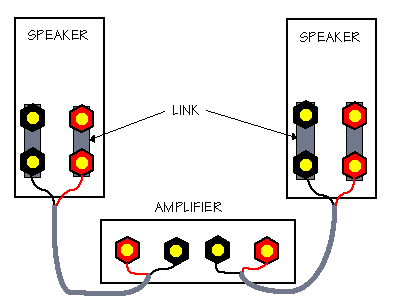
Normally the amp is connected with the corresponding terminals of the speakers using a single wire.

Speakers might have more than one pair of terminals (binding posts).

As in the picture above, there are separate binding posts for the woofer and the tweeter.

This makes it possible to bi-wire them.

Bi-wiring


Bi-wiring runs two pair of cables from the terminals of the amp to the binding posts of the speaker.

Will bi-wiring do more besides doubling your speaker cable budget?


An amp output Watts = Voltage * Current
Single or bi-wired, on all terminals you will measure the same voltage.
A tweeter has a high pass filter to avoid it will be burned by the strong current needed for the woofer.
Likewise a woofer has a low pass filter to avoid distortion due to frequencies above its working range.
Obvious when using a single wire, all current pass thru it.
In case of bi-wiring the cable to the tweeter will only carry the current for the tweeter. The cables to the woofer only the current for the woofer.
The filters simply block the current  for anything outside the frequency range of the speaker.


Jim Lesurf using a simple model demonstrates that there is an effect (within the constraints of the model) but very small.
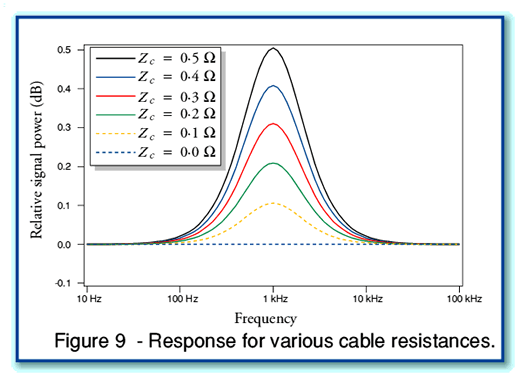
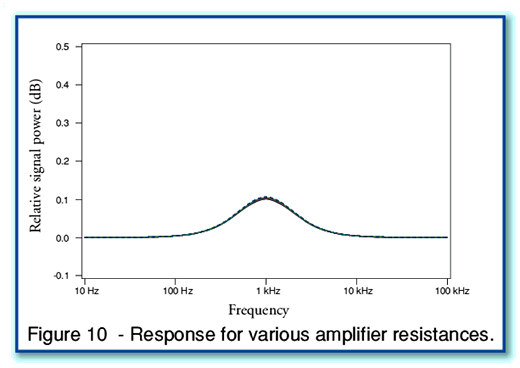
 

DonH50 on the What’s Best Forum used a more complex model taking the RF behavior of cables into account.
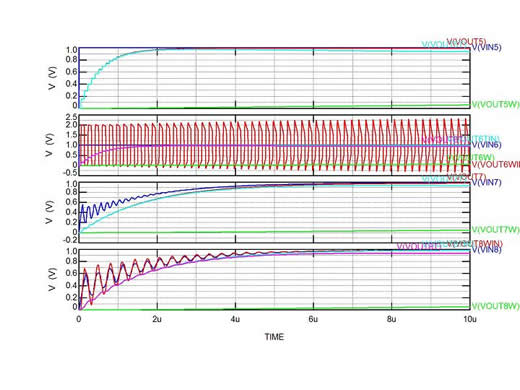
He thinks the effect is very small but seeing the ringing in the bi-wired model he concludes:

Frankly, while the speed with which all these waveforms settle makes their audibility questionable, just looking at the amplifier's output and speaker's inputs makes me want to not bi-wire!


Reference
  • An explanation of bi-wiring - Jim Lesurf
  • Speaker Cables: Bi-wired! - DonH50
  • Bi-wire, not only an advantage - Ingvar Öhman


© Vincent Kars Augustus 2012


You are visitor 01402503 — GeezerVison does not store the pages you look up.
Best viewed with Netscape Navigator 4.7 or Internet Explorer 6 at 800×600. No cookies required.