GV

GeezerVison

The World Wide Web, restored to 800 pixels of glory.

Home|About|Gaming cabinet|Archives|How it works|Starter sites

On this site

  • Introduction
  • Hardware
  • Software
  • Sound Quality
  • Reference
  • Enjoy
  • AccurateRip
  • Acoustid
  • AES/EBU
  • AirPlay
  • Amplifier
  • aptX
  • Audio file formats
  • AAC

This view

  • Original page
  • New address

GeezerVison is showing thewelltemperedcomputer.com — The Well-Tempered Computer

The Well-Tempered Computer

An introduction to computer audio

  • Introduction
  • Hardware
  • Software
  • Sound Quality
  • Reference
  • Enjoy
  • AccurateRip
  • Acoustid
  • AES/EBU
  • AirPlay
  • Amplifier
  • aptX
  • Audio file formats
    • AAC
    • AIFF
    • ALAC
    • APE
    • DSD
    • DXD
    • FLAC
    • MP3
    • MQA
    • M4A
    • WAV
    • WMAL
  • ASRC
  • AVB
  • Bit perfect jitter
  • Bits: 16 or 24
  • Bit perfect playback
  • Bitrate
  • Bluetooth
  • Burn-in
  • BWF
  • Cables
    • Analog
    • Speaker
    • Bi-wiring
    • Digital
  • CDtext
  • Chromecast
  • Clipping
  • Clock
  • Codec
  • Compression
  • CRC
  • Crossover
  • Cue sheet
  • DAC
  • Damping
  • DASH
  • Digital
  • Digital Room Correction
  • Dither
  • DLNA
  • Drivers
    • ASIO
    • Direct Sound
    • Kernel Streaming
    • WASAPI
    • Wave Out
  • DoP
  • DSP
  • EBU R128 (loudness)
  • FFT
  • FireWire
  • Freedb
  • Gapless playback
  • Generation loss
  • HDMI
  • Headphone listening
  • Hearing
    • Single-sided deafness
    • Hard of hearing
  • Hires recording
  • Homeplug
  • I2S
  • ID3
  • Inter sample peak
  • LDAC
  • Linearity (DAC)
  • Memory playback
  • Music Server
  • OCF
  • OFC
  • PCM
  • Perception
  • RAID
  • ReplayGain
  • Ripping
  • RFI
  • RIAA
  • Router
  • Sampling, up and over
  • Sample Rate Conversion
  • Speakers
    • Driver design
    • Crossover
    • Amplification
    • Connecting
    • Measurement
    • Placement
  • S/PDIF
  • Storage
  • Sync
  • Tagging
  • Toslink
  • Transcoding
  • UAA
  • Units
  • UPnP
  • USB
  • VST
  • WiFi
  • WiSA

Placement


Speaker Position

How to position speakers.

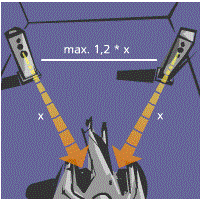
Give them some air, against the wall or in a corner is not a good idea.
I use solo piano recordings to position them. If the arms of the pianist are too short, they are too wide apart.


A more useful advice can be found here: Audio physics.

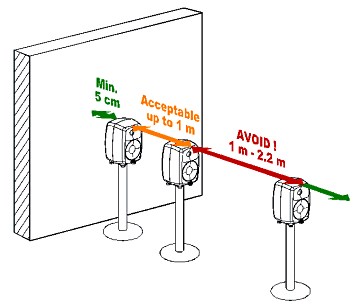
Genelec offers a nice explanation of the bass response in relation to the distance between the speaker and the rear wall. When positioned wrong the bass radiating of the wall cancels out the bass radiating directly from the speaker.

Measuring

A more advanced method is to measure the system response using a calibrated microphone.

Bass response of 2 different positions - Nyal Mellor

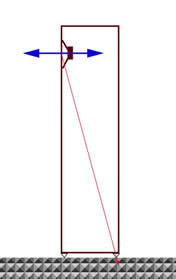
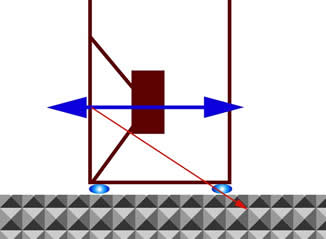
Coupling/decoupling a loudspeaker

You can put a loudspeaker on the floor, use spikes, a viscoelastic material or stands.

Some thoughts on  this subject by Gary L Koh.

References

  1. Setting up Loudspeakers in a Room - Audio Physic
  2. Understanding Coupling/Decoupling - with particular reference to loudspeakers - Gary L Koh
  3. Monitor setup guide- Genelec 2020

© Vincent Kars March 2012


You are visitor 01402503 — GeezerVison does not store the pages you look up.
Best viewed with Netscape Navigator 4.7 or Internet Explorer 6 at 800×600. No cookies required.