GV

GeezerVison

The World Wide Web, restored to 800 pixels of glory.

Home|About|Gaming cabinet|Archives|How it works|Starter sites

On this site

  • Introduction
  • Hardware
  • Software
  • Sound Quality
  • Reference
  • Enjoy
  • AccurateRip
  • Acoustid
  • AES/EBU
  • AirPlay
  • Amplifier
  • aptX
  • Audio file formats
  • AAC

This view

  • Original page
  • New address

GeezerVison is showing thewelltemperedcomputer.com — The Well-Tempered Computer

The Well-Tempered Computer

An introduction to computer audio

  • Introduction
  • Hardware
  • Software
  • Sound Quality
  • Reference
  • Enjoy
  • AccurateRip
  • Acoustid
  • AES/EBU
  • AirPlay
  • Amplifier
  • aptX
  • Audio file formats
    • AAC
    • AIFF
    • ALAC
    • APE
    • DSD
    • DXD
    • FLAC
    • MP3
    • MQA
    • M4A
    • WAV
    • WMAL
  • ASRC
  • AVB
  • Bit perfect jitter
  • Bits: 16 or 24
  • Bit perfect playback
  • Bitrate
  • Bluetooth
  • Burn-in
  • BWF
  • Cables
    • Analog
    • Speaker
    • Bi-wiring
    • Digital
  • CDtext
  • Chromecast
  • Clipping
  • Clock
  • Codec
  • Compression
  • CRC
  • Crossover
  • Cue sheet
  • DAC
  • Damping
  • DASH
  • Digital
  • Digital Room Correction
  • Dither
  • DLNA
  • Drivers
    • ASIO
    • Direct Sound
    • Kernel Streaming
    • WASAPI
    • Wave Out
  • DoP
  • DSP
  • EBU R128 (loudness)
  • FFT
  • FireWire
  • Freedb
  • Gapless playback
  • Generation loss
  • HDMI
  • Headphone listening
  • Hearing
    • Single-sided deafness
    • Hard of hearing
  • Hires recording
  • Homeplug
  • I2S
  • ID3
  • Inter sample peak
  • LDAC
  • Linearity (DAC)
  • Memory playback
  • Music Server
  • OCF
  • OFC
  • PCM
  • Perception
  • RAID
  • ReplayGain
  • Ripping
  • RFI
  • RIAA
  • Router
  • Sampling, up and over
  • Sample Rate Conversion
  • Speakers
    • Driver design
    • Crossover
    • Amplification
    • Connecting
    • Measurement
    • Placement
  • S/PDIF
  • Storage
  • Sync
  • Tagging
  • Toslink
  • Transcoding
  • UAA
  • Units
  • UPnP
  • USB
  • VST
  • WiFi
  • WiSA

Dither

You record at 24 bits but needs to convert to 16 bits to create a CD.
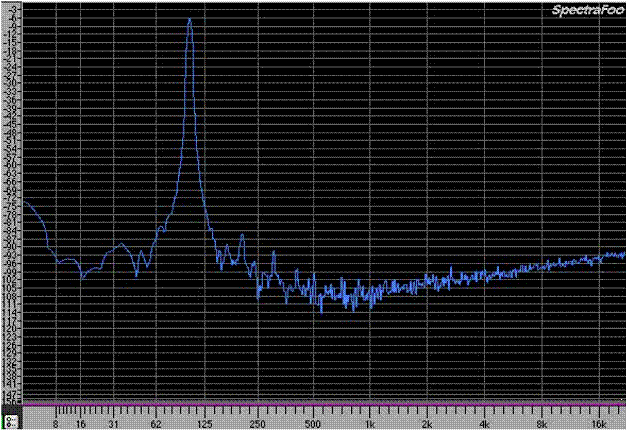
Inevitably you have to reduce the 24 bits to 16.
This will result in quantization errors.


Spectrograph Plot of a 24 Bit 100Hz Sine Wave
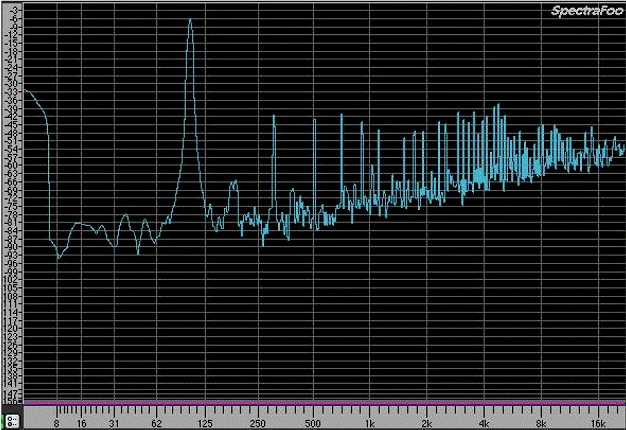
 

Spectrograph Plot of a 24 Bit 100Hz Sine Wave Truncated to 16 Bits
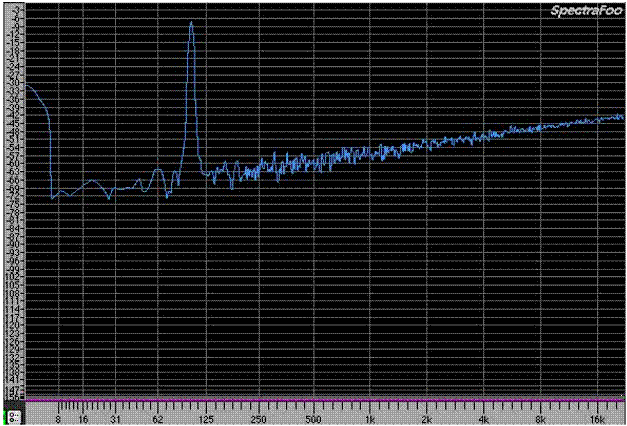
 

Spectrograph Plot of 24 bit Sine Wave Dithered to 16 bits


Adding dither is mixing the audio with some random noise.

It has two effects:
The spikes disappear by adding dither.
The noise floor increases.
That is the paradox of jitter; you get a more natural sounding recording by adding noise!

The sound of jitter

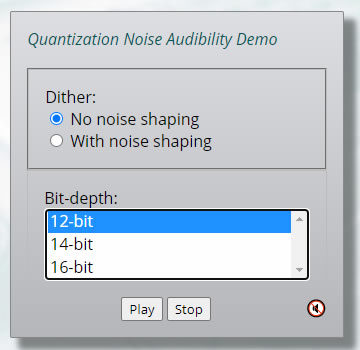
Csaba Horváth published a test with dither from bit 12 to 16. Gives you a taste of how it sounds and the magnitude.

As the file contains no audio, it gives you also a taste of the contribution of these lower bits. Indeed you have to crank up the volume substantial to make them audible.

Listening test: Quantization noise & bit-depth

References

  1. Dither Explained. An explanation and proof of the benefit of dither for the audio engineer. Nika Aldrich - April 25, 2002
  2. What Is Dithering in Audio? - iZotope, 2020
  3. Dithering is a Mathematical Process - j_j 2020
  4. Listening test: Quantization noise & bit-depth - Csaba Horváth
© Vincent Kars November 20, 2022


You are visitor 01402503 — GeezerVison does not store the pages you look up.
Best viewed with Netscape Navigator 4.7 or Internet Explorer 6 at 800×600. No cookies required.