GeezerVisonThe World Wide Web, restored to 800 pixels of glory. | ||||||||||||||||||||||||||||||||||||||||||
| Home|About|Gaming cabinet|Archives|How it works|Starter sites | ||||||||||||||||||||||||||||||||||||||||||
GeezerVison is showing www.tutorialspoint.com — Python - CGI Programming 
Selected Reading
Python - CGI ProgrammingThe Common Gateway Interface, or CGI, is a set of standards that define how information is exchanged between the web server and a custom script. The CGI specs are currently maintained by the NCSA. What is CGI?
Web BrowsingTo understand the concept of CGI, let us see what happens when we click a hyper link to browse a particular web page or URL.
However, it is possible to set up the HTTP server so that whenever a file in a certain directory is requested that file is not sent back; instead it is executed as a program, and whatever that program outputs is sent back for your browser to display. This function is called the Common Gateway Interface or CGI and the programs are called CGI scripts. These CGI programs can be a Python Script, PERL Script, Shell Script, C or C++ program, etc. CGI Architecture Diagram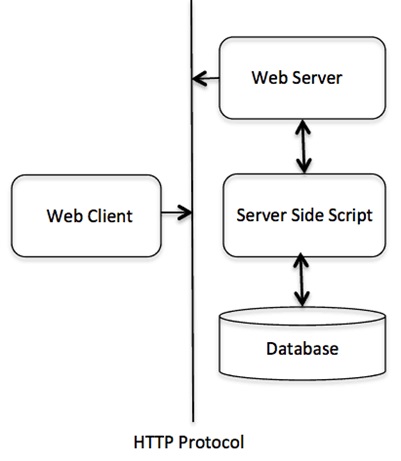
Web Server Support and ConfigurationBefore you proceed with CGI Programming, make sure that your Web Server supports CGI and it is configured to handle CGI Programs. All the CGI Programs to be executed by the HTTP server are kept in a pre-configured directory. This directory is called CGI Directory and by convention it is named as /var/www/cgi-bin. By convention, CGI files have extension as. cgi, but you can keep your files with python extension .py as well. By default, the Linux server is configured to run only the scripts in the cgi-bin directory in /var/www. If you want to specify any other directory to run your CGI scripts, comment the following lines in the httpd.conf file − <Directory "/var/www/cgi-bin"> AllowOverride None Options ExecCGI Order allow,deny Allow from all </Directory> <Directory "/var/www/cgi-bin"> Options All </Directory> The following line should also be added for apache server to treat .py file as cgi script. AddHandler cgi-script .py Here, we assume that you have Web Server up and running successfully and you are able to run any other CGI program like Perl or Shell, etc. First CGI ProgramHere is a simple link, which is linked to a CGI script called hello.py. This file is kept in /var/www/cgi-bin directory and it has following content. Before running your CGI program, make sure you have change mode of file using chmod 755 hello.py UNIX command to make file executable. print ("Content-type:text/html\r\n\r\n")
print ('<html>')
print ('<head>')
print ('<title>Hello Word - First CGI Program</title>')
print ('</head>')
print ('<body>')
print ('<h2>Hello Word! This is my first CGI program</h2>')
print ('</body>')
print ('</html>')
Note − First line in the script must be the path to Python executable. It appears as a comment in Python program, but it is called shebang line. In Linux, it should be #!/usr/bin/python3. In Windows, it should be #!c:/python311/python.exd. Enter the following URL in your browser − http://localhost/cgi-bin/hello.py
This hello.py script is a simple Python script, which writes its output on STDOUT file, i.e., screen. There is one important and extra feature available which is first line to be printed Content-type:text/html\r\n\r\n. This line is sent back to the browser and it specifies the content type to be displayed on the browser screen. By now you must have understood basic concept of CGI and you can write many complicated CGI programs using Python. This script can interact with any other external system also to exchange information such as RDBMS. HTTP HeaderThe line Content-type:text/html\r\n\r\n is part of HTTP header which is sent to the browser to understand the content. All the HTTP header will be in the following form − HTTP Field Name: Field Content For Example Content-type: text/html\r\n\r\n There are few other important HTTP headers, which you will use frequently in your CGI Programming.
CGI Environment VariablesAll the CGI programs have access to the following environment variables. These variables play an important role while writing any CGI program.
Here is small CGI program to list out all the CGI variables. Click this link to see the result Get Environment import os
print ("Content-type: text/html\r\n\r\n");
print ("<font size=+1>Environment</font><\br>");
for param in os.environ.keys():
print ("<b>%20s</b>: %s<\br>" % (param, os.environ[param]))
GET and POST MethodsYou must have come across many situations when you need to pass some information from your browser to web server and ultimately to your CGI Program. Most frequently, browser uses two methods two pass this information to web server. These methods are GET Method and POST Method. Passing Information using GET methodThe GET method sends the encoded user information appended to the page request. The page and the encoded information are separated by the ? character as follows − http://www.test.com/cgi-bin/hello.py?key1=value1&key2=value2
You can pass information by simply concatenating key and value pairs along with any URL or you can use HTML <FORM> tags to pass information using GET method. Simple URL Example:Get MethodHere is a simple URL, which passes two values to hello_get.py program using GET method. /cgi-bin/hello_get.py?first_name=Malhar&last_name=Lathkar Given below is the hello_get.py script to handle the input given by web browser. We are going to use the cgi module, which makes it very easy to access the passed information − # Import modules for CGI handling
import cgi, cgitb
# Create instance of FieldStorage
form = cgi.FieldStorage()
# Get data from fields
first_name = form.getvalue('first_name')
last_name = form.getvalue('last_name')
print ("Content-type:text/html")
print()
print ("<html>")
print ('<head>')
print ("<title>Hello - Second CGI Program</title>")
print ('</head>')
print ('<body>')
print ("<h2>Hello %s %s</h2>" % (first_name, last_name))
print ('</body>')
print ('</html>')
This would generate the following result −
Simple FORM Example:GET MethodThis example passes two values using HTML FORM and submit button. We use same CGI script hello_get.py to handle this input. <form action = "/cgi-bin/hello_get.py" method = "get"> First Name: <input type = "text" name = "first_name"> <br /> Last Name: <input type = "text" name = "last_name" /> <input type = "submit" value = "Submit" /> </form> Here is the actual output of the above form, you enter First and Last Name and then click submit button to see the result. First Name:Last Name: Passing Information Using POST MethodA generally more reliable method of passing information to a CGI program is the POST method. This packages the information in exactly the same way as GET methods, but instead of sending it as a text string after a ? in the URL it sends it as a separate message. This message comes into the CGI script in the form of the standard input. Below is same hello_get.py script which handles GET as well as POST method. # Import modules for CGI handling
import cgi, cgitb
# Create instance of FieldStorage
form = cgi.FieldStorage()
# Get data from fields
first_name = form.getvalue('first_name')
last_name = form.getvalue('last_name')
print "Content-type:text/html\r\n\r\n"
print "<html>"
print "<head>"
print "<title>Hello - Second CGI Program</title>"
print "</head>"
print "<body>"
print "<h2>Hello %s %s</h2>" % (first_name, last_name)
print "</body>"
print "</html>"
Let us take again same example as above which passes two values using HTML FORM and submit button. We use same CGI script hello_get.py to handle this input. <form action = "/cgi-bin/hello_get.py" method = "post"> First Name: <input type = "text" name = "first_name"><br /> Last Name: <input type = "text" name = "last_name" /> <input type = "submit" value = "Submit" /> </form> Here is the actual output of the above form. You enter First and Last Name and then click submit button to see the result. First Name:Last Name: Passing Checkbox Data to CGI ProgramCheckboxes are used when more than one option is required to be selected. Here is example HTML code for a form with two checkboxes − <form action = "/cgi-bin/checkbox.cgi" method = "POST" target = "_blank"> <input type = "checkbox" name = "maths" value = "on" /> Maths <input type = "checkbox" name = "physics" value = "on" /> Physics <input type = "submit" value = "Select Subject" /> </form> The result of this code is the following form − Maths PhysicsBelow is checkbox.cgi script to handle input given by web browser for checkbox button. # Import modules for CGI handling
import cgi, cgitb
# Create instance of FieldStorage
form = cgi.FieldStorage()
# Get data from fields
if form.getvalue('maths'):
math_flag = "ON"
else:
math_flag = "OFF"
if form.getvalue('physics'):
physics_flag = "ON"
else:
physics_flag = "OFF"
print "Content-type:text/html\r\n\r\n"
print "<html>"
print "<head>"
print "<title>Checkbox - Third CGI Program</title>"
print "</head>"
print "<body>"
print "<h2> CheckBox Maths is : %s</h2>" % math_flag
print "<h2> CheckBox Physics is : %s</h2>" % physics_flag
print "</body>"
print "</html>"
Passing Radio Button Data to CGI ProgramRadio Buttons are used when only one option is required to be selected. Here is example HTML code for a form with two radio buttons − <form action = "/cgi-bin/radiobutton.py" method = "post" target = "_blank"> <input type = "radio" name = "subject" value = "maths" /> Maths <input type = "radio" name = "subject" value = "physics" /> Physics <input type = "submit" value = "Select Subject" /> </form> The result of this code is the following form − Maths PhysicsBelow is radiobutton.py script to handle input given by web browser for radio button − # Import modules for CGI handling
import cgi, cgitb
# Create instance of FieldStorage
form = cgi.FieldStorage()
# Get data from fields
if form.getvalue('subject'):
subject = form.getvalue('subject')
else:
subject = "Not set"
print "Content-type:text/html\r\n\r\n"
print "<html>"
print "<head>"
print "<title>Radio - Fourth CGI Program</title>"
print "</head>"
print "<body>"
print "<h2> Selected Subject is %s</h2>" % subject
print "</body>"
print "</html>"
Passing Text Area Data to CGI ProgramTEXTAREA element is used when multiline text has to be passed to the CGI Program. Here is example HTML code for a form with a TEXTAREA box − <form action = "/cgi-bin/textarea.py" method = "post" target = "_blank">
<textarea name = "textcontent" cols = "40" rows = "4">
Type your text here...
</textarea>
<input type = "submit" value = "Submit" />
</form>
The result of this code is the following form − Below is textarea.cgi script to handle input given by web browser − # Import modules for CGI handling
import cgi, cgitb
# Create instance of FieldStorage
form = cgi.FieldStorage()
# Get data from fields
if form.getvalue('textcontent'):
text_content = form.getvalue('textcontent')
else:
text_content = "Not entered"
print "Content-type:text/html\r\n\r\n"
print "<html>"
print "<head>";
print "<title>Text Area - Fifth CGI Program</title>"
print "</head>"
print "<body>"
print "<h2> Entered Text Content is %s</h2>" % text_content
print "</body>"
Passing Drop Down Box Data to CGI ProgramDrop Down Box is used when we have many options available but only one or two will be selected. Here is example HTML code for a form with one drop down box − <form action = "/cgi-bin/dropdown.py" method = "post" target = "_blank">
<select name = "dropdown">
<option value = "Maths" selected>Maths</option>
<option value = "Physics">Physics</option>
</select>
<input type = "submit" value = "Submit"/>
</form>
The result of this code is the following form − Below is dropdown.py script to handle input given by web browser. # Import modules for CGI handling
import cgi, cgitb
# Create instance of FieldStorage
form = cgi.FieldStorage()
# Get data from fields
if form.getvalue('dropdown'):
subject = form.getvalue('dropdown')
else:
subject = "Not entered"
print "Content-type:text/html\r\n\r\n"
print "<html>"
print "<head>"
print "<title>Dropdown Box - Sixth CGI Program</title>"
print "</head>"
print "<body>"
print "<h2> Selected Subject is %s</h2>" % subject
print "</body>"
print "</html>"
Using Cookies in CGIHTTP protocol is a stateless protocol. For a commercial website, it is required to maintain session information among different pages. For example, one user registration ends after completing many pages. How to maintain user's session information across all the web pages? In many situations, using cookies is the most efficient method of remembering and tracking preferences, purchases, commissions, and other information required for better visitor experience or site statistics. How It Works?Your server sends some data to the visitor's browser in the form of a cookie. The browser may accept the cookie. If it does, it is stored as a plain text record on the visitor's hard drive. Now, when the visitor arrives at another page on your site, the cookie is available for retrieval. Once retrieved, your server knows/remembers what was stored. Cookies are a plain text data record of 5 variable-length fields −
Setting up CookiesIt is very easy to send cookies to browser. These cookies are sent along with HTTP Header before to Content-type field. Assuming you want to set UserID and Password as cookies. Setting the cookies is done as follows − print "Set-Cookie:UserID = XYZ;\r\n" print "Set-Cookie:Password = XYZ123;\r\n" print "Set-Cookie:Expires = Tuesday, 31-Dec-2007 23:12:40 GMT;\r\n" print "Set-Cookie:Domain = www.tutorialspoint.com;\r\n" print "Set-Cookie:Path = /perl;\n" print "Content-type:text/html\r\n\r\n" ...........Rest of the HTML Content.... From this example, you must have understood how to set cookies. We use Set-Cookie HTTP header to set cookies. It is optional to set cookies attributes like Expires, Domain, and Path. It is notable that cookies are set before sending magic line "Content-type:text/html\r\n\r\n. Retrieving CookiesIt is very easy to retrieve all the set cookies. Cookies are stored in CGI environment variable HTTP_COOKIE and they will have following form − key1 = value1;key2 = value2;key3 = value3.... Here is an example of how to retrieve cookies. # Import modules for CGI handling
from os import environ
import cgi, cgitb
if environ.has_key('HTTP_COOKIE'):
for cookie in map(strip, split(environ['HTTP_COOKIE'], ';')):
(key, value ) = split(cookie, '=');
if key == "UserID":
user_id = value
if key == "Password":
password = value
print "User ID = %s" % user_id
print "Password = %s" % password
This produces the following result for the cookies set by above script − User ID = XYZ Password = XYZ123 File Upload ExampleTo upload a file, the HTML form must have the enctype attribute set to multipart/form-data. The input tag with the file type creates a "Browse" button. <html>
<body>
<form enctype = "multipart/form-data" action = "save_file.py" method = "post">
<p>File: <input type = "file" name = "filename" /></p>
<p><input type = "submit" value = "Upload" /></p>
</form>
</body>
</html>
The result of this code is the following form − File: Above example has been disabled intentionally to save people uploading file on our server, but you can try above code with your server. Here is the script save_file.py to handle file upload − import cgi, os
import cgitb; cgitb.enable()
form = cgi.FieldStorage()
# Get filename here.
fileitem = form['filename']
# Test if the file was uploaded
if fileitem.filename:
# strip leading path from file name to avoid
# directory traversal attacks
fn = os.path.basename(fileitem.filename)
open('/tmp/' + fn, 'wb').write(fileitem.file.read())
message = 'The file "' + fn + '" was uploaded successfully'
else:
message = 'No file was uploaded'
print """\
Content-Type: text/html\n
<html>
<body>
<p>%s</p>
</body>
</html>
""" % (message,)
If you run the above script on Unix/Linux, then you need to take care of replacing file separator as follows, otherwise on your windows machine above open() statement should work fine. fn = os.path.basename(fileitem.filename.replace("\\", "/" ))
How To Raise a "File Download" Dialog Box?Sometimes, it is desired that you want to give option where a user can click a link and it will pop up a "File Download" dialogue box to the user instead of displaying actual content. This is very easy and can be achieved through HTTP header. This HTTP header is be different from the header mentioned in previous section. For example, if you want make a FileName file downloadable from a given link, then its syntax is as follows − # HTTP Header
print "Content-Type:application/octet-stream; name = \"FileName\"\r\n";
print "Content-Disposition: attachment; filename = \"FileName\"\r\n\n";
# Actual File Content will go here.
fo = open("foo.txt", "rb")
str = fo.read();
print str
# Close opend file
fo.close()

Advertisements
| ||||||||||||||||||||||||||||||||||||||||||
| You are visitor 01402503 — GeezerVison does not store the pages you look up. Best viewed with Netscape Navigator 4.7 or Internet Explorer 6 at 800×600. No cookies required. |