GeezerVisonThe World Wide Web, restored to 800 pixels of glory. | ||||||||
| Home|About|Gaming cabinet|Archives|How it works|Starter sites | ||||||||
GeezerVison is showing www.tutorialspoint.com — Python - Functions 
Selected Reading
Python - FunctionsA Python function is a block of organized, reusable code that is used to perform a single, related action. Functions provide better modularity for your application and a high degree of code reusing. A top-to-down approach towards building the processing logic involves defining blocks of independent reusable functions. A Python function may be invoked from any other function by passing required data (called parameters or arguments). The called function returns its result back to the calling environment. 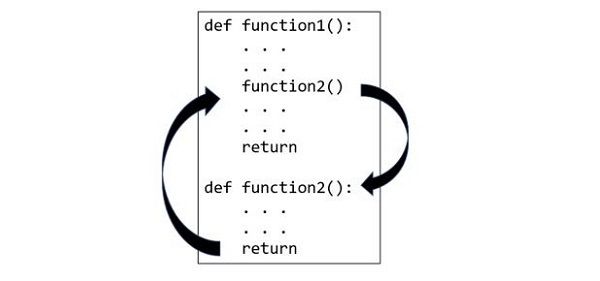
Types of Python FunctionsPython provides the following types of functions −
Defining a Python FunctionYou can define custom functions to provide the required functionality. Here are simple rules to define a function in Python −
Syntax to Define a Python Functiondef function_name( parameters ): "function_docstring" function_suite return [expression] By default, parameters have a positional behavior and you need to inform them in the same order that they were defined. Once the function is defined, you can execute it by calling it from another function or directly from the Python prompt. Example to Define a Python FunctionThe following example shows how to define a function greetings(). The bracket is empty so there aren't any parameters. Here, the first line is a docstring and the function block ends with return statement. def greetings():
"This is docstring of greetings function"
print ("Hello World")
return
When this function is called, Hello world message will be printed. Calling a Python FunctionDefining a function only gives it a name, specifies the parameters that are to be included in the function and structures the blocks of code. Once the basic structure of a function is finalized, you can call it by using the function name itself. If the function requires any parameters, they should be passed within parentheses. If the function doesn't require any parameters, the parentheses should be left empty. Example to Call a Python FunctionFollowing is the example to call printme() function − # Function definition is here
def printme( str ):
"This prints a passed string into this function"
print (str)
return;
# Now you can call the function
printme("I'm first call to user defined function!")
printme("Again second call to the same function")
When the above code is executed, it produces the following output − I'm first call to user defined function! Again second call to the same function Pass by Reference vs ValueIn programming languages like C and C++, there are two main ways to pass variables to a function, which are Call by Value and Call by Reference (also known as pass by reference and pass by value). However, the way we pass variables to functions in Python differs from others.
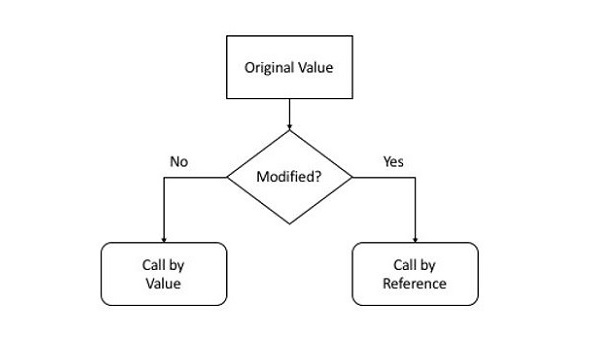
Python uses pass by reference mechanism. As variable in Python is a label or reference to the object in the memory, both the variables used as actual argument as well as formal arguments really refer to the same object in the memory. We can verify this fact by checking the id() of the passed variable before and after passing. ExampleIn the following example, we are checking the id() of a variable. def testfunction(arg):
print ("ID inside the function:", id(arg))
var = "Hello"
print ("ID before passing:", id(var))
testfunction(var)
If the above code is executed, the id() before passing and inside the function will be displayed. ID before passing: 1996838294128 ID inside the function: 1996838294128 The behavior also depends on whether the passed object is mutable or immutable. Python numeric object is immutable. When a numeric object is passed, and then the function changes the value of the formal argument, it actually creates a new object in the memory, leaving the original variable unchanged. ExampleThe following example shows how an immutable object behaves when it is passed to a function. def testfunction(arg):
print ("ID inside the function:", id(arg))
arg = arg + 1
print ("new object after increment", arg, id(arg))
var=10
print ("ID before passing:", id(var))
testfunction(var)
print ("value after function call", var)
It will produce the following output − ID before passing: 140719550297160 ID inside the function: 140719550297160 new object after increment 11 140719550297192 value after function call 10 Let us now pass a mutable object (such as a list or dictionary) to a function. It is also passed by reference, as the id() of list before and after passing is same. However, if we modify the list inside the function, its global representation also reflects the change. ExampleHere we pass a list, append a new item, and see the contents of original list object, which we will find has changed. def testfunction(arg):
print ("Inside function:",arg)
print ("ID inside the function:", id(arg))
arg=arg.append(100)
var=[10, 20, 30, 40]
print ("ID before passing:", id(var))
testfunction(var)
print ("list after function call", var)
It will produce the following output − ID before passing: 2716006372544 Inside function: [10, 20, 30, 40] ID inside the function: 2716006372544 list after function call [10, 20, 30, 40, 100] Python Function ArgumentsFunction arguments are the values or variables passed into a function when it is called. The behavior of a function often depends on the arguments passed to it. While defining a function, you specify a list of variables (known as formal parameters) within the parentheses. These parameters act as placeholders for the data that will be passed to the function when it is called. When the function is called, value to each of the formal arguments must be provided. Those are called actual arguments. 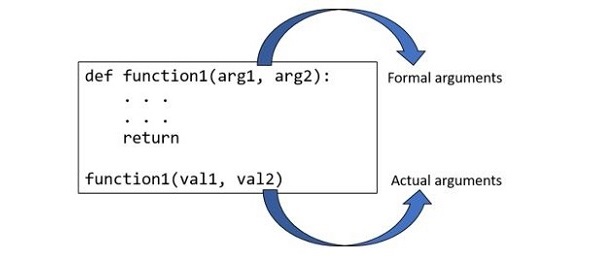
ExampleLet's modify greetings function and have name an argument. A string passed to the function as actual argument becomes name variable inside the function. def greetings(name):
"This is docstring of greetings function"
print ("Hello {}".format(name))
return
greetings("Samay")
greetings("Pratima")
greetings("Steven")
This code will produce the following output − Hello Samay Hello Pratima Hello Steven Types of Python Function ArgumentsBased on how the arguments are declared while defining a Python function, they are classified into the following categories − Positional or Required ArgumentsRequired arguments are the arguments passed to a function in correct positional order. Here, the number of arguments in the function call should match exactly with the function definition, otherwise the code gives a syntax error. ExampleIn the code below, we call the function printme() without any parameters which will give error. # Function definition is here def printme( str ): "This prints a passed string into this function" print (str) return; # Now you can call printme function printme() When the above code is executed, it produces the following result − Traceback (most recent call last):
File "test.py", line 11, in <module>
printme();
TypeError: printme() takes exactly 1 argument (0 given)
Keyword ArgumentsKeyword arguments are related to the function calls. When you use keyword arguments in a function call, the caller identifies the arguments by the parameter name. This allows you to skip arguments or place them out of order because the Python interpreter is able to use the keywords provided to match the values with parameters. Example 1The following example shows how to use keyword arguments in Python. # Function definition is here def printme( str ): "This prints a passed string into this function" print (str) return; # Now you can call printme function printme( str = "My string") When the above code is executed, it produces the following result − My string Example 2The following example gives more clear picture. Note that the order of parameters does not matter. # Function definition is here
def printinfo( name, age ):
"This prints a passed info into this function"
print ("Name: ", name)
print ("Age ", age)
return;
# Now you can call printinfo function
printinfo( age=50, name="miki" )
When the above code is executed, it produces the following result − Name: miki Age 50 Default ArgumentsA default argument is an argument that assumes a default value if a value is not provided in the function call for that argument. ExampleThe following example gives an idea on default arguments, it prints default age if it is not passed − # Function definition is here
def printinfo( name, age = 35 ):
"This prints a passed info into this function"
print ("Name: ", name)
print ("Age ", age)
return;
# Now you can call printinfo function
printinfo( age=50, name="miki" )
printinfo( name="miki" )
When the above code is executed, it produces the following result − Name: miki Age 50 Name: miki Age 35 Positional-only argumentsThose arguments that can only be specified by their position in the function call is called as Positional-only arguments. They are defined by placing a "/" in the function's parameter list after all positional-only parameters. This feature was introduced with the release of Python 3.8. The benefit of using this type of argument is that it ensures the functions are called with the correct arguments in the correct order. The positional-only arguments should be passed to a function as positional arguments, not keyword arguments. ExampleIn the following example, we have defined two positional-only arguments namely "x" and "y". This method should be called with positional arguments in the order in which the arguments are declared, otherwise, we will get an error. def posFun(x, y, /, z):
print(x + y + z)
print("Evaluating positional-only arguments: ")
posFun(33, 22, z=11)
It will produce the following output − Evaluating positional-only arguments: 66 Keyword-only argumentsThose arguments that must be specified by their name while calling the function is known as Keyword-only arguments. They are defined by placing an asterisk ("*") in the function's parameter list before any keyword-only parameters. This type of argument can only be passed to a function as a keyword argument, not a positional argument. ExampleIn the code below, we have defined a function with three keyword-only arguments. To call this method, we need to pass keyword arguments, otherwise, we will encounter an error. def posFun(*, num1, num2, num3):
print(num1 * num2 * num3)
print("Evaluating keyword-only arguments: ")
posFun(num1=6, num2=8, num3=5)
It will produce the following output − Evaluating keyword-only arguments: 240 Arbitrary or Variable-length ArgumentsYou may need to process a function for more arguments than you specified while defining the function. These arguments are called variable-length arguments and are not named in the function definition, unlike required and default arguments. Syntax for a function with non-keyword variable arguments is this − def functionname([formal_args,] *var_args_tuple ): "function_docstring" function_suite return [expression] An asterisk (*) is placed before the variable name that holds the values of all non-keyword variable arguments. This tuple remains empty if no additional arguments are specified during the function call. ExampleFollowing is a simple example of Python variable-length arguments. # Function definition is here
def printinfo( arg1, *vartuple ):
"This prints a variable passed arguments"
print ("Output is: ")
print (arg1)
for var in vartuple:
print (var)
return;
# Now you can call printinfo function
printinfo( 10 )
printinfo( 70, 60, 50 )
When the above code is executed, it produces the following result − Output is: 10 Output is: 70 60 50 In the next few chapters, we will discuss these function arguments at length. Order of Python Function ArgumentsA function can have arguments of any of the types defined above. However, the arguments must be declared in the following order −
The following diagram shows the order of formal arguments − 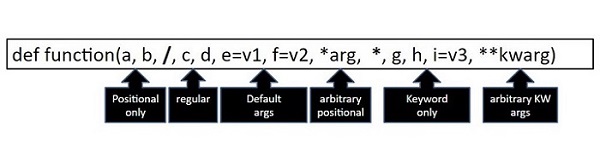
Python Function with Return ValueThe return keyword as the last statement in function definition indicates end of function block, and the program flow goes back to the calling function. Although reduced indent after the last statement in the block also implies return but using explicit return is a good practice. Along with the flow control, the function can also return value of an expression to the calling function. The value of returned expression can be stored in a variable for further processing. ExampleLet us define the add() function. It adds the two values passed to it and returns the addition. The returned value is stored in a variable called result. def add(x,y):
z=x+y
return z
a=10
b=20
result = add(a,b)
print ("a = {} b = {} a+b = {}".format(a, b, result))
It will produce the following output − a = 10 b = 20 a+b = 30 The Anonymous FunctionsThe functions are called anonymous when they are not declared in the standard manner by using the def keyword. Instead, they are defined using the lambda keyword.
SyntaxThe syntax of lambda functions contains only a single statement, which is as follows − lambda [arg1 [,arg2,.....argn]]:expression ExampleFollowing is the example to show how lambda form of function works − # Function definition is here
sum = lambda arg1, arg2: arg1 + arg2;
# Now you can call sum as a function
print ("Value of total : ", sum( 10, 20 ))
print ("Value of total : ", sum( 20, 20 ))
When the above code is executed, it produces the following result − Value of total : 30 Value of total : 40 Scope of VariablesAll variables in a program may not be accessible at all locations in that program. This depends on where you have declared a variable. The scope of a variable determines the portion of the program where you can access a particular identifier. There are two basic scopes of variables in Python −
Global vs. Local variablesVariables that are defined inside a function body have a local scope, and those defined outside have a global scope. This means that local variables can be accessed only inside the function in which they are declared, whereas global variables can be accessed throughout the program body by all functions. When you call a function, the variables declared inside it are brought into scope. ExampleFollowing is a simple example of local and global scope − total = 0; # This is global variable.
# Function definition is here
def sum( arg1, arg2 ):
# Add both the parameters and return them."
total = arg1 + arg2; # Here total is local variable.
print ("Inside the function local total : ", total)
return total;
# Now you can call sum function
sum( 10, 20 );
print ("Outside the function global total : ", total)
When the above code is executed, it produces the following result − Inside the function local total : 30 Outside the function global total : 0 
Advertisements
| ||||||||
| You are visitor 01402503 — GeezerVison does not store the pages you look up. Best viewed with Netscape Navigator 4.7 or Internet Explorer 6 at 800×600. No cookies required. |