GeezerVisonThe World Wide Web, restored to 800 pixels of glory. | ||||||||||||||||||||||||||||||||
| Home|About|Gaming cabinet|Archives|How it works|Starter sites | ||||||||||||||||||||||||||||||||
GeezerVison is showing www.tutorialspoint.com — Python - Database Access 
Selected Reading
Python - Database AccessDatabase Access in PythonDatabase access in Python is used to interact with databases, allowing applications to store, retrieve, update, and manage data consistently. Various relational database management systems (RDBMS) are supported for these tasks, each requiring specific Python packages for connectivity −
Data input and generated during execution of a program is stored in RAM. If it is to be stored persistently, it needs to be stored in database tables. Relational databases use SQL (Structured Query Language) for performing INSERT/DELETE/UPDATE operations on the database tables. However, implementation of SQL varies from one type of database to other. This raises incompatibility issues. SQL instructions for one database do not match with other. DB-API (Database API)To address this issue of compatibility, Python Enhancement Proposal (PEP) 249 introduced a standardized interface known as DB-API. This interface provides a consistent framework for database drivers, ensuring uniform behavior across different database systems. It simplifies the process of transitioning between various databases by establishing a common set of rules and methods. 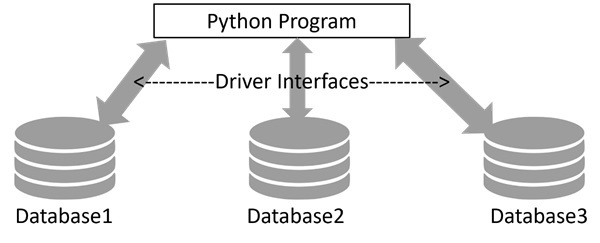
Using SQLite with PythonPython's standard library includes sqlite3 module, a DB_API compatible driver for SQLite3 database. It serves as a reference implementation for DB-API. For other types of databases, you will have to install the relevant Python package −
Working with SQLiteUsing SQLite with Python is very easy due to the built-in sqlite3 module. The process involves −
In this tutorial, we shall learn how to access database using Python, how to store data of Python objects in a SQLite database, and how to retrieve data from SQLite database and process it using Python program. The sqlite3 ModuleSQLite is a server-less, file-based lightweight transactional relational database. It doesn't require any installation and no credentials such as username and password are needed to access the database. Python's sqlite3 module contains DB-API implementation for SQLite database. It is written by Gerhard Hring. Let us learn how to use sqlite3 module for database access with Python. Let us start by importing sqlite3 and check its version. >>> import sqlite3 >>> sqlite3.sqlite_version '3.39.4' The Connection ObjectA connection object is set up by connect() function in sqlite3 module. First positional argument to this function is a string representing path (relative or absolute) to a SQLite database file. The function returns a connection object referring to the database. >>> conn=sqlite3.connect('testdb.sqlite3')
>>> type(conn)
<class 'sqlite3.Connection'>
Various methods are defined in connection class. One of them is cursor() method that returns a cursor object, about which we shall know in next section. Transaction control is achieved by commit() and rollback() methods of connection object. Connection class has important methods to define custom functions and aggregates to be used in SQL queries. The Cursor ObjectNext, we need to get the cursor object from the connection object. It is your handle to the database when performing any CRUD operation on the database. The cursor() method on connection object returns the cursor object. >>> cur=conn.cursor() >>> type(cur) <class 'sqlite3.Cursor'> We can now perform all SQL query operations, with the help of its execute() method available to cursor object. This method needs a string argument which must be a valid SQL statement. Creating a Database TableWe shall now add Employee table in our newly created 'testdb.sqlite3' database. In following script, we call execute() method of cursor object, giving it a string with CREATE TABLE statement inside. import sqlite3
conn=sqlite3.connect('testdb.sqlite3')
cur=conn.cursor()
qry='''
CREATE TABLE Employee (
EmpID INTEGER PRIMARY KEY AUTOINCREMENT,
FIRST_NAME TEXT (20),
LAST_NAME TEXT(20),
AGE INTEGER,
SEX TEXT(1),
INCOME FLOAT
);
'''
try:
cur.execute(qry)
print ('Table created successfully')
except:
print ('error in creating table')
conn.close()
When the above program is run, the database with Employee table is created in the current working directory. We can verify by listing out tables in this database in SQLite console. sqlite> .open mydb.sqlite sqlite> .tables Employee INSERT OperationThe INSERT Operation is required when you want to create your records into a database table. ExampleThe following example, executes SQL INSERT statement to create a record in the EMPLOYEE table − import sqlite3
conn=sqlite3.connect('testdb.sqlite3')
cur=conn.cursor()
qry="""INSERT INTO EMPLOYEE(FIRST_NAME,
LAST_NAME, AGE, SEX, INCOME)
VALUES ('Mac', 'Mohan', 20, 'M', 2000)"""
try:
cur.execute(qry)
conn.commit()
print ('Record inserted successfully')
except:
conn.rollback()
print ('error in INSERT operation')
conn.close()
You can also use the parameter substitution technique to execute the INSERT query as follows − import sqlite3
conn=sqlite3.connect('testdb.sqlite3')
cur=conn.cursor()
qry="""INSERT INTO EMPLOYEE(FIRST_NAME,
LAST_NAME, AGE, SEX, INCOME)
VALUES (?, ?, ?, ?, ?)"""
try:
cur.execute(qry, ('Makrand', 'Mohan', 21, 'M', 5000))
conn.commit()
print ('Record inserted successfully')
except Exception as e:
conn.rollback()
print ('error in INSERT operation')
conn.close()
READ OperationREAD Operation on any database means to fetch some useful information from the database. Once the database connection is established, you are ready to make a query into this database. You can use either fetchone() method to fetch a single record or fetchall() method to fetch multiple values from a database table.
ExampleIn the following code, the cursor object executes SELECT * FROM EMPLOYEE query. The resultset is obtained with fetchall() method. We print all the records in the resultset with a for loop. import sqlite3
conn=sqlite3.connect('testdb.sqlite3')
cur=conn.cursor()
qry="SELECT * FROM EMPLOYEE"
try:
# Execute the SQL command
cur.execute(qry)
# Fetch all the rows in a list of lists.
results = cur.fetchall()
for row in results:
fname = row[1]
lname = row[2]
age = row[3]
sex = row[4]
income = row[5]
# Now print fetched result
print ("fname={},lname={},age={},sex={},income={}".format(fname, lname, age, sex, income ))
except Exception as e:
print (e)
print ("Error: unable to fecth data")
conn.close()
It will produce the following output − fname=Mac,lname=Mohan,age=20,sex=M,income=2000.0 fname=Makrand,lname=Mohan,age=21,sex=M,income=5000.0 Update OperationUPDATE Operation on any database means to update one or more records, which are already available in the database. The following procedure updates all the records having income=2000. Here, we increase the income by 1000. import sqlite3
conn=sqlite3.connect('testdb.sqlite3')
cur=conn.cursor()
qry="UPDATE EMPLOYEE SET INCOME = INCOME+1000 WHERE INCOME=?"
try:
# Execute the SQL command
cur.execute(qry, (1000,))
# Fetch all the rows in a list of lists.
conn.commit()
print ("Records updated")
except Exception as e:
print ("Error: unable to update data")
conn.close()
DELETE OperationDELETE operation is required when you want to delete some records from your database. Following is the procedure to delete all the records from EMPLOYEE where INCOME is less than 2000. import sqlite3
conn=sqlite3.connect('testdb.sqlite3')
cur=conn.cursor()
qry="DELETE FROM EMPLOYEE WHERE INCOME<?"
try:
# Execute the SQL command
cur.execute(qry, (2000,))
# Fetch all the rows in a list of lists.
conn.commit()
print ("Records deleted")
except Exception as e:
print ("Error: unable to delete data")
conn.close()
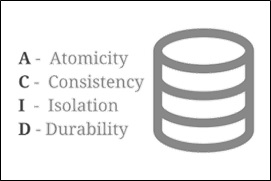
Performing TransactionsTransactions are a mechanism that ensure data consistency. Transactions have the following four properties −
The Python DB API 2.0 provides two methods to either commit or rollback a transaction. ExampleYou already know how to implement transactions. Here is a similar example − # Prepare SQL query to DELETE required records sql = "DELETE FROM EMPLOYEE WHERE AGE > ?" try: # Execute the SQL command cursor.execute(sql, (20,)) # Commit your changes in the database db.commit() except: # Rollback in case there is any error db.rollback() COMMIT OperationCommit is an operation, which gives a green signal to the database to finalize the changes, and after this operation, no change can be reverted back. Here is a simple example to call the commit method. db.commit() ROLLBACK OperationIf you are not satisfied with one or more of the changes and you want to revert back those changes completely, then use the rollback() method. Here is a simple example to call the rollback() method. db.rollback() The PyMySQL ModulePyMySQL is an interface for connecting to a MySQL database server from Python. It implements the Python Database API v2.0 and contains a pure-Python MySQL client library. The goal of PyMySQL is to be a drop-in replacement for MySQLdb. Installing PyMySQLBefore proceeding further, you make sure you have PyMySQL installed on your machine. Just type the following in your Python script and execute it − import PyMySQL If it produces the following result, then it means MySQLdb module is not installed − Traceback (most recent call last):
File "test.py", line 3, in <module>
Import PyMySQL
ImportError: No module named PyMySQL
The last stable release is available on PyPI and can be installed with pip − pip install PyMySQL Note − Make sure you have root privilege to install the above module. MySQL Database ConnectionBefore connecting to a MySQL database, make sure of the following points −
ExampleTo use MySQL database instead of SQLite database in earlier examples, we need to change the connect() function as follows − import PyMySQL
# Open database connection
db = PyMySQL.connect("localhost","testuser","test123","TESTDB" )
Apart from this change, every database operation can be performed without difficulty. Handling ErrorsThere are many sources of errors. A few examples are a syntax error in an executed SQL statement, a connection failure, or calling the fetch method for an already cancelled or finished statement handle. The DB API defines a number of errors that must exist in each database module. The following table lists these exceptions.

Advertisements
| ||||||||||||||||||||||||||||||||
| You are visitor 01402503 — GeezerVison does not store the pages you look up. Best viewed with Netscape Navigator 4.7 or Internet Explorer 6 at 800×600. No cookies required. |