GV

GeezerVison

The World Wide Web, restored to 800 pixels of glory.

Home|About|Gaming cabinet|Archives|How it works|Starter sites

On this site

  • Python Technologies
  • Databases
  • Computer Programming
  • Web Development
  • Java Technologies
  • Computer Science
  • Mobile Development
  • Big Data & Analytics
  • Microsoft Technologies
  • DevOps
  • Latest Technologies
  • Machine Learning
  • Digital Marketing
  • Software Quality

This view

  • Original page
  • New address

GeezerVison is showing www.tutorialspoint.com — Python Slicing Strings

Python Tutorial
  • Python - Home
  • Python - Overview
  • Python - History
  • Python - Features
  • Python vs C++
  • Python - Hello World Program
  • Python - Application Areas
  • Python - Interpreter
  • Python - Environment Setup
  • Python - Virtual Environment
  • Python - Basic Syntax
  • Python - Variables
  • Python - Private Variables
  • Python - Data Types
  • Python - Type Casting
  • Python - Unicode System
  • Python - Literals
  • Python - Operators
  • Python - Arithmetic Operators
  • Python - Comparison Operators
  • Python - Assignment Operators
  • Python - Logical Operators
  • Python - Bitwise Operators
  • Python - Membership Operators
  • Python - Identity Operators
  • Python - Walrus Operator
  • Python - Operator Precedence
  • Python - Comments
  • Python - User Input
  • Python - Numbers
  • Python - Booleans
  • Python - Floating Points
  • Python - Control Flow
  • Python - Decision Making
  • Python - If Statement
  • Python - If else
  • Python - Nested If
  • Python - Conditional User Inputs
  • Python - Match-Case Statement
  • Python - Loops
  • Python - for Loops
  • Python - for-else Loops
  • Python - While Loops
  • Python - break Statement
  • Python - continue Statement
  • Python - pass Statement
  • Python - Nested Loops
  • Python Functions & Modules
  • Python - Functions
  • Python - Default Arguments
  • Python - Keyword Arguments
  • Python - Keyword-Only Arguments
  • Python - Positional Arguments
  • Python - Positional-Only Arguments
  • Python - Arbitrary Arguments
  • Python - Variables Scope
  • Python - Function Annotations
  • Python - Modules
  • Python - Packing and Unpacking
  • Python - Built in Functions
  • Python Strings
  • Python - Strings
  • Python - Slicing Strings
  • Python - Modify Strings
  • Python - String Concatenation
  • Python - String Formatting
  • Python - Escape Characters
  • Python - String Methods
  • Python - String Exercises
  • Python Lists
  • Python - Lists
  • Python - Access List Items
  • Python - Change List Items
  • Python - Add List Items
  • Python - Remove List Items
  • Python - Loop Lists
  • Python - List Comprehension
  • Python - Sort Lists
  • Python - Copy Lists
  • Python - Join Lists
  • Python - List Methods
  • Python - List Exercises
  • Python Tuples
  • Python - Tuples
  • Python - Access Tuple Items
  • Python - Update Tuples
  • Python - Unpack Tuples
  • Python - Loop Tuples
  • Python - Join Tuples
  • Python - Tuple Methods
  • Python - Namedtuple
  • Python - Tuple Exercises
  • Python Sets
  • Python - Sets
  • Python - Access Set Items
  • Python - Add Set Items
  • Python - Remove Set Items
  • Python - Loop Sets
  • Python - Join Sets
  • Python - Copy Sets
  • Python - Set Operators
  • Python - Set Methods
  • Python - Set Exercises
  • Python Dictionaries
  • Python - Dictionaries
  • Python - Access Dictionary Items
  • Python - Change Dictionary Items
  • Python - Add Dictionary Items
  • Python - Remove Dictionary Items
  • Python - Dictionary View Objects
  • Python - Loop Dictionaries
  • Python - Copy Dictionaries
  • Python - Nested Dictionaries
  • Python - Dictionary Methods
  • Python - Dictionary Exercises
  • Python Arrays
  • Python - Arrays
  • Python - Access Array Items
  • Python - Add Array Items
  • Python - Remove Array Items
  • Python - Loop Arrays
  • Python - Copy Arrays
  • Python - Reverse Arrays
  • Python - Sort Arrays
  • Python - Join Arrays
  • Python - Array Methods
  • Python - Array Exercises
  • Python File Handling
  • Python - File Handling
  • Python - Write to File
  • Python - Read Files
  • Python - Renaming and Deleting Files
  • Python - Directories
  • Python - File Methods
  • Python - OS File/Directory Methods
  • Python - OS Path Methods
  • Object Oriented Programming
  • Python - OOPs Concepts
  • Python - Classes & Objects
  • Python - Class Attributes
  • Python - Class Methods
  • Python - Static Methods
  • Python - Constructors
  • Python - Access Modifiers
  • Python - Inheritance
  • Python - Multiple Inheritance
  • Python - Multilevel Inheritance
  • Python - Polymorphism
  • Python - Method Overriding
  • Python - Method Overloading
  • Python - Dynamic Binding
  • Python - Dynamic Typing
  • Python - Abstraction
  • Python - Encapsulation
  • Python - Interfaces
  • Python - Packages
  • Python - Inner Classes
  • Python - Anonymous Class and Objects
  • Python - Singleton Class
  • Python - Wrapper Classes
  • Python - Enums
  • Python - Reflection
  • Python - Data Classes
  • Python Errors & Exceptions
  • Python - Syntax Errors
  • Python - Exceptions
  • Python - try-except Block
  • Python - try-finally Block
  • Python - Raising Exceptions
  • Python - Exception Chaining
  • Python - Nested try Block
  • Python - User-defined Exception
  • Python - Logging
  • Python - Assertions
  • Python - Warnings
  • Python - Built-in Exceptions
  • Python - Debugger (PDB)
  • Python Multithreading
  • Python - Multithreading
  • Python - Thread Life Cycle
  • Python - Creating a Thread
  • Python - Starting a Thread
  • Python - Joining Threads
  • Python - Naming Thread
  • Python - Thread Scheduling
  • Python - Thread Pools
  • Python - Main Thread
  • Python - Thread Priority
  • Python - Daemon Threads
  • Python - Synchronizing Threads
  • Python Synchronization
  • Python - Inter-thread Communication
  • Python - Thread Deadlock
  • Python - Interrupting a Thread
  • Python Networking
  • Python - Networking
  • Python - Socket Programming
  • Python - URL Processing
  • Python - Generics
  • Python Libraries
  • NumPy Tutorial
  • Pandas Tutorial
  • SciPy Tutorial
  • Matplotlib Tutorial
  • Django Tutorial
  • OpenCV Tutorial
  • Python Miscellenous
  • Python - Date & Time
  • Python - Maths
  • Python - Iterators
  • Python - Generators
  • Python - Generator Expressions
  • Python - Lambda Expressions
  • Python - Closures
  • Python - Decorators
  • Python - Recursion
  • Python - Reg Expressions
  • Python - PIP
  • Python - Database Access
  • Python - Weak References
  • Python - Serialization
  • Python - Templating
  • Python - Output Formatting
  • Python - Performance Measurement
  • Python - Data Compression
  • Python - CGI Programming
  • Python - XML Processing
  • Python - GUI Programming
  • Python - Command-Line Arguments
  • Python - Docstrings
  • Python - JSON
  • Python - Sending Email
  • Python - Further Extensions
  • Python - Tools/Utilities
  • Python - Odds and Ends
  • Python - GUIs
  • Python Advanced Concepts
  • Python - Abstract Base Classes
  • Python - Custom Exceptions
  • Python - Higher Order Functions
  • Python - Object Internals
  • Python - Memory Management
  • Python - Metaclasses
  • Python - Metaprogramming with Metaclasses
  • Python - Mocking and Stubbing
  • Python - Monkey Patching
  • Python - Signal Handling
  • Python - Type Hints
  • Python - Automation Tutorial
  • Python - Humanize Package
  • Python - Context Managers
  • Python - Coroutines
  • Python - Descriptors
  • Python - Diagnosing and Fixing Memory Leaks
  • Python - Immutable Data Structures
  • Python - Domain Specific Language (DSL)
  • Python - Data Model
  • Python Useful Resources
  • Python - Questions & Answers
  • Python - Interview Questions & Answers
  • Python - Online Quiz
  • Python - Quick Guide
  • Python - Reference
  • Python - Cheatsheet
  • Python - Projects
  • Python - Useful Resources
  • Python - Discussion
  • Python Compiler
  • NumPy Compiler
  • Matplotlib Compiler
  • SciPy Compiler
Selected Reading
  • UPSC IAS Exams Notes
  • Developer's Best Practices
  • Questions and Answers
  • Online Resume Builder
  • HR Interview Questions
  • Computer Glossary
  • Who is Who

Python Slicing Strings


Previous
Quiz
Next

Python String slicing is a way of creating a sub-string from a given string. In this process, we extract a portion or piece of a string. Usually, we use the slice operator "[ : ]" to perform slicing on a Python String. Before proceeding with string slicing let's understand string indexing.

In Python, a string is an ordered sequence of Unicode characters. Each character in the string has a unique index in the sequence. The index starts with 0. First character in the string has its positional index 0. The index keeps incrementing towards the end of string.

If a string variable is declared as var="HELLO PYTHON", index of each character in the string is as follows −
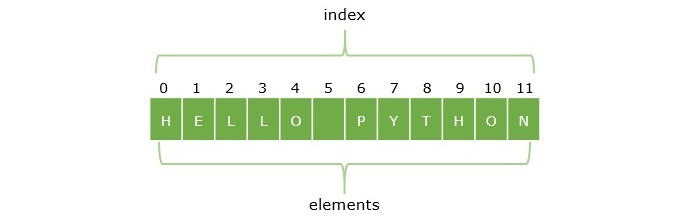
string index representation

Python String Indexing

Python allows you to access any individual character from the string by its index. In this case, 0 is the lower bound and 11 is the upper bound of the string. So, var[0] returns H, var[6] returns P. If the index in square brackets exceeds the upper bound, Python raises IndexError.

Example

In the below example, we accessing the characters of a string through index.

var = "HELLO PYTHON"
print(var[0]) 
print(var[7])  
print(var[11])  
print(var[12]) 

On running the code, it will produce the following output −

H
Y
N
ERROR!
Traceback (most recent call last):
  File "<main.py>", line 5, in <module>
IndexError: string index out of range

Python String Negative & Positive Indexing

One of the unique features of Python sequence types (and therefore a string object) is that it has a negative indexing scheme also. In the example above, a positive indexing scheme is used where the index increments from left to right. In case of negative indexing, the character at the end has -1 index and the index decrements from right to left, as a result the first character H has -12 index.
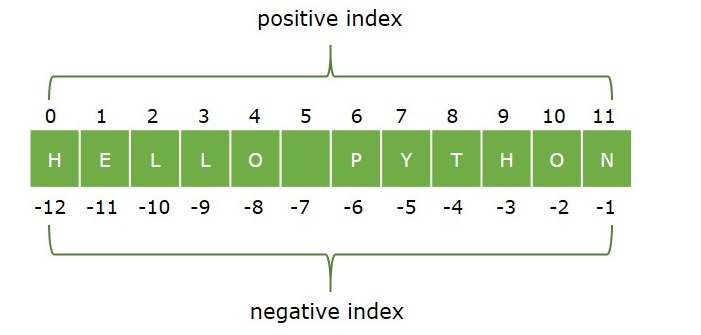
positive negative indexing

Example

Let us use negative indexing to fetch N, Y, and H characters.

var = "HELLO PYTHON"
print(var[-1]) 
print(var[-5])  
print(var[-12])  

On executing the above code, it will give the following result −

N
Y
H

We can therefore use positive or negative index to retrieve a character from the string.

In Python, string is an immutable object. The object is immutable if it cannot be modified in-place, once stored in a certain memory location. You can retrieve any character from the string with the help of its index, but you cannot replace it with another character.

Example

In the following example, character Y is at index 7 in HELLO PYTHON. Try to replace Y with y and see what happens.

var="HELLO PYTHON"
var[7]="y"
print (var)

It will produce the following output −

Traceback (most recent call last):
 File "C:\Users\users\example.py", line 2, in <module>
  var[7]="y"
  ~~~^^^
TypeError: 'str' object does not support item assignment

The TypeError is because the string is immutable.

Python String Slicing

Python defines ":" as string slicing operator. It returns a substring from the original string. Its general usage is as follows −

substr=var[x:y]

The ":" operator needs two integer operands (both of which may be omitted, as we shall see in subsequent examples). The first operand x is the index of the first character of the desired slice. The second operand y is the index of the character next to the last in the desired string. So var(x:y] separates characters from xth position to (y-1)th position from the original string.

Example

var="HELLO PYTHON"

print ("var:",var)
print ("var[3:8]:", var[3:8])

It will produce the following output −

var: HELLO PYTHON
var[3:8]: LO PY

Python String Slicing With Negative Indexing

Like positive indexes, negative indexes can also be used for slicing.

Example

The below example shows how to slice a string using negative indexes.

var="HELLO PYTHON"
print ("var:",var)
print ("var[3:8]:", var[3:8])
print ("var[-9:-4]:", var[-9:-4])

It will produce the following output −

var: HELLO PYTHON
var[3:8]: LO PY
var[-9:-4]: LO PY

Default Values of Indexes with String Slicing

Both the operands for Python's Slice operator are optional. The first operand defaults to zero, which means if we do not give the first operand, the slice starts of character at 0th index, i.e. the first character. It slices the leftmost substring up to "y-1" characters.

Example

In this example, we are performing slice operation using default values.

var="HELLO PYTHON"
print ("var:",var)
print ("var[0:5]:", var[0:5])
print ("var[:5]:", var[:5])

It will produce the following output −

var: HELLO PYTHON
var[0:5]: HELLO
var[:5]: HELLO

Example

Similarly, y operand is also optional. By default, it is "-1", which means the string will be sliced from the xth position up to the end of string.

var="HELLO PYTHON"
print ("var:",var)
print ("var[6:12]:", var[6:12])
print ("var[6:]:", var[6:])

It will produce the following output −

var: HELLO PYTHON
var[6:12]: PYTHON
var[6:]: PYTHON

Example

Naturally, if both the operands are not used, the slice will be equal to the original string. That's because "x" is 0, and "y" is the last index+1 (or -1) by default.

var="HELLO PYTHON"
print ("var:",var)
print ("var[0:12]:", var[0:12])
print ("var[:]:", var[:])

It will produce the following output −

var: HELLO PYTHON
var[0:12]: HELLO PYTHON
var[:]: HELLO PYTHON

Example

The left operand must be smaller than the operand on right, for getting a substring of the original string. Python doesn't raise any error, if the left operand is greater, bu returns a null string.

var="HELLO PYTHON"
print ("var:",var)
print ("var[-1:7]:", var[-1:7])
print ("var[7:0]:", var[7:0])

It will produce the following output −

var: HELLO PYTHON
var[-1:7]:
var[7:0]:

Return Type of String Slicing

Slicing returns a new string. You can very well perform string operations like concatenation, or slicing on the sliced string.

Example

var="HELLO PYTHON"

print ("var:",var)
print ("var[:6][:2]:", var[:6][:2])

var1=var[:6]
print ("slice:", var1)
print ("var1[:2]:", var1[:2])

It will produce the following output −

var: HELLO PYTHON
var[:6][:2]: HE
slice: HELLO
var1[:2]: HE

Tutorix - AI Tutor
Previous Quiz Next
Advertisements
You are visitor 01402503 — GeezerVison does not store the pages you look up.
Best viewed with Netscape Navigator 4.7 or Internet Explorer 6 at 800×600. No cookies required.